


SQL is used to execute queries, insert, update and delete datasets, and to create new databases, views and stored procedures, as well as set permissions. It is one of the main tools through which data is accessed and shaped before it is used elsewhere.
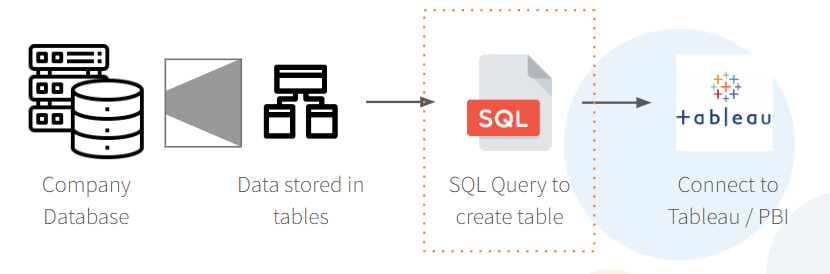
The main workflow typically starts at the company database, where the data is stored in tables. A SQL query is then written to create an extract, which is connected to Tableau or Power BI for reporting and analysis.
There are several vendors offering database solutions, and these vendors largely compete on memory, and quickly they are able to process and return queries. It is a programing language which has been used for around 50 years, it has evolved over time in to the extremely useful tool which it is today and the standard language around which most vendors build code today.
The Six Basic Terms
There are six main terms which are used to run a query.
SELECT is used to choose the data which will be worked with. It selects the columns which are wanted, and each column is listed on its own line, separated by a comma.
FROM defines the location where the data is being held, whether that is a table or a view.
WHERE sets the conditions which the data must meet, filtered on a row-by-row basis. This clause is optional, and is used where a specific condition needs to be applied to the data being returned.
GROUP BY is used when data needs to be aggregated, and defines the level of granularity being worked at, such as sales by region. Any column included in the SELECT statement which is not being aggregated must be included in the GROUP BY.
HAVING is the aggregated equivalent of a filter, applied to a column after aggregation has taken place.
ORDER BY is used to sort the output by a specific column or combination of columns.
A Few Practical Tips
Although SELECT is written first in a query, it is often easier to build a query starting from FROM. Joins should be made first, and only once the tables are correctly joined should attention turn to selecting what is actually needed in the output.
Using SELECT DISTINCT returns only the unique values for the columns selected, which is useful when checking the range of values present within a dataset.
Columns can also be renamed using an alias, which relabels the output column as something more readable, for example as "New Name" at the end of the line of code.
When joining tables, it is common practice to shorten or nickname the table name. The query then calls FROM the table, decides on the appropriate join type (inner or outer), and defines the condition on which the join is being made.
Example Query Using Prepping Data 2023 Wk 2
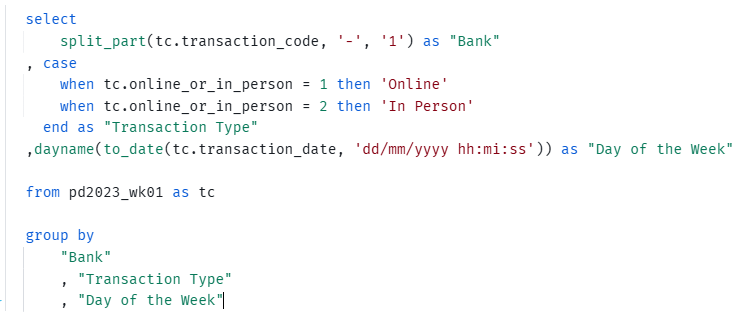
- This query pulls three columns from the
pd2023_wk01table, which has been aliased astc. Choosing the table first is what then allows the user to call the columns in the table as you type them, ensuring accuracy. - The
split_partfunction is used to extract the bank name from thetransaction_codefield, splitting the value on the-character and taking the first part. - A
casestatement is then used to translate the numericonline_or_in_personfield into a readable label, either "Online" or "In Person" depending on the value present. It is used in the cases where you want to replace a value daynameis combined withto_dateto convert thetransaction_datefield into a proper date, and to return the day of the week on which the transaction took place. Each of these three outputs is aliased by the as "x" so that the resulting columns are clearly labelled, rather than being left with the raw field or function names.- The
group byat the end brings all three of these aliased columns together, defining the level of granularity the output is being returned at. Rather than returning one row per individual transaction, the query instead returns one row for each unique combination of "Bank", "Transaction Type" and "Day of the Week" that appears in the data. This is what allows the different outputs produced above, the bank name, the transaction type, and the day of the week, to actually be used to summarise the data, rather than simply relabelling every individual row.