


What is an API call?
An API, short for Application Programming Interface, is just two systems talking to each other over the internet. You send a request to a web address, called an endpoint, and the server sends back data, almost always as JSON.
Say you want London's current weather. The request from open-meteo.com's API looks like this:
https://api.open-meteo.com/v1/forecast?latitude=51.5074&longitude=-0.1278¤t_weather=trueEverything after the question mark is a parameter. If you change the coordinates in the URL, you'll get a different location. If you add a parameter, you could get a seven-day forecast instead of just today. That's really all that's behind APIs, the URL tells the server exactly what information to send back.
Some APIs require further information in the payload to be able to send back particular data. For example, some APIs require you to define the data type you want it to return, such as HTML. All this information can be found in the API's documentation.
Building it in Alteryx
Alteryx doesn't have a dedicated API connector, and it doesn't need one. An API call is just an HTTP request, and four tools handle it end to end.
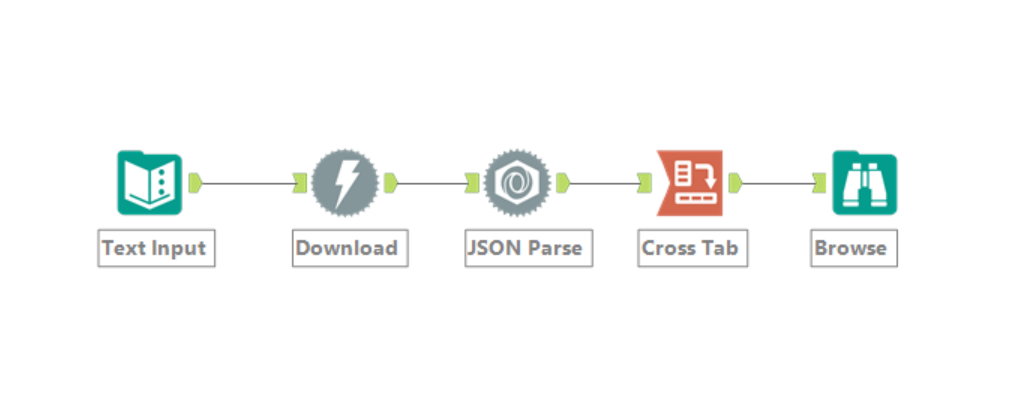
Start with a Text Input tool holding your URL as a single field, one row per call. Feed that into a Download tool, set to GET, and run it. If the API needs a key, which most commercial ones do, that gets added here too, usually as a header rather than written into the URL.
What comes back is a wall of JSON text all in one field. The JSON Parse tool breaks it into rows, one per value, each tagged with its name and type. A Cross Tab tool afterwards turns those rows back into ordinary columns, so you're left with a table that looks exactly like anything else you'd build in Alteryx.
That's it. Four tools between a web address and a dataset you can refresh whenever you like.
Where this could go wrong
The request working once doesn't mean it'll keep working. Most public APIs cap how many calls you can make in a given stretch of time, and it's easy to exceed that if you loop the Download tool over a few hundred rows without checking first.
A failed call doesn't always look like a failure either. A bad URL or an expired key can still return something, so unless you're checking the response headers for a status code, a broken connection can sit there for weeks before anyone notices the numbers stopped changing.
Authentication is the other thing worth getting used to. Some APIs want a key in the URL, most want it in a header, a few want something more elaborate involving tokens that expire. None of it is complicated once you've done it once, but it's rarely identical twice.
Key takeaways
An API call is nothing more than an HTTP request, which is why the Download tool can make one without any special connector. Turning the response into something usable is just JSON Parse followed by Cross Tab. The part worth remembering is how to fix it when it doesn't work (e.g. rate limits, expired keys, depreciated requests etc.).
Once it's working, the possibilities are endless. You stop waiting on someone to email you a file and start pulling the current version yourself, whenever you need it. Next time a workflow depends on a spreadsheet that's already a day out of date, it might be worth checking whether the source has an API instead.