


What Is Version Control?
Have you ever been working on a project or writing code, only to make a few updates and somehow break everything else in the process? Then you spend just as much time trying to figure out what went wrong as you did building it in the first place.
Well, this is where version control comes in.
Version control tracks changes to files over time, allowing us to maintain a history of updates instead of creating multiple copies of the same project.
This helps us answer a few important questions:
- What changed?
- Who made the changes?
- When were the changes made?
- Can we return to an earlier version?
Whether you're writing code or collaborating on a project, version control helps keep your work organized and makes it easier to understand how your project has changed over time.
Git and GitHub: What's the Difference?
Git and GitHub may sound very similar, but they serve two different purposes.
Git is a version control system installed on your computer that tracks changes made to a project. It saves snapshots of your files at different points in time, known as commits.
These commits provide a paper trail that allows us to review changes and return to an earlier version if necessary.
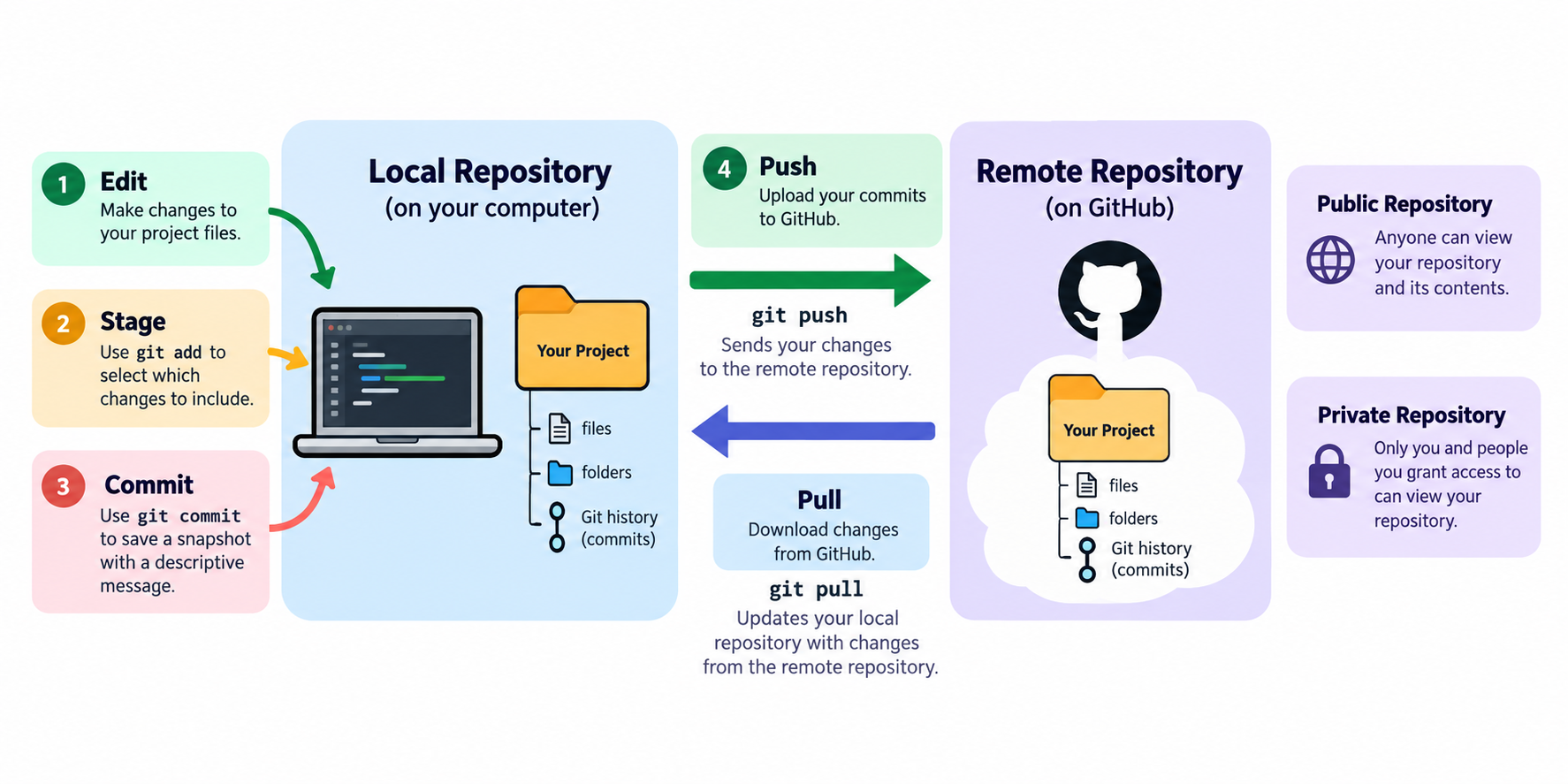
GitHub, on the other hand, is an online platform that hosts Git repositories in the cloud. These repositories can be either:
- Public: Anyone can view your repository and its contents.
- Private: Only you and people you grant access to can view your repository.
A repository, often shortened to repo, contains your project files, folders, and Git history. Typically, each project has its own repository.
When working with Git and GitHub, there are two important locations to understand:
- Local Repository: The version of your project stored on your computer.
- Remote Repository: The version of your project hosted online through GitHub.
Typically, you'll make edits and test changes locally before saving those changes through a commit. Once you're satisfied, you can push those commits to GitHub, updating the remote repository. Similarly, you can pull changes from GitHub to update your local repository.
This provides another copy of your work while giving you the flexibility to experiment locally before sharing your changes.
Although this might sound similar to development and production environments, local and remote repositories aren't necessarily separate environments. They are simply different locations where your project's version history can exist.
How Does Version Control Work?
Imagine you're working on a SQL script that cleans data for a dashboard.
You start with a working script, but later decide to update the logic to handle missing values.
Instead of making changes and potentially losing track of what worked before, Git allows you to record your progress through commits. This makes it easier to see what changed between versions and identify where something might have gone wrong.
A simple workflow might look something like this:
1. Edit: Make changes to your project files
2. Stage: Use git add to select which changes you want to include
3. Commit: Use git commit to save a snapshot of those changes with a descriptive message
4. Push: Use git push to upload your commits to the remote repository on GitHub
We'll go further into Git commands and how to use them in another blog post!
You can use Git through a terminal, including Windows Terminal or the integrated terminal in Visual Studio Code. GitHub Desktop offers a visual way to manage your repositories.
Git also supports branching, allowing you to test new features without changing the main branch. After testing, changes can be merged back. On GitHub, pull requests let teams review and discuss changes before merging them.
Why Does Version Control Matter in Data Analytics?
Although Git is commonly associated with software development, it's just as valuable in data analytics and data engineering.
As analysts, we work with SQL queries, Python scripts, data pipelines, and other files that evolve as we test features and improve our solutions.
But what happens if something breaks after those changes are made?
With Git, we can review commit history, compare versions, identify the issue, and restore an earlier version if needed.
GitHub gives teams a shared place to collaborate without constantly exchanging files. It can also serve as a portfolio where analysts showcase projects, code, and technical skills.
Final Thoughts
Version control is more than just a way to save files. It's a way to understand how a project changes over time.
Git allows us to track those changes, while GitHub provides a place to store, share, and collaborate on our work.
Whether you're writing Python, building SQL transformations, or developing a data pipeline, version control helps make projects easier to maintain.
Thanks for reading, and I hope this helped you better understand version control, Git, GitHub, and how you can incorporate them into your own projects!