


In Part 1, we looked at why a large flat file like the Superstore dataset is not ideal for analysis. We explored what the data contained and started thinking about it as several different entities: orders, customers, products, and geography, all collapsed into a single row.
If you’d like a refresher on the foundations before diving into relationships and keys, you can read Part 1 here:
In this part, we’re going to pull those entities apart into proper tables, understand how those tables relate to each other, and introduce the three concepts that hold the whole structure together: primary keys, foreign keys, and the relationship between tables with keys.
What Is a Primary Key?
A primary key is a column, or sometimes a combination of columns, that uniquely identifies every row in a table. No duplicates, no nulls, no exceptions. Every row gets exactly one, and no two rows share the same value.
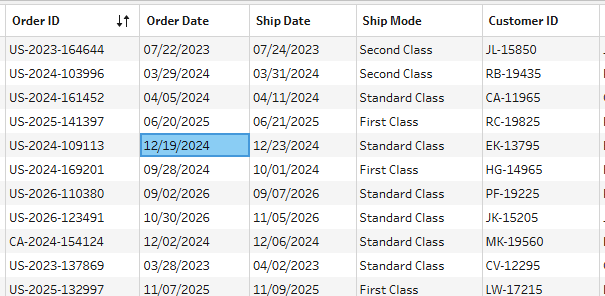
In the Superstore dataset, the clearest example is Order ID. Every order that was ever placed has its own Order ID. You'll never see the same Order ID on two different transactions. That makes it a perfect primary key for an Orders table.
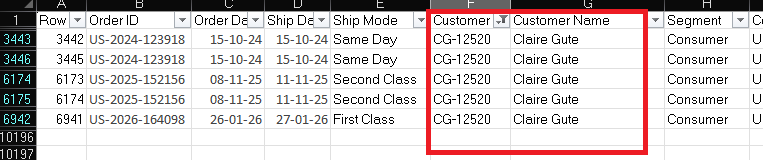
Same logic applies to customers. Every customer in Superstore has a Customer ID, something like “CG-12520”. That ID belongs to Claire Gute and nobody else. It's her primary key in a Customers table.
And products have Product IDs, a string like FUR-BO-10001798 that uniquely identifies a single item in the catalog. A Primary key for a Products table.
The thing to internalize about a primary key is that it is not just a technical detail. When we split a flat file into separate tables based on entities like customers, products, orders, and geography, each table needs a value that uniquely identifies one row.
If I give the customer table a customer ID, I should get back one customer. If I give the product table a product ID, I should get back one product. That is the job of a primary key.
What Is a Foreign Key?
A foreign key is how one table references a row in another table. It’s a column that stores the primary key value of a related record that exists somewhere else.
It can sound a little complicated at first, but the Superstore dataset makes it easier to see.
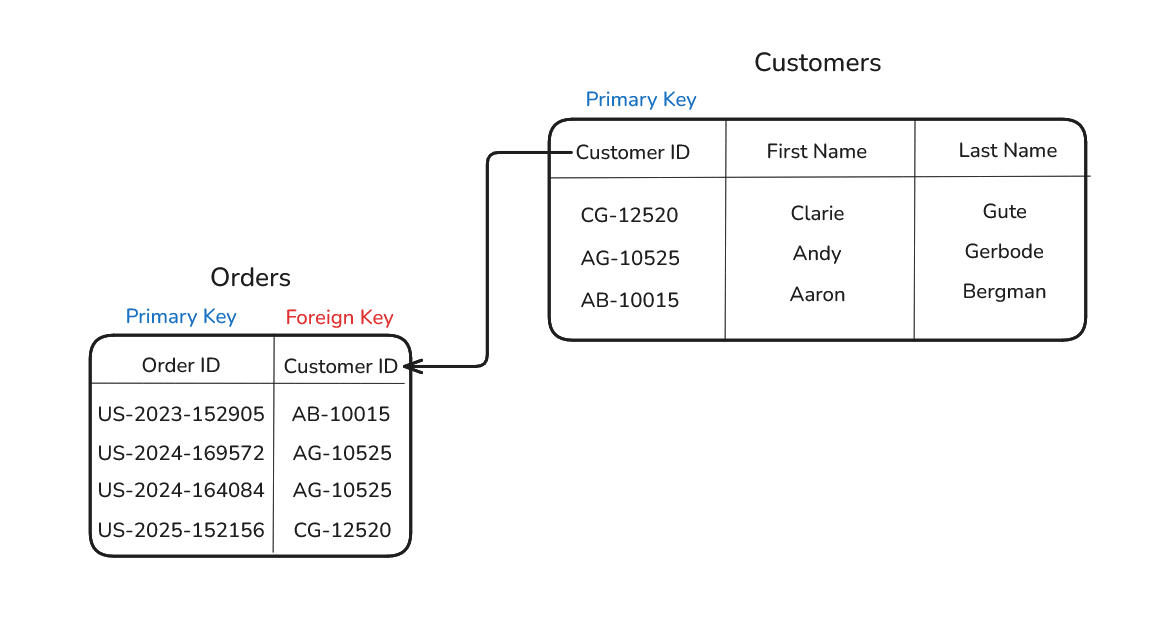
Imagine we split the flat file into two tables: an Orders table and a Customers table.
The Customers table contains one row per customer, with Customer ID acting as the primary key.
The Orders table contains one row per order. But each order still needs to know which customer placed it. Instead of repeating the customer’s name, segment, and city on every single order row, the Orders table simply stores the Customer ID.
That Customer ID, when stored inside the Orders table, becomes a foreign key because it points back to the matching customer record in the Customers table.
This is one of the key ideas behind relational databases:
Tables stay focused on their own entity and connect to other tables when related information is needed.
The Relationship Between Orders and Products
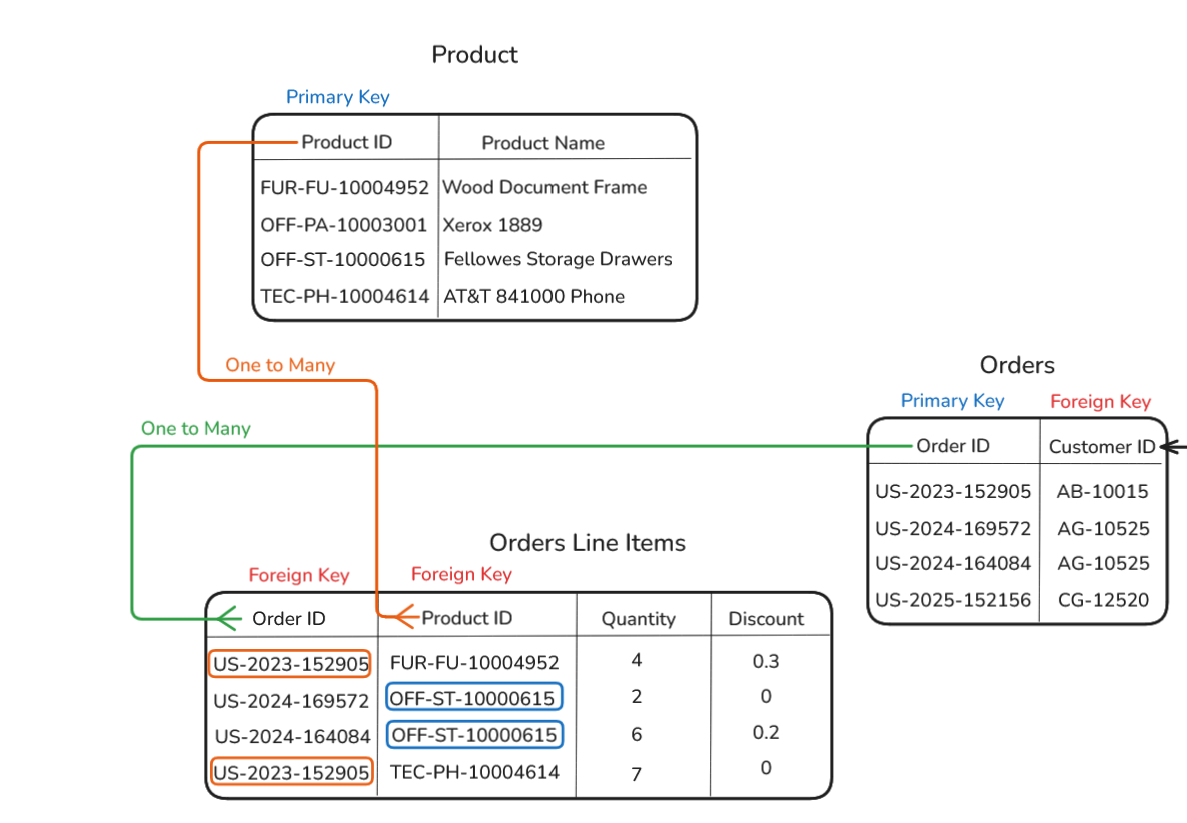
Orders and products have a slightly more interesting relationship than orders and customers. A single order can contain multiple products, and the same product can appear in many different orders.
Because of this, neither Order ID nor Product ID is unique on its own. This is called a many-to-many relationship, and it usually needs a third table to work properly.
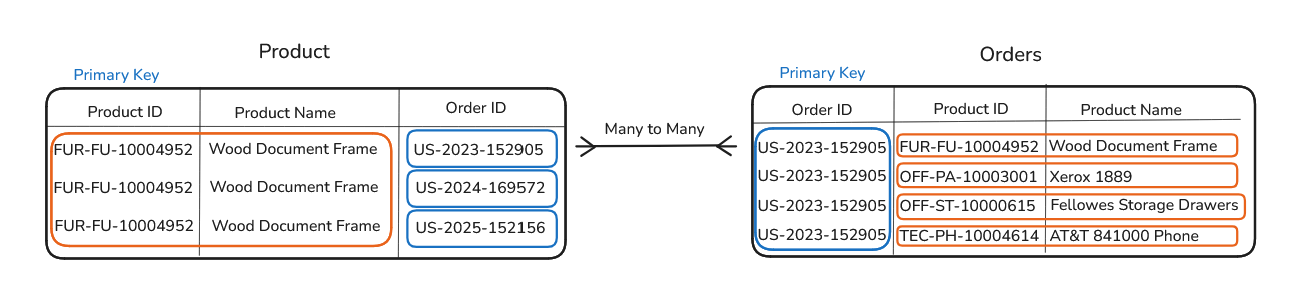
In Superstore, that middle table can be named as the order line items table. Each row represents one product within one order.
You can think of the Orders table as existing at the order-level grain, with one row per order, while the Order Line Items table is more granular because it breaks each order down into its individual products. It includes fields like Order ID, Product ID, quantity, discount for that specific line item.
In this table, the same order can appear multiple times because it may contain multiple products. The same product can also appear multiple times because it may be sold in many different orders. What makes each row unique is the combination of Order ID and Product ID. That combination is called a composite key.
This kind of table is often called a junction table or bridge table. Once you start recognizing it, you’ll see it everywhere: students and courses, employees and projects, customers and products.
Whenever two things can have a many-to-many relationship, there is usually a table in the middle managing that connection.
A one-to-many relationship means one record in a table can connect to multiple records in another table. One order can appear many times in the Orders Line Items table because a single order may contain multiple products. Likewise, one product can also appear many times because the same product may be sold across many different orders. The Orders Line Items table connects these tables together using foreign keys like Order ID and Product ID.
Why This Matters When You're Writing Queries
Understanding keys isn't just conceptual, it directly affects how you write SQL and how you interpret results.
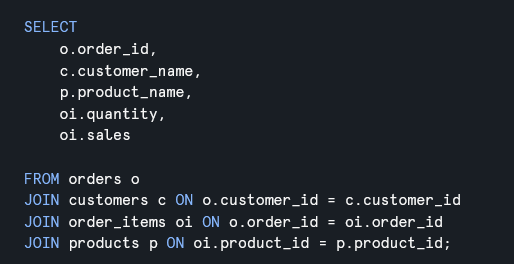
When you join two tables together, you’re almost always joining on a key. The join is essentially saying: take the Customer ID from this order, find the matching Customer ID in the Customers table, and bring back the related customer information.
Once you understand that Customer ID is a primary key in the Customers table and a foreign key in the Orders table, you can immediately reason about the relationship. Each order maps to exactly one customer, which means the join is predictable and won’t accidentally duplicate or multiply rows.
Where things go wrong is when analysts join on columns that aren't properly keyed. If you join on a column that isn't unique in the table you're joining to, every matching row comes back, and suddenly one order row becomes three, your sales figures triple, and you spend two hours wondering why your numbers are wrong. Understanding keys is understanding how to prevent that from ever happening.
What's Coming in Part 3
We now have properly separated tables, we understand what makes a row uniquely identifiable, and we know how tables reference each other through keys. In Part 3 we're going to take this structure and formalize it into something you'll encounter constantly in analytics work: the star schema! We'll build one from the Superstore data, talk about the difference between fact tables and dimension tables, and walk through the practical SQL an analyst would actually write against it.