


If you've worked around data, you've probably heard someone say:
"We'll just build a dbt model for that."
And if you're not a data engineer or analytics engineer, you might be thinking:
What exactly is a dbt model? And why do we need one?
Let's break it down.
What Is dbt?
dbt stands for data build tool.
At its simplest, dbt helps teams take data they already have and transform it into organized, reusable datasets.
Imagine a company has data coming from all kinds of places:
- Salesforce
- An application database
- Excel files
- Marketing platforms
- Financial systems
That data will be loaded into a data warehouse.
But just because the data is there doesn't mean it's ready to use.
You might have something that looks like:
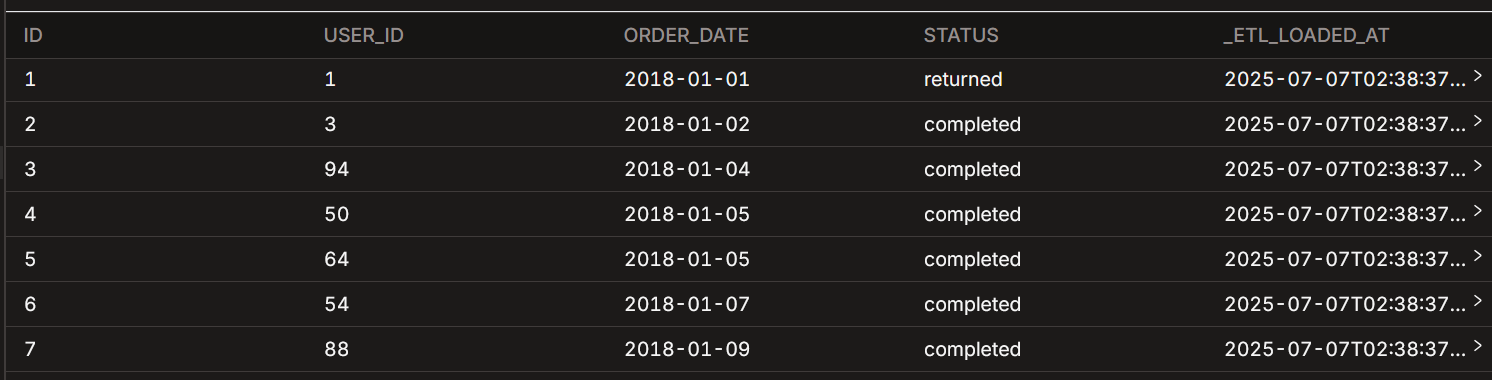
Someone building a dashboard might want something easier to work with:
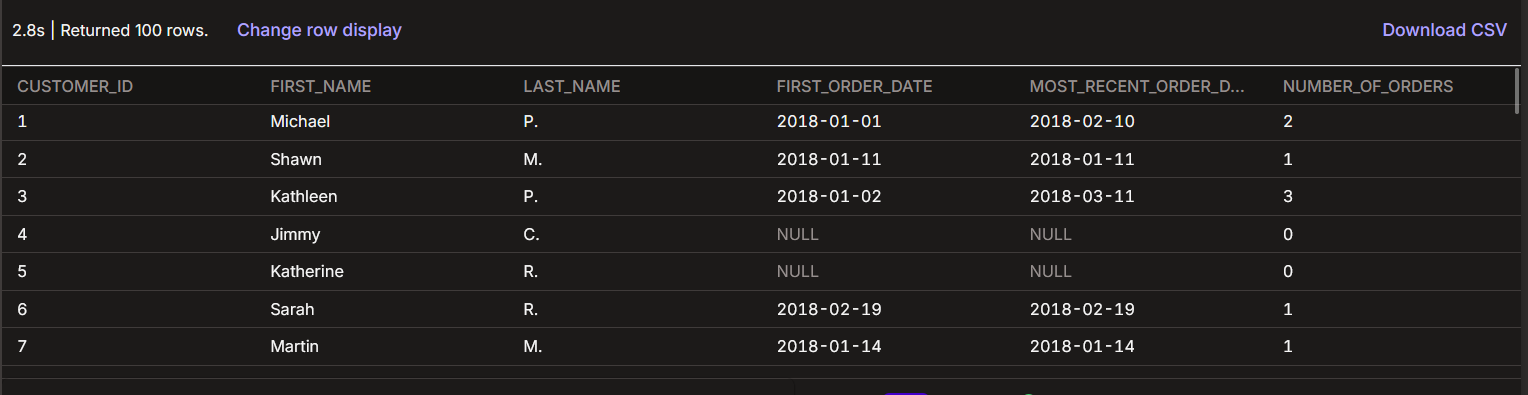
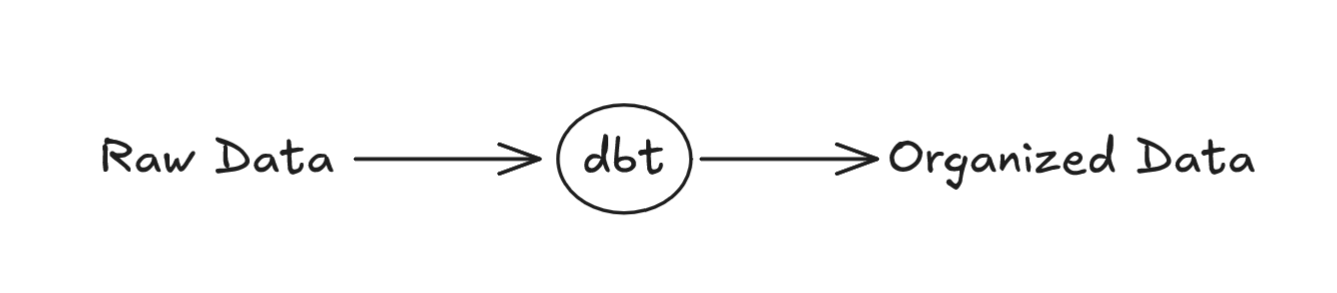
Simply, dbt helps you get from one to the other.
What Is a "Model"?
So we've established that dbt helps us transform data.
But what exactly is a model?
Before dbt comes into the picture, data is typically extracted from different systems (as mentioned before) and loaded into a data warehouse. Once it's there, dbt can reference that raw data as a source and use it as the starting point for transforming the data into models.
A model starts as a SQL file that defines how existing data should be transformed. When dbt runs that SQL, it creates a dataset in your data warehouse, typically a table or view.
Think of it as a building block.
You might start with a raw table.
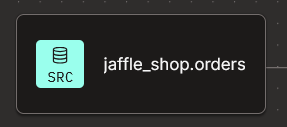
This is your source data.
From that source, you can create a dbt model:
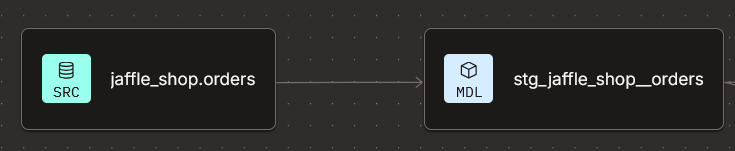
One model can become the starting point for several others

Each model has a specific job.
Together, they create a collection of reusable building blocks for your data.
Think of a model as a prepared dataset that can be reused by people, dashboards, or other models.
Is this not just SQL?
That's one of the things that makes dbt approachable.
If you know SQL, you already have a great starting point.
You might write a query like this:
SELECT
    customer_id,
    first_name,
    last_name,
    email
FROM customers
In SQL you're querying a table and selecting the data you want.
So where does dbt come in?
In dbt, that SQL can become a model, a reusable transformation that can be built and referenced by other models.
For example:
select
    id,
    order_id,
    sku

from {{ source('jaffle_shop', 'items') }}
This is a dbt model.
We're taking data from a source table and selecting the fields we want to use in our model.
The important part is:
from {{ source('jaffle_shop', 'items') }}
Instead of simply saying:
FROM items
We're telling dbt:
"This data comes from the items table in the jaffle_shop source."
This allows dbt to understand where the data comes from and how it connects to the rest of your project, making it easier to trace your data back to its origin and see the full lineage of your data.
Why Break Things Into Models?
Imagine you're building a house.
You wouldn't build the entire house as one giant piece.
You'd have:
- Foundation
- Walls
- Plumbing
- Electrical
- Roof
Each piece has a purpose.
Data modeling works similarly.
Instead of:
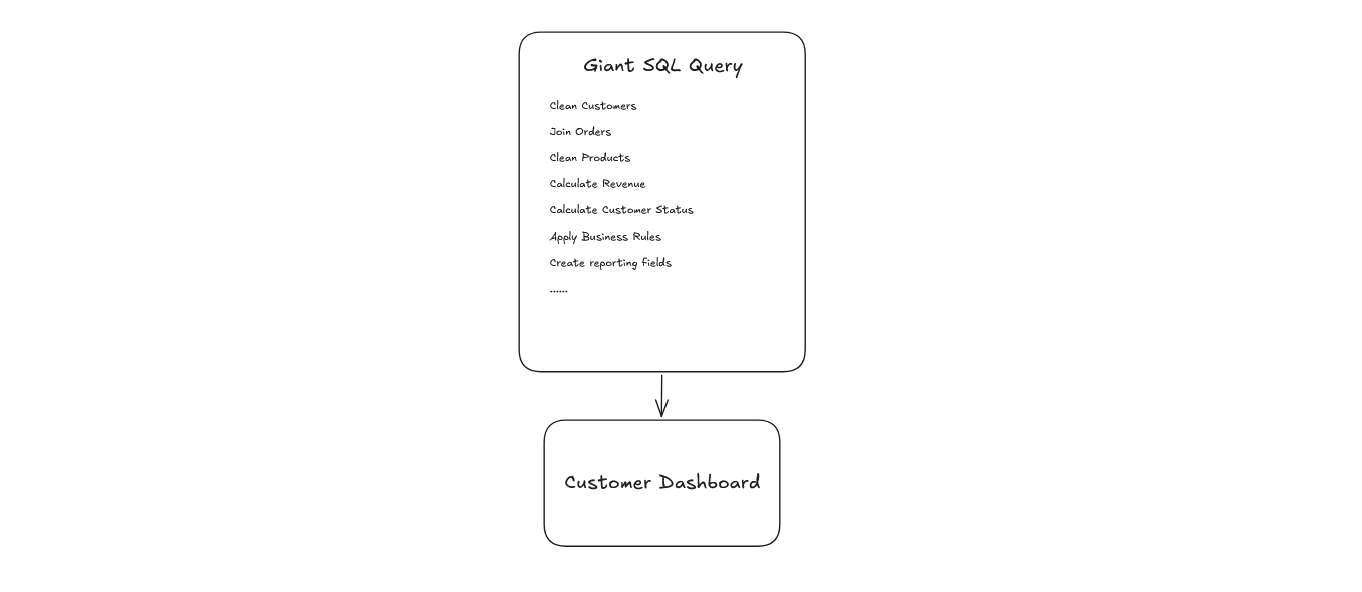
You can break your transformations into smaller pieces:
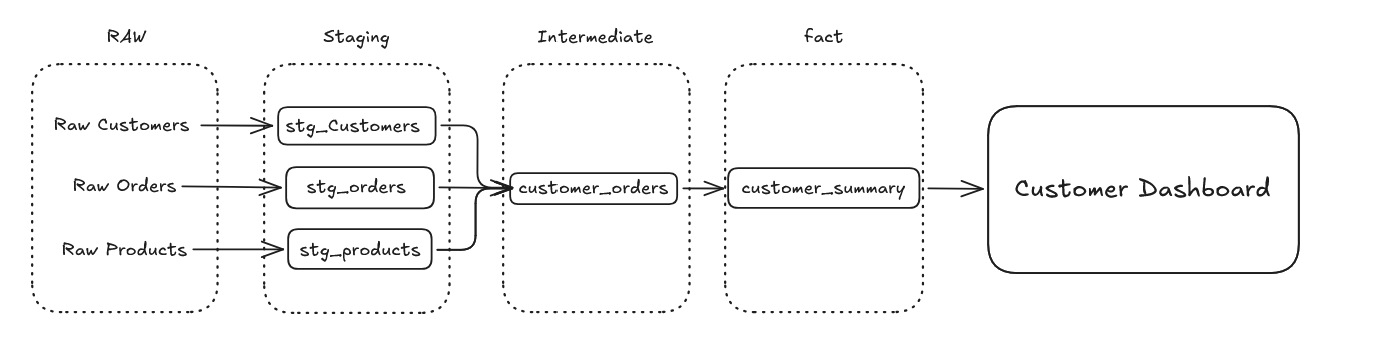
Each step has a specific job.
This makes the data easier to understand, reuse, and change.
This is one of the biggest ideas behind dbt:
Instead of rebuilding the same logic over and over, create a model once and reuse it.
So What's ref()?
You'll see this everywhere in dbt:
{{ ref('customers') }}
Don't let the syntax scare you.
At a high level, ref() simply means:
"I want to use this other dbt model."
For example:
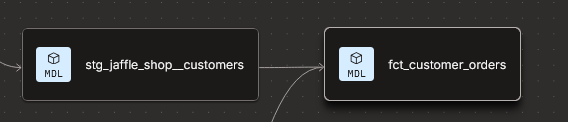
src_customer_info
    ↓
stg_jaffle_shop_customers
    ↓
fct_customer_orders
The fct_customer_orders model can reference stg_jaffle_shop_customers to bring in customer information, such as name, customer_id, etc that the orders table might not have.
dbt understands that relationship and knows that one model depends on another.

This is different from source().
Think of it this way:
source()
   ↓
"I am using data that already exists in my data warehouse."

ref()
   ↓
"I am using another dbt model."
That distinction is worth remembering.
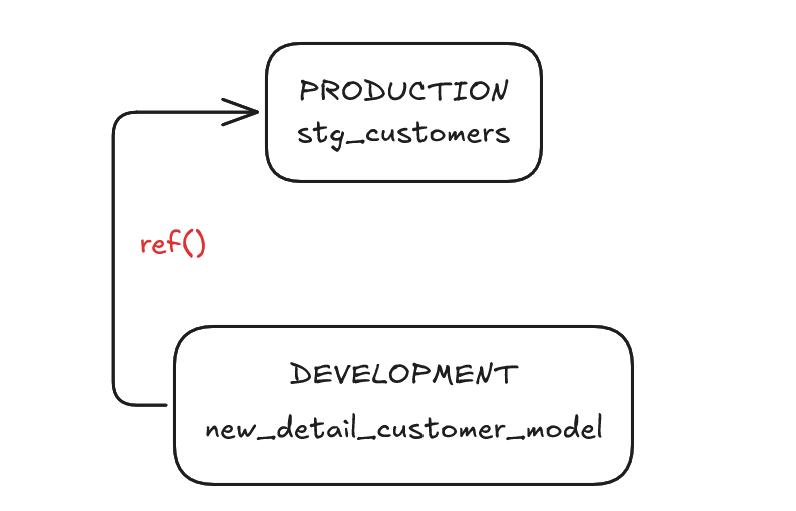
But ref() does more than just connect models together.
For example, let's say you want to build a new model in your development environment while referencing an existing model from your production environment. You can use that production model as an input without changing it, while building and testing your new model separately in development.
This also means you don't have to hardcode table names throughout your SQL, making it easier to work across different environments.
Why Does That Matter?
Let's say you're working on a dashboard and someone asks:
"Where does this number come from?"
Instead of digging through dozens of SQL queries, you can follow the data backward:
Dashboard
   ↓
Revenue Model
   ↓
Orders Model
   ↓
Raw Orders
   ↓
Source System
This is called data lineage.
Think of lineage as a map showing how your data moves through your transformations.

It can also help answer another important question:
"If I change this model, what else could be affected?"
That's where having these relationships defined becomes really useful.
What About Data Quality?
Here's another useful part of dbt.
You can also run tests as part of your dbt job. If a test fails, the job can stop before downstream processes continue building on potentially incorrect data.
This helps catch issues earlier, before they make their way into the datasets and dashboards that other people use.
You can define expectations about your data and have dbt check them.
For example, maybe every customer_id should:
- Be unique
- Never be blank
You can set up tests for those conditions.
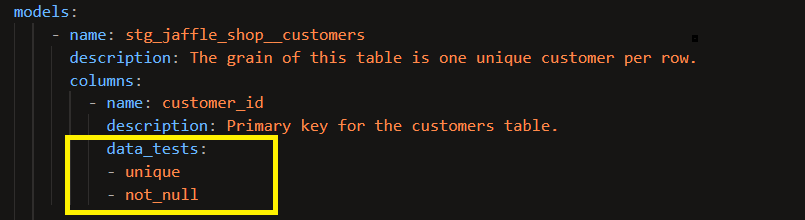
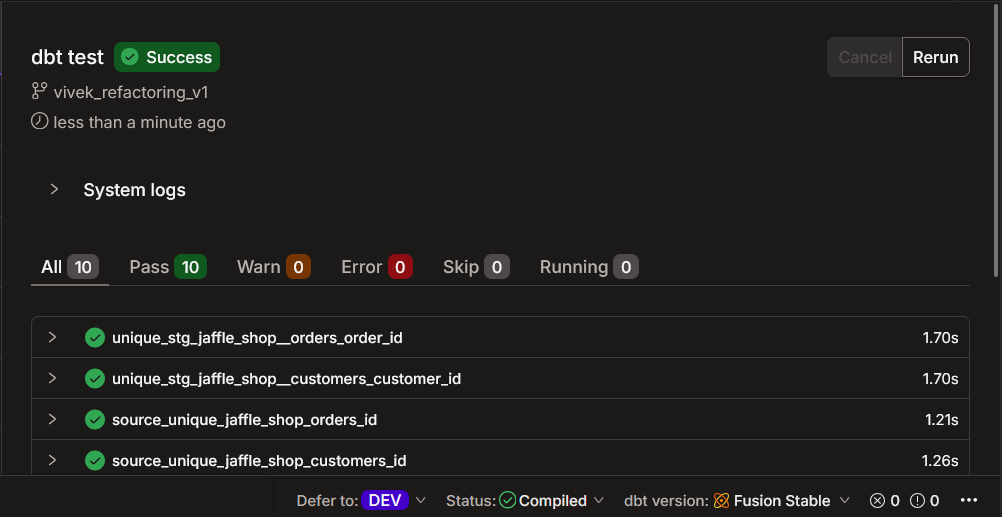
Instead of manually checking the same things over and over, you can make those checks part of your data workflow.
The idea isn't complicated:
If something should always be true about your data, you can test for it.
How Can This Help You?
This is probably the most important question.
Because you might be thinking:
"Cool... but how does this actually help me?"
If you're an Analyst
Without transforming data upstream, it's easy for the same data to end up with multiple slightly different versions.
For example, one analyst might create custom SQL in Tableau to calculate revenue one way, while another analyst creates a slightly different calculation for a different dashboard.
Over time, you can end up with multiple versions of the same logic and no clear single source of truth.
By moving those transformations upstream into dbt, you can create a reusable model that everyone can build from instead of recreating the same logic in every dashboard or reporting tool.
If you're a Data Engineer
dbt provides a structured way to manage SQL transformations and understand how different datasets depend on one another.
Instead of managing transformations as disconnected queries, you can organize them into models that can be reused and built upon downstream.
If you're a Business User
You may not interact with dbt directly, but you still benefit from the work happening upstream.
The datasets used in dashboards and reports can have reusable business logic, and tests that check whether the data meets certain expectations.
This can give you more confidence in the data you're using, especially when those checks happen before the data reaches your reports and dashboards.
If you're on a Data Team
dbt gives the team a shared way to manage transformations and understand the data they're working with.
You can see:
- What models exist
- Where their data comes from
- How models connect
- What logic is being reused
- What tests are in place
- What the models and columns mean
Here are 5 Things to Remember
If you're brand new to dbt, start here:
1. Models
SQL transformations that create useful datasets.
2. source()
Tells dbt where your source data comes from.
3. ref()
Connects your dbt models together.
4. Tests
Help you check and understand your data.
5. Lineage
Shows how your data moves from one model to another.
Takeaway
At its core, dbt helps teams take raw data and turn it into organized, reusable data models using SQL.
But the value of dbt goes beyond the models themselves. It also gives teams a structured way to:
- Version control their SQL and changes
- Test their data
- Track lineage between datasets
- Reuse transformations across projects and teams
And that's only scratching the surface. There are plenty of other dbt features and concepts to explore, but these are the fundamentals to keep in mind.
Once you understand:
Raw Data → Models → Reusable Data
you've got the foundation you need to start learning dbt.
Take the data you already have, transform it into something useful, and build from there.