


In most data analytics tools, performing a join involves declaring the type of join you would like to perform. For example, in Tableau Prep, the user must select the join type (inner, left, outer, etc.) directly in the configuration of the join itself. Similarly, the SQL language requires users to declare the join type in the query before it is to be executed. The Alteryx join tool is slightly different. Instead of adding the join type to the configuration pane of the tool itself, it instead performs an inner join automatically and provides you with the join results as well as the unmatched rows on either side.
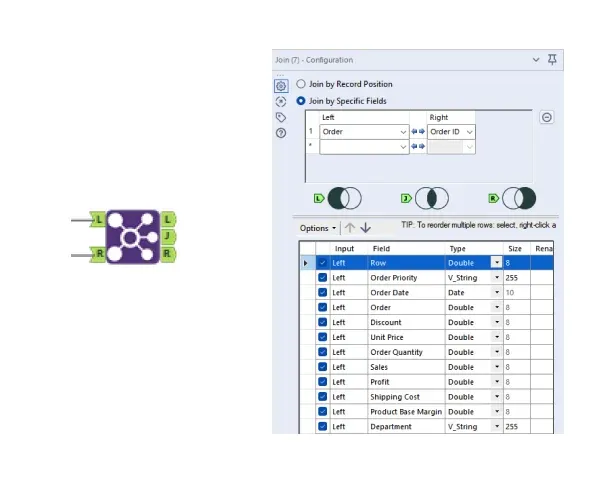
As seen in the image above, the join tool has 3 output anchors, representing the joined rows (J) as well as the unmatched records in the left table (L) and the right table (R). Incase you ever forget, Alteryx provides a neat illustration representing what each anchor represents in the configuration window. It might be frustrating initially to discover that the (J) anchor can only contain an inner join of the two inputs as opposed to a different join method of the user's choice, however there are a few ways to perform different join types, such as left/right joins, and full joins in Alteryx. In this blog, we will go over 2 key ways to perform different join types in Alteryx.
1: Join + Union
Combining a join tool and a union tool is the most common and flexible way to perform different join types in Alteryx. By performing the typical join and a union on a select combination of the join tool's output anchors, you can achieve pretty much any join you would like. Performing a union on the (J) anchor and the (L) anchor will give you a left join. Performing a union on all 3 anchors gives you the full join. This option offers the most flexibility as the user is able to choose what anchors are included in the union. One thing to remember is to make sure your union tool is set to auto configure by field name instead of position in order to avoid combining fields in the left and right table.
2: Find & Replace
Using a find & replace tool is a quick way to perform a left join. By inputting the left table on the (F) input anchor, the right table on the (R) input anchor, and configuring the find & replace tool to append the selected field names of your choice, you will get a left join output. While this option is limited to just left joins, it offers a one-tool solution to a common join type and allows the user to drop certain unnecessary fields from the right table.
Even though multiple join types are not supported in Alteryx's join tool, it's clear to see that there are often many ways to achieve certain niche data transformations using a combination of tools or an unusual configuration of a seemingly unrelated tools. This is true not just in the case of left joins but in many other data transformation techniques. If Alteryx ever seems to be limiting you with a certain tool, look to be creative with the other tools and you'll likely find a cool solution to your problem!