


Fuzzy matching is used to find records that mean the same but aren’t spelled the same.
In Alteryx, the fuzzy match tool provides
- Prerequisite = Must have unique identifier
- If your data has no key field, you can add a Record ID tool one step before the Fuzzy Match tool
Compare match fields
- You choose which fields to match on and how strictly
Uses similarity thresholds
- A pair only counts if its match score clears the threshold
Weighs multiple fields
- Best practice: when matching with several fields, configure each separately.
Configuring the tool
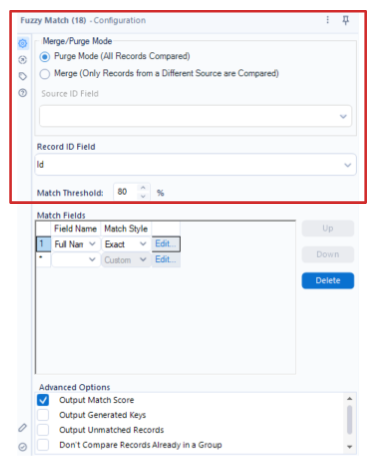
Choose your preferred match mode
- Merge Mode
- Compares records across different sources - each needs a Source ID field
- Purge Mode
- Compares all records in one source to find internal duplicates
Specify the unique Record ID Field
- If your data has no key field, you can add a Record ID tool one step before the Fuzzy Match tool
Specify the match threshold
- Default is 80%
- Pairs scoring below the threshold don’t qualify as a match
- Each field, the match style, the match weight, and the resulting field match score is considered in calculating the score
Match Styles
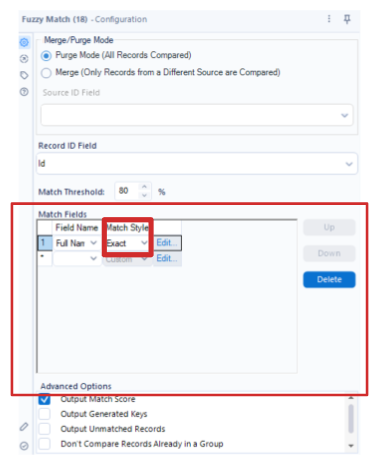
For each field, you must select a match style.
For example:
- Exact: must match exactly - not fuzzy at all.
- Address: finds address matches using Double Metaphone plus a digit match.
- ZIP Code: looks at the 5 digits of a ZIP field.
- Etc...
Edit match options
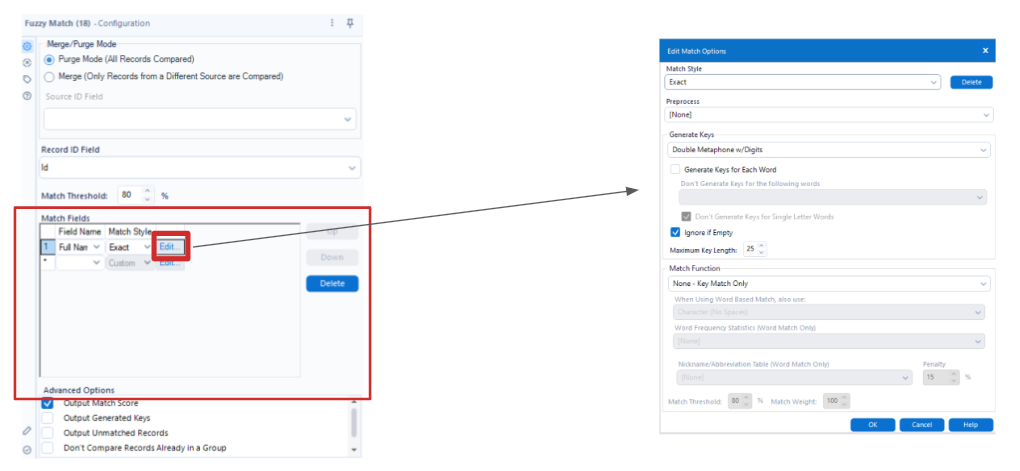
Preprocess
- Clean the text before anything else
- Strip punctuation, salutations, filler words, address units - so it doesn’t break matches.
Generate Keys
- Nominate potential matches
- A first pass filter - keys must match exactly to advance a pair to scoring.
Match function
- Score the pairs that are left
Preprocess
This is a procedure that runs before Generate Keys and the Fuzzy Match function. It helps with punctuation that might interfere with finding matches.
Options include:
- None: No Preprocess is run.
- Strip Punctuation: Any punctuation characters within the specified data field are ignored while the tool determines matches.
Generate Keys
Generate Keys is the method by which a potential match is identified
- Digits Only: Only records with the same digits in the specified field are matched.
- Double Metaphone: Double Metaphone is the preferred algorithm. This is an algorithm to code English words (and foreign words often heard in the English language) phonetically by reducing them to 12 consonant sounds.
- Double Metaphone w/ Digits: Uses the same Double Metaphone algorithm but includes digits as well
Further options if you tick Generate Keys for Each Word
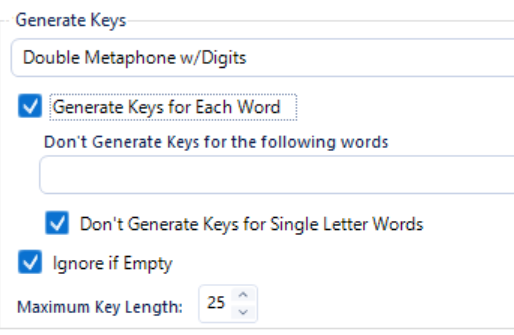
- Exclude specific words
- Skip single letter words
- Ignore if empty
- Set a max key length
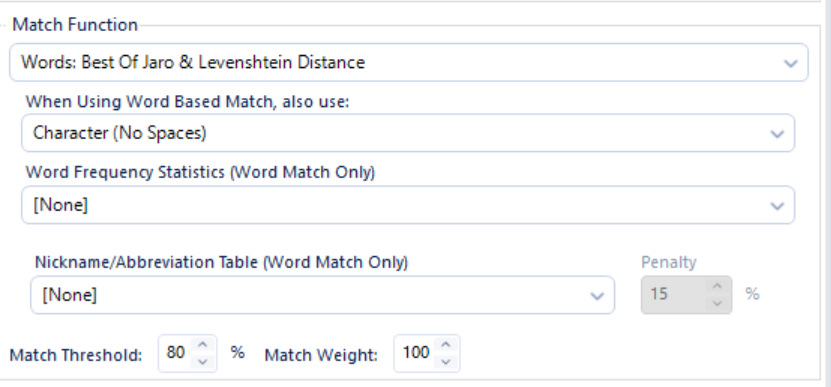
Match function
This scores each nominated pair. It differs from keys which must match exactly.
- None: Key Match Only
- Levenshtein Distance: counts insertions/deletions/substitutions - is stricter.
- Jaro Distance: The weighted sum of the percentage of matched characters and necessary transpositions (more forgiving of differences).
- Best of Jaro & Levenshtein: Runs both and takes the best.
Further options
- Each function has options for Character, Character (No Spaces), Words, and Words & Digits.
- Word options unlock word frequency stats and nickname abbreviation tables.
- You can set the threshold and weight of each field
Advanced Options
There are also more options:
- Output Match Score as an additional column
- Output Generated Keys
- Output Unmatched Records
- Generate Keys Only: No matching occurs and all records are returned with the generated keys as an additional field.