Correctly formatting dates for processing and analysis is a familiar occurrence to any data analyst. Luckily, Alteryx offers a number of ways to quickly do this.
DateTime Parse Tool

The DateTime Tool, found in the parse tab of the toolbar is one of the quickest ways to translate between string and date types. Simply decide if you're converting string to date or date to string, then select the field you're converting, name your output field, and provide info about you're formatting.
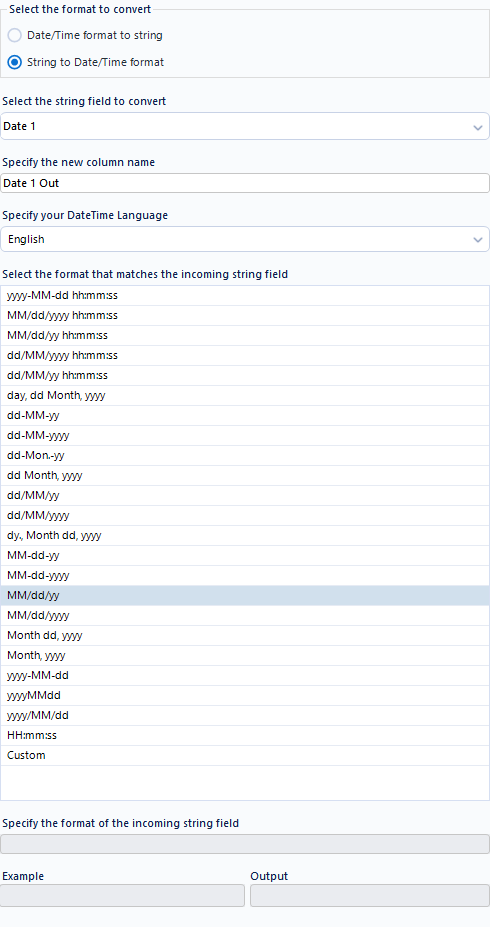
The DateTime tool uses d (day) M (month) y (year) and h (hour), m (minute), s (second) in order to translate between our date formatting and Alteryx's date type which formats as yyyy-MM-dd.
Alteryx even allows you to specify the language of the in or output data.
If none of Alteryx's provided date formats aligns with your formatting then you can use the Custom input in order to specify the correct formatting.
When inputting custom formatting, Alteryx's documentation provides a useful translation dictionary here, including multiple languages in addition to English.
Key Date Formats:
- d: Day of the month as digits, without leading zeros for single-digit days.
- day: The full name of the day of the week.
- dd: Day in 2 digits, with leading zeros for single-digit days. On input, leading zeros are optional.
- dy: Day of the week as a 3-letter abbreviation. On input, full names are accepted but Alteryx doesn't check that the day of the week agrees with the rest of the date.
- EEEE: The full name of the day of the week.
- M: A single-digit month, without a leading zero.
- MM: Month as digits, with leading zeros for single-digit months. On input, leading zeros are optional.
- MMM: The abbreviated name of the month.
- MMMM: The name of the month spelled out.
- Mon: A 3-letter abbreviation of the name of the month. On input, full names are also accepted.
- Month: Name of the Month. On input, abbreviations are also accepted.
- yy: Year represented only by the last two digits. When converting from a string, two-digit years are mapped into the range from the current year, minus 66 years to the current year, plus 33 years. For example, in 2016, a two-digit year will be mapped into the range: 1950 to 2049. On input, four digits are also be accepted.
- yyyy: Year represented by the full 4 digits. On input, 2 digits will also be accepted and mapped as done for the “yy” pattern.
Date Parsing with the Formula Tool
Perhaps the DateTime tool isn't for you, or you'd like an even more complex output. Luckily, Alteryx also allows you to convert dates in the Formula tool using the DateTimeParse() function. If you want to convert date to string you have to use the DateTimeFormat() function.

Simply call upon DATETIMEPARSE() in the Formula Tool's widow and input the parameters.
DateTimeParse(string, format, [language])
Language is optional an you ignore it for the English default and opt to just put the string column name and then the format of that incoming string. The main downside is that DateTimeParse formatting is different (and less intuitive) than DateTime Tool's formatting.
Ex: If you have a string formatted as MM/DD/YYYY: DateTimeParse([DateString], "%m/%d/%Y")
Alteryx provides a helpful documentation table for these conversion on their help page here.
If you're looking to convert from date to string you can use the same formatting but with the DateTimeFormat() function.
DateTimeFormat(date, format, [language])
Specifier | Output from DateTimeFormat | Supported Input with DateTimeParse |
|---|---|---|
Year | ||
| Last two digits of the year ("16"). | Up to 4 digits are read, stopping at a separator or the end of the string, and mapped to a range of the current year minus 66 to the current year plus 33. For example, in 2025, two-digit years are treated as being from 1959 to 2058. Limitation with 6-Digit Dates Because up to 4 digits are read for the year, formats that are intended to have only 2 digits without a separator, such as a 6-digit date stamp (for example, %y%m%d for data resembling 170522 for May 22, 2017), are still read as 4 digits. To work around this limitation, you can...
|
| All four digits of the year ("2016"). | Two or four digits are read. Two digits are mapped to a range from the current year minus 66 to the current year plus 33. For example, in 2024, that's 1958 to 2057. |
Month | ||
| Abbreviated Month Name ("Sep") | Any valid abbreviation of a month name ("Sep", "SEPT."). Returns an error only if the given text is not the name of a month (in the specified language). |
| Full Month Name ("September") | Month name or any valid abbreviation of a month name ("Sep", "SEPT."). It returns an error only if the given text is not the name of a month (in the specified language). |
| Abbreviated Month Name. Same as %b ("Sep"). | Any valid abbreviation of a month name ("Sep", "SEPT."). Returns an error only if the given text is not the name of a month. |
| Month number, 01 to 12. | 1 or 2-digit month number, 1 or 01 to 12. |
Week | ||
| This returns the week number, as 00 – 53, with the beginning of weeks as Sunday. | Not Supported |
| This returns the week number, as 00 – 53, with the beginning of weeks as Monday. | Not Supported |
Day of the Year/Month | ||
| Day of the Month ("01") | 1 or 2 digits, ignoring spaces ("1" or "01"). |
| Day of the month, leading 0 replaced by a space (" 1"). | 1 or 2 digits, ignoring spaces ("1" or "01"). |
| The day of the year, from 001 to 365 (or 366 in leap years) | 3-digit day of the year, from 001 to 365 (or 366 in leap years). |
Day of the Week | ||
| Abbreviated Weekday Name ("Mon") | Any valid abbreviation of a day of the week ("mon", "Tues.", "Thur"). Returns an error only if the given text is not a day of the week. Note that Alteryx does not check that the specified day name is valid for a particular date. |
| Full Weekday Name ("Monday") | Day name or any valid abbreviation of a day of the week ("mon", "Tues.", "Thur"). Returns an error only if the given text is not a day of the week. Note that Alteryx does not check that the specified day name is valid for a particular date. |
| Day of week as a decimal, 1 to 7, with Monday as 1. | Not Supported |
| Day of week as a number, 0 to 6, with Sunday as 0. | Not Supported |
Hour, Minute, Second | ||
| Hour in 24-hour clock, 00 to 23. | Up to 2 digits for hour, 0 to 23. Not compatible with %p or %P. |
| Hour in 12-hour clock, 01 to 12. | Up to 2 digits for hour, 1 to 12. Must follow with %p or %P. |
| 24 hours, leading zero is space, " 0" to "23". | Up to 2 digits for hour. |
| Minutes, 00 to 59 | Up to 2 digits for minutes. |
| Seconds, 00 to 59 | Up to 2 digits for seconds. |
Miscellaneous | ||
| The number of digits of precision for sub-seconds. | Up to 18 digits of precision for sub-seconds. |
| The date and time for the computer’s locale. | Not Supported |
| The Century Number ("20") | Not Supported |
| Equivalent to %m/%d/%y | Not Supported |
| Same as %b ("Sep") | Any valid abbreviation of a month name ("Sep", "SEPT."). Returns an error only if the given text is not the name of a month. |
For additional information and a helpful pro/con comparison between these approaches I recommend exploring Le's Blog on the topic or attending a Learn What the Data School Learns session since I will be teaching a hands on workshop on Date and Text Parsing this March!