


Window Functions allow for the performing of calculations across a set of related rows, while still preserving the original row-level of the input table(s).
Therein lies the main difference between window functions and normal aggregate functions.
Normal aggregate functions, such as SUM(), AVG() or MAX(), collapse rows when they are used with a GROUP BY clause. For example, grouping by product segment and calculating the maximum order value returns one row per segment.
A window function can calculate that same maximum order value per segment, but without collapsing an order-level table. Instead, each order is preserved, with the maximum value being added alongside it in a separate column.
This makes window functions useful when we need both (1) row-level information and (2) group-level or sequential information.
Window functions can be used to calculate:
● rankings within groups
● running totals
● moving averages
● previous or next row comparisons
● group totals without losing the original rows
● top N records within each category
The general syntax for a window function is as follows:
WINDOW_FUNCTION() OVER ( PARTITION BY column_name ORDER BY column_name )Where the OVER keyword defines the 'window' of rows that the function can see.
The PARTITION BY clause splits the rows into groups. The window function is then calculated separately inside each group.
The ORDER BY clause defines the order of rows inside of each partition, important in cases where sequence matters, like rankings or running totals.
Some common window functions:
ROW_NUMBER() OVER (...)
RANK() OVER (...)
DENSE_RANK() OVER (...)
SUM(column_name) OVER (...)
AVG(column_name) OVER (...)
MAX(column_name) OVER (...)
LAG(column_name) OVER (...)
LEAD(column_name) OVER (...)
Window Functions & SQL's Execution Order
Window functions are calculated after WHERE, GROUP BY and HAVING. As such, in many dialects like PostgreSQL, the products of window functions cannot be used to directly filter within the WHERE or HAVING clause.
Thus, window functions are often used inside CTEs or subqueries. The window function is calculated, and then the outer query filters the result. See below for a way that Snowflake mitigates this 'issue' with the QUALIFY keyword.
I've found LeetCode problems to be a good way to consolidate the learning of programming languages. We go through two problems using window functions below.
Example 1: RANK()
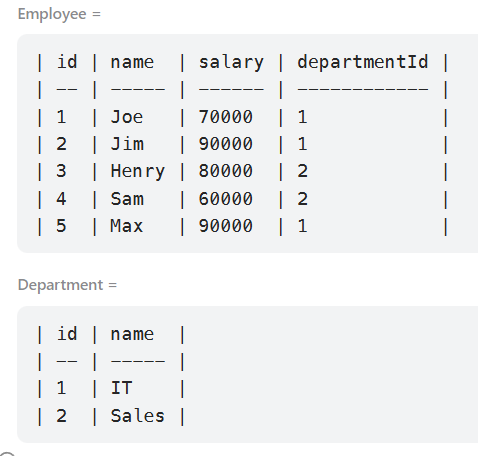
The first problem is LeetCode 184: Department Highest Salary. We need to find employees who have the highest salary in each department.
https://leetcode.com/problems/department-highest-salary/?utm
We are given two tables: (1) an employees table containing information on all employees and, (2), a department table containing information on the departments.
The expected output looks like the following:
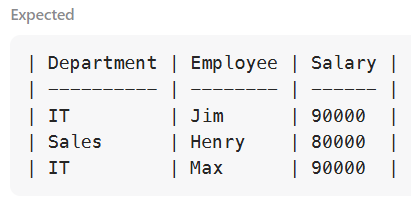
Where we see two employees for the IT department, as they have the joint highest salary.
The problem doesn't need a window function.
Using a CTE
One way is to first calculate the maximum salary in each department and then join the result back to the employees table, leaving only the employees with the highest salary, per department.
WITH max_salary AS -- Returns the highest salary in each department
(
    SELECT
        d.id AS department_id,
        d.name AS department_name,
        MAX(e.salary) AS max_sal
    FROM employee AS e
    JOIN department AS d
        ON e.departmentid = d.id
    GROUP BY
        d.id,
        d.name
)

SELECT          -- Returns employee details if their salary matches the highest in their department
    ms.department_name AS department,
    e.name AS employee,
    e.salary AS salary
FROM employee AS e
INNER JOIN max_salary AS ms
    ON e.departmentid = ms.department_id -- Ensures employee is matched to their own department
   AND e.salary = ms.max_sal;            -- Ensures employee has the highest salary in that department
I send bad vibes to anyone who doesn't:
● indent properly
● capitalise key words
● lower-case everything else
● use underscores for aliasing, instead of quotes
Using a Window Function
A window function is more appropriately used for this problem:
WITH ranked_salaries AS (  -- Returns ranks of employee salaries
    SELECT
        d.name AS department,
        e.name AS employee,
        e.salary,
        DENSE_RANK() OVER (    --
            PARTITION BY e.departmentId -- Resets each department
            ORDER BY e.salary DESC      -- Ordered highest salary first
        ) AS salary_rank
    FROM Employee AS e
    JOIN Department AS d
        ON e.departmentId = d.id
)
SELECT
    department,
    employee,
    salary
FROM ranked_salaries
WHERE salary_rank = 1;    -- Returns only the employees with the highest salary
Where the key part is:
DENSE_RANK() OVER ( PARTITION BY e.departmentid ORDER BY e.salary DESC )The PARTITION BY restarts the ranking for each department.
The ORDER BY ranks employees by salary from highest to lowest, giving the highest salary a rank of 1.
ROW_NUMBER would not yield the correct output as, in the case of a tie, ROW_NUMBER would arbitrarily assign one row as 1 and the other as 2.
Snowflake's QUALIFY Keyword
Snowflake's QUALIFY allows for filtering after a window function has been evaluated. This avoids the need for an extra CTE or subquery for filtering purposes.
In Snowflake's order of execution, QUALIFY comes after window functions, but before ORDER BY and LIMIT. And it is written after WHERE / GROUP BY / HAVING, if they exist, and before ORDER BY and LIMIT.
The general syntax for QUALIFY, with an aliased window function, is as follows:
SELECT
    column_1,
    column_2,
    WINDOW_FUNCTION() OVER (
        PARTITION BY column_1
        ORDER BY column_2
    ) AS window_result  -- The window function
FROM table_name
QUALIFY window_result condition -- Where 'condition' is a placeholder for something like <= 50;
Were the above question being solved in Snowflake's dialect, the query would look like:
SELECT
    d.name AS department,
    e.name AS employee,
    e.salary AS salary
FROM employee AS e
JOIN department AS d
    ON e.departmentid = d.id
QUALIFY DENSE_RANK() OVER (
    PARTITION BY e.departmentid
    ORDER BY e.salary DESC
) = 1;
Example 2: SUM()
Now, for the use of a running sum. LeetCode 1204: Last Person to Fit in the Bus.
https://leetcode.com/problems/last-person-to-fit-in-the-bus/?utm
We're given a single table:
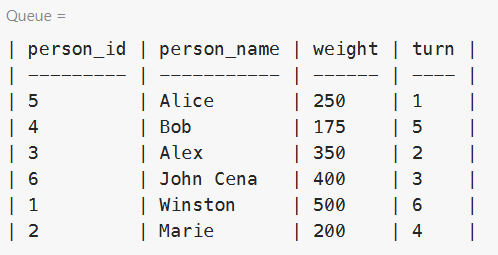
People enter the bus as per the order given in the turn field. The bus has a weight limit of 1000kg. We're to find the name of the last person who can fit on the bus without exceeding the weight limit.
If we ordered the table by turn, a running sum column would allow us to find the last row where the weight is less than 1000. And that is what this code block does:
WITH run_sum AS  -- Calculate cumulative bus weight by turn order
(
    SELECT
        *,
        SUM(weight) OVER (ORDER BY turn) AS running_weight  -- Running total up to and including this person
    FROM queue AS q
)

SELECT *
FROM run_sum
WHERE running_weight <= 1000    -- Keep only people who can board without exceeding the weight limit
ORDER BY turn DESC              -- Put the latest valid boarding position first
LIMIT 1;                        -- Return the last person who can fit on the bus
This section within the CTE -
SUM(weight) OVER (ORDER BY turn) AS running_weight- computes a running sum, ordered by turn. The first row contains the weight of the first person, the second row the weight of the first and second person, etc.
Then, the outer query keeps only those rows where the running total is less than or equal to 1000.
ORDER BY turn descending and LIMIT 1 returns the last person who can board the bus.
Were we to omit the ORDER BY, like -
SUM(weight) OVER () AS running_weight- rather than a running sum, we would have a table-level sum against every row, i.e., the same, grand total repeated for every row. For this example, we'd be able to compute the % of total each person contributes to the combined weight.
Takeaway
- Unlike normal aggregate functions with GROUP BY, window functions do not collapse the result set.
- PARTITION BY specifies the group to restart the calculation over.
- ORDER BY defines the order within each group specified in PARTITION BY. When no column is specified in PARTITION BY, the result set is not split, and the window function is computed across the entire table.
- Omitting both PARTITION BY and ORDER BY also computes across the entire table. For aggregate functions like SUM(), AVG() or MAX(), this returns the same table-level value on every row.
- Ranking functions are different. They generally need an ORDER BY to define what the rank is being computed over.
- Use window functions when needing to compute ranks, running totals, moving averages, % of totals...