


Use a DIVIDE() Syntax Instead!
In Power BI, it’s tempting to use a simple forward slash '/ ' for division. However, doing so often sets you up for a world of frustration, especially when a calculation hits a zero value. All of a sudden, your visual breaks because the standard operator doesn't know how to handle a null or zero denominator.
This is where the DIVIDE() function swoops in and saves the day.
For example, imagine you have a sales dataset and you need to calculate the percentage difference between current and previous sales. Your first instinct might be to use this formula:

This seems correct in theory, but in practice, when I place this measure as a column in a table, these are the results:
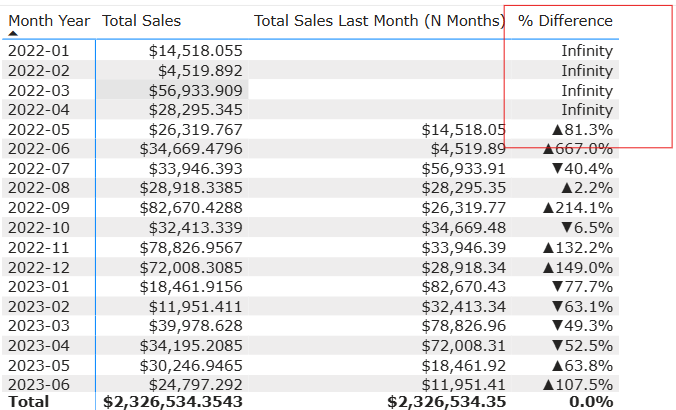
As you can see, there are breaks in this calculation; this is why the values are showing up as 'Infinity.'
So, why does this happen?
If a row in your denominator is a 0 or Blank, the standard '/' operator will return Infinity, -Infinity, or NaN (Not a Number). You definitely do not want these on your dashboard. Not only does it make the report look unprofessional, but it can also affect your sorting logic and create huge outliers in your charts.
Now, how do we fix this?
By utilising the DIVIDE() function.

In this function, the comma ',' acts as the separator between your numerator and denominator.
If a row in your denominator is 0 or Blank, the function automatically returns a BLANK. This ensures those rows stay invisible on your charts, keeping your dashboard clean and professional:
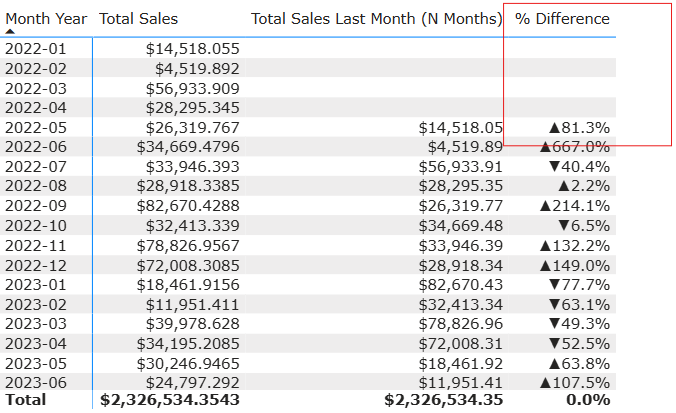
And voila, problem solved!