


As we're going over and putting version control to practice in our data engineering training, I thought to make a brief outline of what this might look like from a diagram perspective when using Git on Power BI's .pbib files.
I won't linger on the .pbip file, but to over simplify it; it's a bunch of files that hold the Power BI reports information in different readable text files. Hence it's perfect for Git as we can track changes to the files as we update the report before committing back to the main file. Opening up collaboration, (code) review and blames (seeing who made what change).
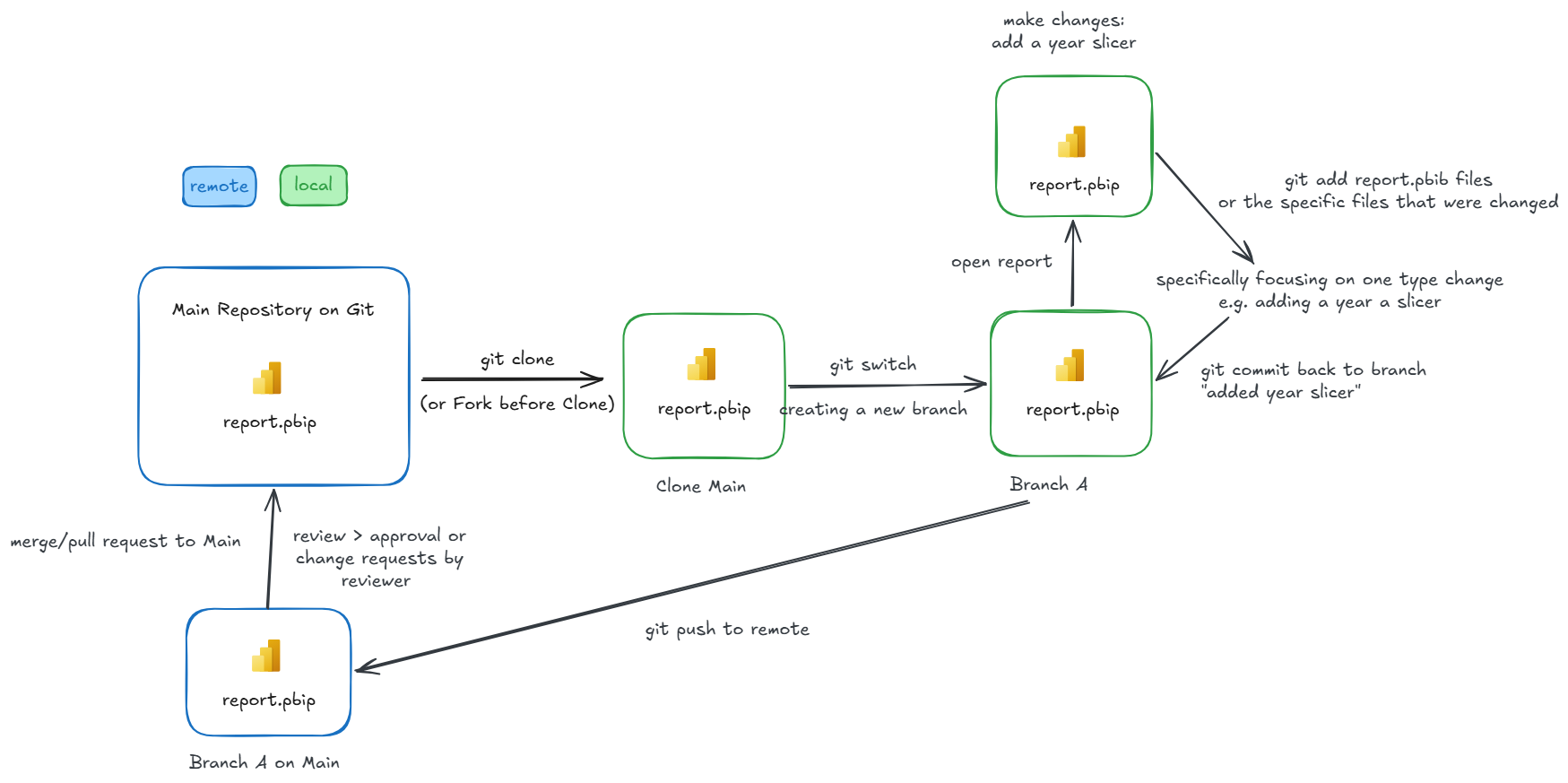
The diagram above can be read clockwise starting at the Main Repository in Git holding an existing report in for instance GitHub cloud (remote).
We start by cloning that Main repository from a remote place to our local device so we have a copy of the most recent report.
Instead of immediately opening up the report and making the changes we want, we create a new branch locally (using git switch, labelled Branch A) so we can alter the report without editing the cloned main directly.
We open up the report now, add the requested year slicer to the page we were asked to add it to and save the file.
Up next is telling Git that we have made some changes and by using a git add the files that changed (or in this case you could add all files of the .pbib file format), which allows the next step, commit, for us to add a comment and describe what we changed.
Our Branch A is now changed and the information is stored locally. In order for us to make this accessible remote, we push it to remote where Branch A is now created and it becomes visible by the rest of the team who has access to the report in the Main repository.
Before updating the Main report, we will do a merge request to Main, if in the interim the Main report has changed and causes issues or if there are any other conflicts it will notify us and won't allow us to proceed before fixing it.
Once everything is cleared if needed, the merge request goes through and has to be approved by someone else who can or request changes depending on the review before the Main .pbib files get merged and the report is now available as a new snapshot (rather than overwriting files, we will keep the other historical versions).
If this is your first time working with Git, I'd highly recommend starting here with the tutorial below that will help you get going with installation and the steps on how to run Git, good luck!
