


At the start of my time at the Data School, we began to cover how to do data preparation. The first tool we used for this was Tableau Prep, closely related to the Tableau Desktop that we had to use for our applications. To help practice our data prep skills, we've done a handful of exercises/challenges found through the Preppin' Data website!
There's plenty of different data prep challenges to do, with provided data and solutions to help guide your journey through data prep. With each year of challenges, they begin with a nice and guided exercise to help get you used to doing data prep. And with each challenge building upon previous ones, it's a great way to learn and get an understanding of what to do.
One of the first ones that I had done was Week 1 of 2021's challenge relating to bike store information. At first, I had done this through Tableau Prep. To start, I began to plan out each step of what I needed to do to the data based on the input and the requirements provided. In the earlier weeks, the requirements are very descriptive, helping to guide you along the way to your solution.
My steps for Week 1's solution:
1. Load the file into the program
2. Split 'Store - Bike' into 'Store' and 'Bike' based on the delimiter ' - '
3. Clean up 'Bike' based on the spelling into 'Mountain', 'Gravel', and 'Road'
4. Covert 'Date' into 'Quarter' and 'Day of Month'
5. Filter to keep only the records where 'OrderID' > 10
6. Reorder, Remove and Rename whatever else needs to be done, and Output file

Within Tableau Prep, using the steps made the whole process of completing the challenge a breeze. The task of needing to clean up the 'Bike' row because of spelling errors was made easy as Tableau Prep has a tool to group values together based on pronunciation, common characters, spelling, and a manual grouping of the distinct values. And all you have to do is press the run button and it'll output exactly what I need.
In comparison, you could also do the task using a different tool, such as coding in Python. Despite having the same steps, the way of approaching it is very different. For one, you have to manage the records and fields manually. In addition, all tasks have to be written manually.
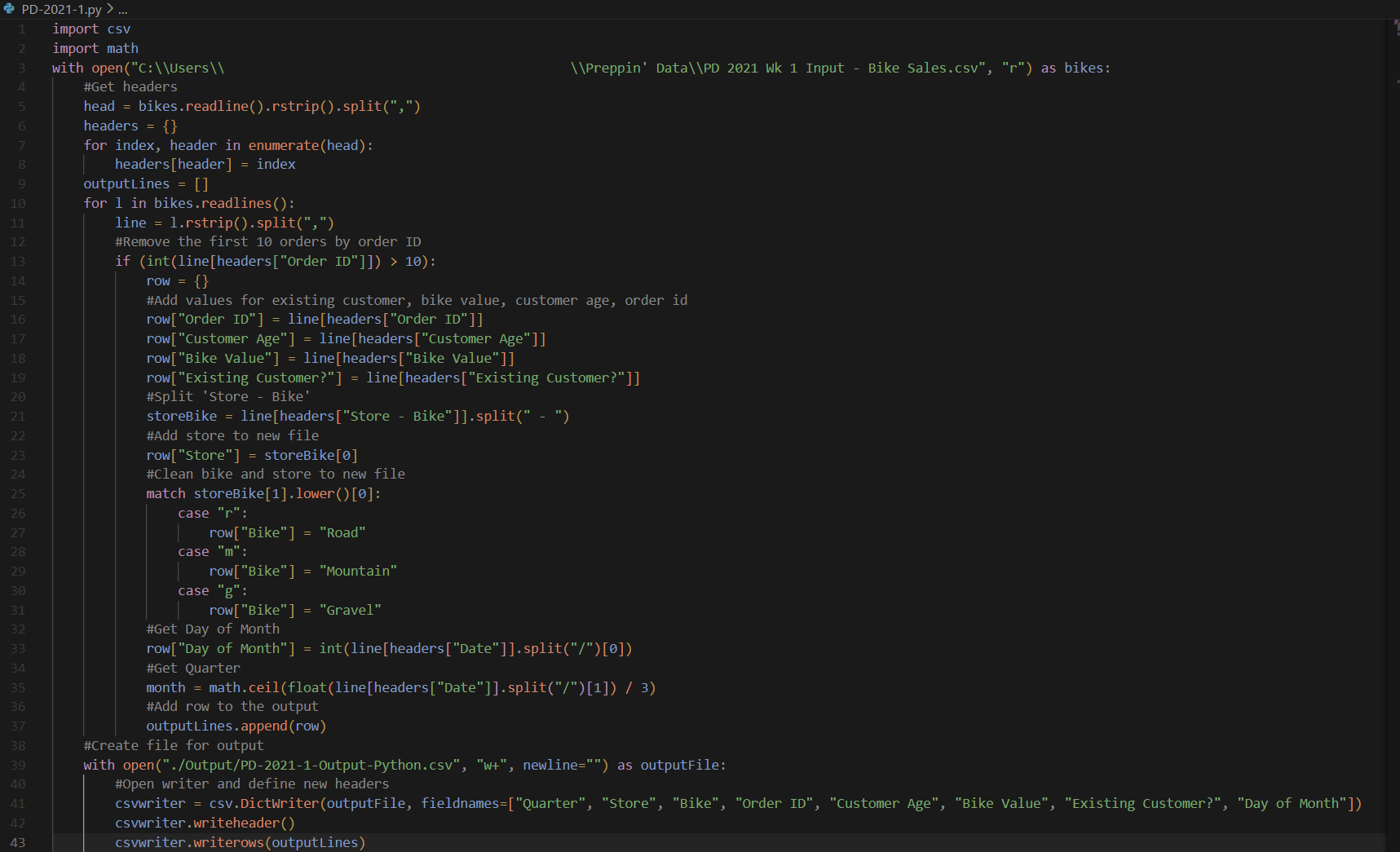
In regards to this task, I had to import in the input file, read the headers and keep track of their positions. Each record in the file is read as a single string which I then split up using ',' as a delimiter. Using the 'with-open-as' format covers the closing of the connection to the file, rather than needing to add it into the end. This also prevents the output file from being created if the input file doesn't.
Each record is dealt with one at a time, so if aggregation needed to be done, then possibly another loop would be needed after an initial read to have the data in a format that could be used by the code. For the filter in step 5, it makes most sense to do it first rather than needing to reiterate the dataset again. After that, you can add the fields that have no changes made to their new fields, allow for field renaming to be done at the same time.
For step 4, Dates are read in as a string format, so to get the 'Day of Month' it can be split by the date's delimiter '/' where the first item would be the day. Then to get the 'Quarter', the month can be pulled in a similar format, then dividing and rounding to get the quarter.
The most difficult part is dealing with the 'Store' and 'Bike', mainly with step 3. 'Store' and 'Bike' can be split up easily enough using the .split() function to get 'Store'. But to get the 'Bike' and fix the spelling mistakes, that is a more complicated issue. If you needed to fully deal with a lot of spelling mistakes, then using something similar to a Levenshtein distance to see which option would be the best fit for the record. But since we have the data available, similar comparing the first character is enough to sort them into being either a 'Road', 'Mountain', or 'Gravel'.
In the end, a DictWriter can be used to write all of the records into the new csv file. As it uses the keys of the dictionary object to match with the headers, the records are written properly into the csv file under the right field.
Overall, both using Python and using Tableau Prep have their strengths and weaknesses. Python is more flexible with what you can do. It also ran much quicker than Tableau Prep in getting the output, even if Tableau Prep was around a second. Tableau Prep was much quicker to do the task with and not having to think about managing fields and records. In addition, doing functions like pivoting and aggregation would also be quicker in Tableau Prep or similar tools rather than in Python.