


When building Tableau dashboards, calculations can provide essential additional analytical flexibility. However, how and where you compute these calculations affects query execution time and rendering speed. To build performant dashboards, it is important to understand how Tableau’s engine processes different types of calculations and how to structure your logic to minimise overhead processing.
Moving Complexity to the Data Layer (Whenever Possible)
The most effective method for optimising calculations is to compute them in your backend data source before connecting to Tableau. When you push calculations to the data layer, the processing is completed before a user even requests the dashboard. This approach is generally always faster than relying on the Tableau engine to perform the computations at runtime.
If you cannot push calculations back to the database, the next best option is materialising the calculations within a Tableau Hyper extract. Materialising a row-level calculation allows Tableau to compute the calculation once during the extract refresh and store the result as a static, physical column in the dataset. This reduces the runtime workload on Tableau because the engine no longer has to evaluate the underlying logic row-by-row every time a user opens the dashboard or applies a filter. The data is simply read as a standard field.
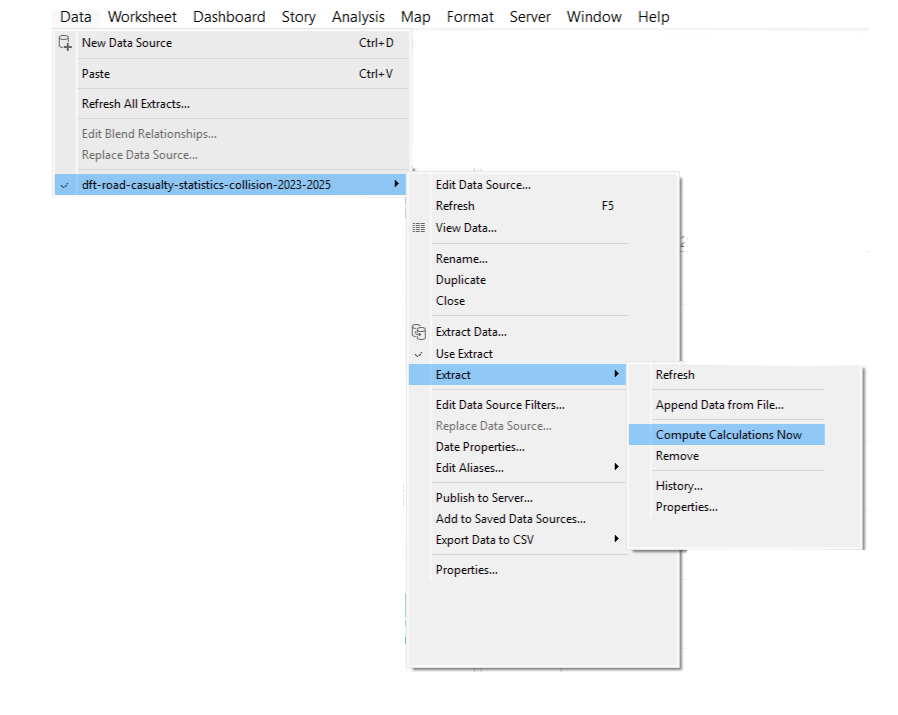
To materialise calculations within a Hyper extract in Tableau Desktop, navigate to the top menu bar, click Data, select your specific data source, and click Extract followed by Compute Calculations Now.
Calculation Types
To optimise calculations, it can be helpful to understand how Tableau processes them. Tableau categorises calculations into three primary types based on where they are computed:
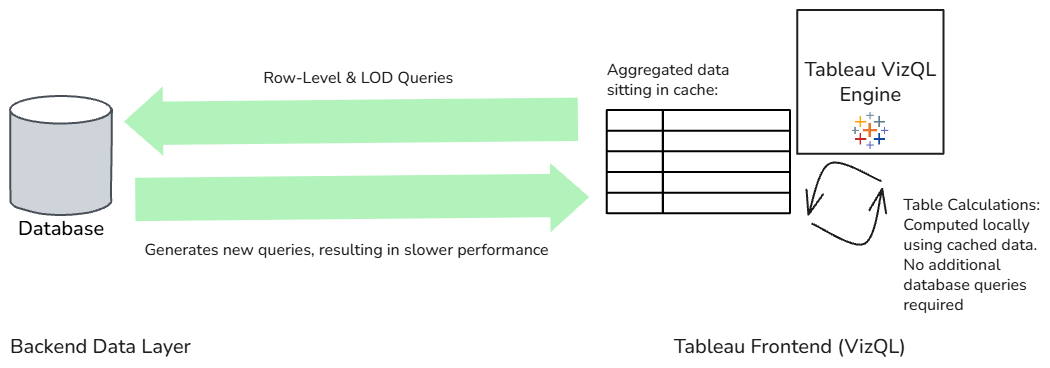
- Row-Level Calculations: These evaluate data independently for every single record before any aggregation occurs (for example, string extraction or date formatting). Tableau sends a query to the underlying database or Hyper extract to perform this row-by-row evaluation.
- Level of Detail (LOD) Expressions: LODs compute aggregations at a different granularity than what is currently displayed in the view. Like row-level calculations, LODs force Tableau to generate additional queries that are sent back to the data source.
- Table Calculations: These calculations apply maths to aggregated values that have already been rendered in the view. Table calculations are computed locally using the VizQL rendering engine and the temporary cache. Because they do not send a new query back to the database, they often execute faster than row-level or LOD calculations.
Due to how these calculations are processed, table calculations are typically the fastest, followed by row-level calculations and LODs. If the required data is already present in the view, opting for a table calculation will most likely be the most performant approach.
Optimising Level of Detail (LOD) Expressions
That being said, sometimes an LOD is necessary. In these situations, you can try and write it in the most optimised way by reducing its granularity.
While LODs are powerful, they require Tableau to send a completely separate query to the data source. The data source processes the calculation and creates a temporary table in the background. Before Tableau can render the visual, it must join this temporary LOD table back to your main data table.
If your LOD contains several unique dimensions, the resulting temporary table becomes larger and the join takes longer to execute. To improve performance, reduce the number of dimensions in your LOD declaration to the absolute minimum required. A simpler LOD creates a smaller temporary table and results in a faster join.
Table Calculations and Mark Density
Although table calculations avoid database queries by computing locally, their execution speed depends on the volume of data in the view. If your initial query returns thousands of marks to the cache, VizQL must compute the table calculation across all of those individual marks.
To ensure table calculations remain performant, reduce the number of marks in your visualisation to the minimum required. If you are displaying a dense scatter plot with thousands of data points, consider whether the calculation could be pushed back to the database as an aggregated measure instead.
Evaluating Distinct Counts
Calculating distinct counts is one of the slowest aggregation types. When using COUNTD, the engine must evaluate every single item in a list against all other items to ensure uniqueness. Whenever possible, use COUNT when you know it is appropriate to do so.
Reducing Nested Calculations
It is common to build calculated fields that reference other custom calculated fields. While this aids validation during development, each nested layer adds processing complexity. This compounds heavily when layering conditional IF statements.
Furthermore, referencing the same calculated field multiple times within another calculation forces the engine to perform the underlying calculation repeatedly for each record. To resolve this, consolidate the logic where possible or push the nested logic back to the data source. Materialising the calculation within a Hyper extract will also resolve the performance issue without requiring complete rewrites.
Efficient Grouping and Logical Statements
When categorising data, the method you choose impacts the time it takes the engine to evaluate the logic. Grouping methods rank in the following order (from most to least performant):
- CASE Statements: This method uses direct mapping, meaning the engine reads the data value exactly once, finds the exact match, and assigns it to the correct bucket. This method makes it the most performant grouping choice.
- Sets: Sets are optimised binary evaluations. The engine only needs to determine if a record is IN or OUT of the set.
- Native Group Function: While user-friendly, the native grouping tool requires Tableau to generate an underlying CASE or IF logic behind the scenes before sending it to the database. This adds a processing overhead compared to writing a custom CASE statement yourself.
- IF / ELSEIF Statements: These are the slowest method because they process sequentially. If the first condition is not met, the engine evaluates the second condition, repeating the evaluation of the same field multiple times.
Writing Performant IF Statements
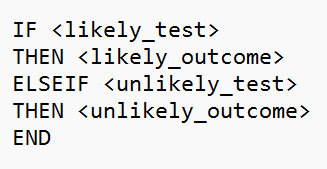
Sometimes an IF statement cannot be avoided. In these scenarios, try and write it in the most performant way by structuring the logic to test the most frequent outcomes first. Tableau stops evaluating as soon as a condition is met, so placing the most likely outcome at the top and ordering tests and outcomes by likelihood (most to least) reduces the total number of evaluations required.
Additionally, always write ELSEIF as one word. Using ELSE IF (with a space) causes Tableau to interpret the logic as two separate logical tests, which results in nested logical statements that take longer for the engine to query.
Simplifying OR Conditions
If your logical statement relies on multiple OR conditions checking the same field, replace them with the IN operator. The data source evaluates a series of OR statements individually, whereas the IN operator checks a single dimension against a list, which requires less processing time.
Parameter Calculations and Aggregations
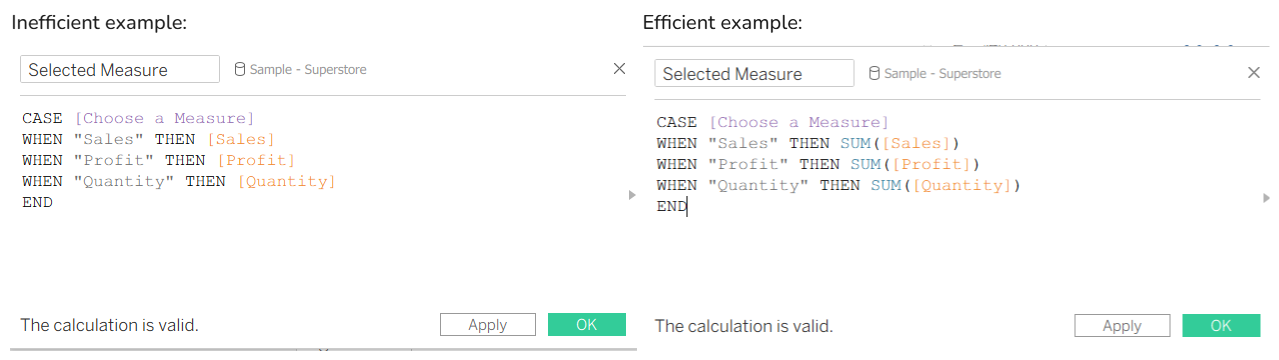
Parameters allow users to dynamically change the measures displayed in a view. When writing a calculation to swap measures based on a parameter selection, always apply aggregations directly within the logical statement.
By wrapping the fields in a SUM aggregation, the engine rolls the data up into summary values first and evaluates the parameter against those aggregated values. Without the aggregation, the engine evaluates the parameter choice against every single record in the dataset before rolling up the numbers.
Using MIN/MAX for Deduplication
AVG/ATTR are frequently used to aggregate a column that contains duplicate values. To compute an average, Tableau adds the value of every row and divides it by the total row count. For ATTR, Tableau calculates both a MIN and a MAX to determine if multiple values exist. If you know the values are identical, using MIN/MAX is computationally faster because the engine simply retrieves one number and stops processing.
String Manipulation and REGEXP
Calculations that manipulate or search strings (e.g. LEFT, RIGHT, MID, FIND, SPLIT) can be resource-intensive. Whenever possible, materialise string manipulation in your data source before it reaches Tableau.
If string manipulation must happen in Tableau, use Regular Expressions (REGEXP) instead of combining multiple string functions. For example, replacing a complex nested IF statement that uses CONTAINS or STARTSWITH with a single REGEXP_MATCH function simplifies the query and can improves execution speed.
Aliasing Over Calculated Fields
Calculated fields are sometimes used to rename dimension members to clean up data for display purposes. Creating a calculation forces the engine to run a row-level evaluation across the entire dataset and generates a new column that consumes cache storage.
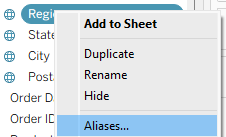
Instead, use Tableau's native Aliasing functionality. Aliasing is a metadata change that occurs at the rendering stage without generating a new query. To alias a field in Tableau Desktop, right-click the dimension in the Data pane, select Aliases, and type the new display values in the dialogue box.
Summary
By computing complex logic in your database whenever possible, favouring table calculations when appropriate, and writing calculations efficiently, you can reduce query execution times. Applying these rules will help your dashboards remain performant as data volumes grow.