


What is SQL?
Structured Query Language (SQL) is the standard language for working with relational databases.
The common uses:
• Retrieving data - querying and filtering data for reports/dashboards
• Analysing data - aggregating, summarising, spotting trends
• Cleaning & transforming data - standardizing, joining, prepping datasets
• Data warehousing/BI - querying across large, centralized company data
Platforms
There are many platforms, which use SQL such as:
• Microsoft SQL Server
• Oracle
• Snowflake
In this blog, I will be using snowflake.
Query Structure
Terminology
Now you know what SQL, you are probably wondering how to write and structure a command. So lets go through the basics. Below are the main clauses that you can use within a command. Not all clauses need to be used in a statement but they need to be written in the following order.
• Select- This clause is used to select the columns which you are calling back.
• From- This clause is used to identify the table that you are calling the columns from.
• Where- This clause is used to filter the data at row level
• Group by- This clause is used to chose granularity that you want to aggregate/summarise by.
• Having- This clause is used to filter the data at an aggregated
• Order by- This clause is used to sort by certain columns (ascending or descending)
The Correct Order to Write Commands
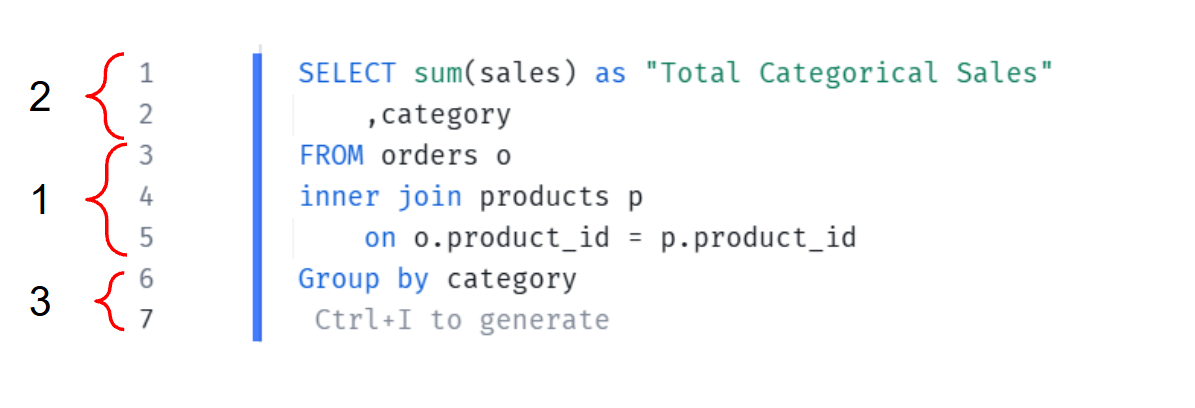
Despite the commands needed to be written in the order outlined, it is easier if you write you commands in a certain order.
Step 1
To make writing commands more logical, it is better to start with the FROM clause, including any JOIN clauses. This will outline the tables that you will be looking at, and their abbreviated forms.
Step 2
Next it is best to write the SELECT clause. As the tables have already been called, it will make it call for the columns, using the abbreviated table names.
Step 3
Finally, as you have the context of what you are looking at it, you can insert any filtering clauses such as WHERE and HAVING.
Example
Here is an example of a SQL command, using the superstore data set.This commands wants to list the customers with total sales greater than 10,000.
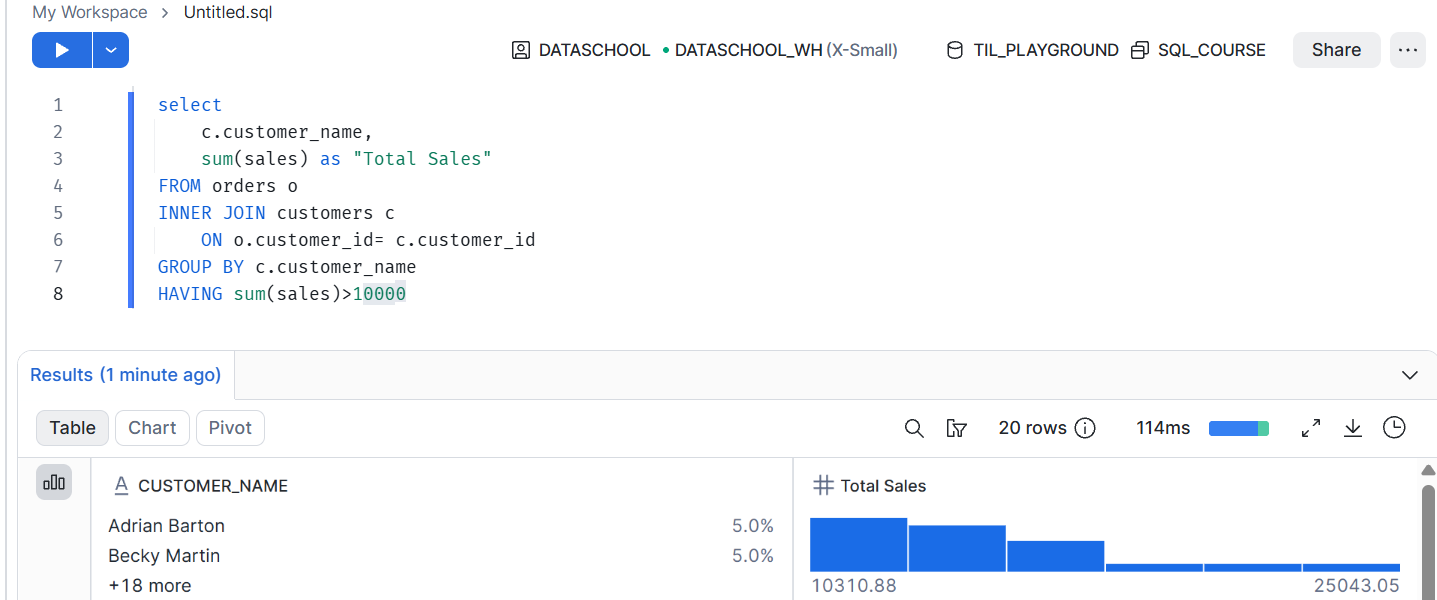
Here we will go through what each line is doing.
1: SELECT- These lines are calling columns from specific tables.
2: Calls for the 'customer_name' column from table 'c', the abbreviated form of 'customers' table
3: SUM- This line calls for the aggregated sum value from the 'sale' column from the 'orders' table. The 'as' line, allows you to alias the header name. In this case the column produced from the query will be "Total Sales". Note- you will notice that in this case the table name has not been called. This is because it is the only existing sales column from both tables. But it could also have been written as 'o.sales'.
4: FROM- This line outlines the first table that the columns will be called from, in this cases 'orders'. The following 'o' acts the tables abbreviation so that you do not need to rewrite the table name each time.
5:INNER JOIN- This line shows the second table that the columns will be called from, in this case 'customers'. The following 'c' acts the tables abbreviation. You can also use LEFT, RIGHT or FULL joins in this line depending on the desired outcome.
6: This line defines how the two tables called are related. Essentially the join clause. In this case both tables 'o' and 'c' join on customer_id.
7: GROUP BY- This line shows how the the data will be grouped, in this case the data is grouped by 'customer name' from table 'c'. Notes-Anything not aggregated in SELECT clause, needs to be in group by CLAUSE
8: HAVING- This line filters for certain data. In this case this line is filtering for data where the sum of sales is greater than 10,000 for each customer.
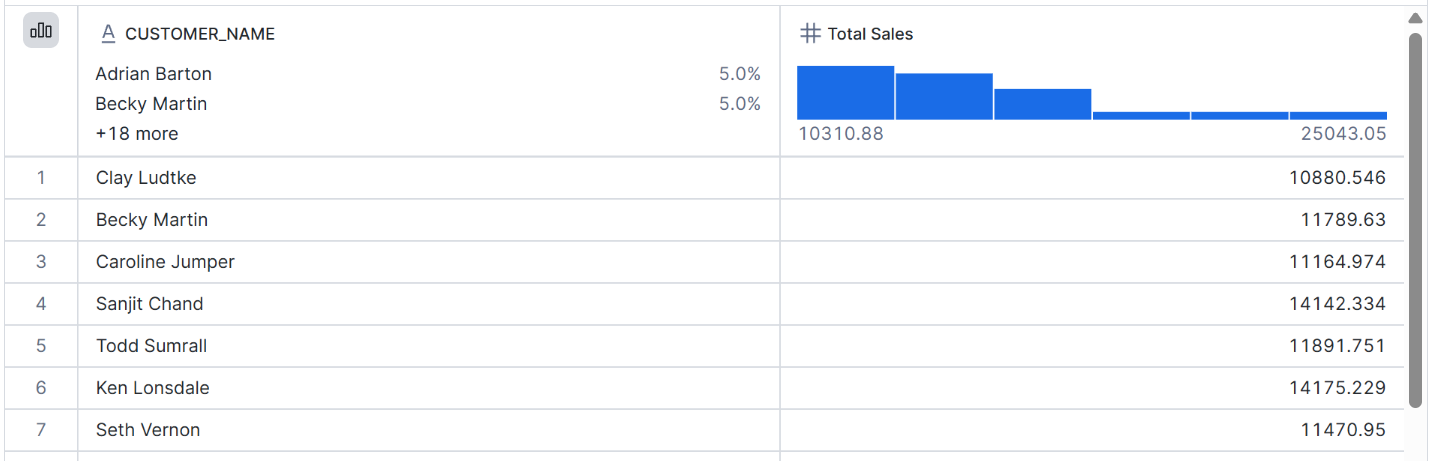
This is the result of the command.