


In a standard data stream, Alteryx is fast because it treats every record as an independent entity. It processes Row 100 without needing to know a single thing about Row 99. This is efficient, but it creates a problem: how do you calculate a running total or find the difference between two sequential events
The Multi-Row Formula tool breaks that isolation. It allows your data to "look up" or "look down" the stack, turning a static list of records into a connected narrative.

The Tool
The Multi Row tool is not to be confused with multi field formula tool. It is not about changing several rows at once, but it lets you perform functions using previous/ next rows. For this is give you 'access' to [Row-N:ID] and [Row+N:ID] (N being defined by you).
The formula moves down the rows step by step, starting at row 1 until the end.
The Configuration
When you connect the Multi Row Formula tool, this configuration window will pop up on the side of your screen:
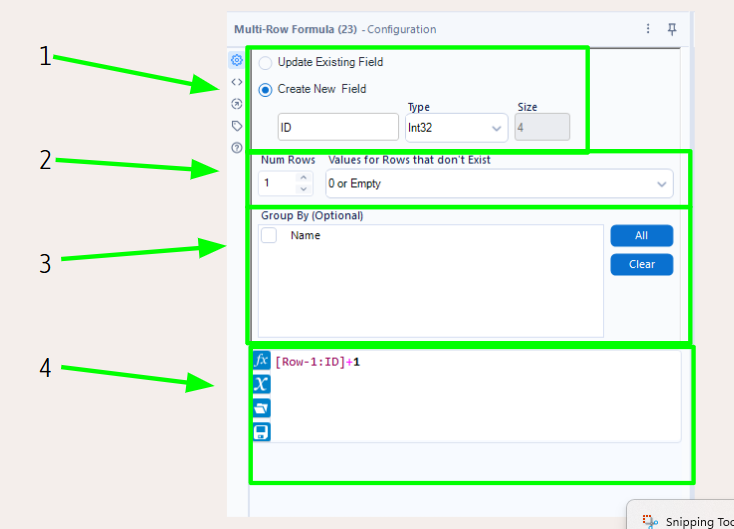
- It first requires you to choose whether to update existing field or create new field. If you create a new field you can name it, and define its data type and size.
- You can then set then number of rows to be referred to in the formula. This defines how many rows ahead and behind the tool can "see" and affects which rows you can reference in your formula.
If you want to create a 6 month running total for example you would have to access the 5 previous rows, so this section would have to be set to 5.
It also needs to know what to do with rows that don't exist (because you are going 'beyond' the dataset). - You can choose whether to group by a field. This allows the calculation to “restart” for your selection.
- And finally, you can write the formula.
Remember: you can refer to rows ahead and behind
Use cases:
You can use this to create row IDs (see configuration example). By saying:
[Row-1:ID]+1
you are adding 1 to every previous row ID. As we have selected for empty rows to be 0 the first row will start as 1.
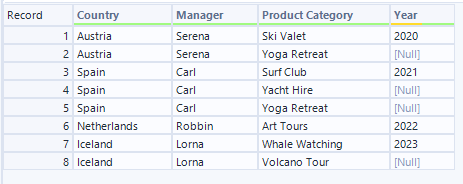
You can also fill down missing values in a dataset. In this example, we are missing the year for some of our rows. We know that we can just fill it down, luckily. So, let's do that.
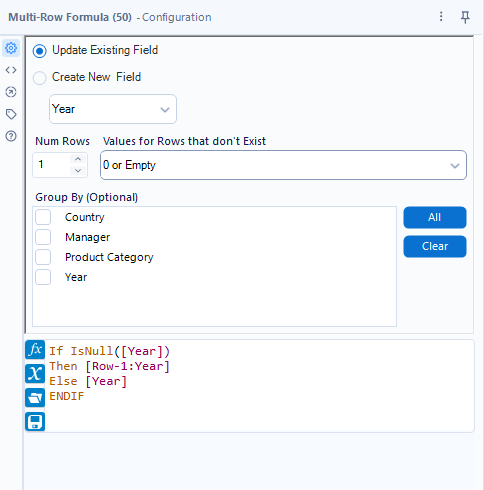
We want to update the existing field, and fill in the value of the row above, if the row is empty.
This is our output:
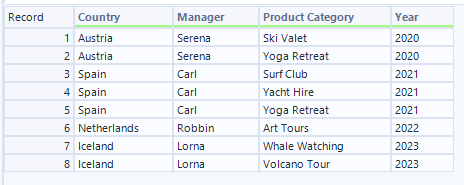
It shows quite nicely, that the Multi Row Formula moves down the dataset row by row and using the updated row if there was one.