Every analyst has a workflow they secretly dread rebuilding. It works perfectly, it does exactly what it should, and it takes ten tools and a small act of concentration to reconstruct from scratch. "How many working days are there between these two dates, excluding weekends and public holidays?" is one of those questions. It sounds trivial. The build behind it is anything but.
The good news is that Alteryx gives us a way to solve a problem once and then never look at the plumbing again. That mechanism is the macro, and it turns out a working-days calculator is a near-perfect candidate for one.
The problem with doing it the long way
If you've ever answered the working-days question by hand in Alteryx, the shape of the workflow is probably familiar. You start with two dates. You calculate the gap between them. You generate a row for every single day in that range. You work out which weekday each of those days falls on, strip out the Saturdays and Sundays, then bring in a holidays table and remove anything that matches. Finally you sort what's left and count it.
None of those steps is difficult in isolation. The friction is that there are so many of them, and they have to be assembled in the right order every time. Do it once and it's satisfying. Do it for the fifth time this quarter because a different report needs the same logic, and it starts to feel like busywork. Worse, each rebuild is another chance to introduce a subtle bug.
This is exactly the kind of repeated, error-prone, multi-step logic that macros were designed to absorb.
What the macro actually does
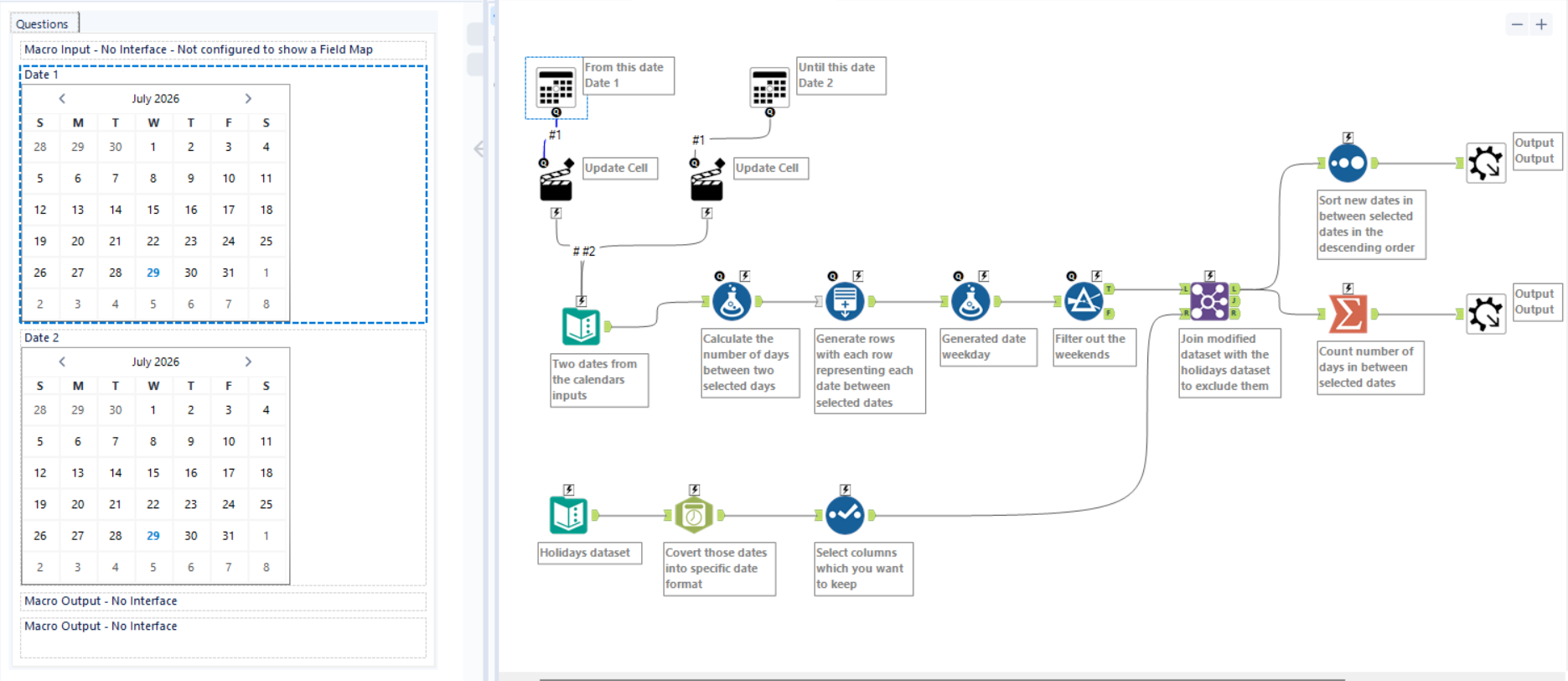
Under the hood, the macro shown here is a complete working-days engine. Behind a friendly front end, it runs through the full sequence so the user never has to.
It begins with two calendar controls — a "from" date and an "until" date — presented as an interface the user simply clicks. Those selections are pushed into the workflow using Action tools, which update the underlying values so the rest of the process runs against whatever the user chose rather than hard-coded dates.
From there the logic takes over. The macro calculates the number of days between the two selected dates, then generates one row for every date in that span so each day can be examined individually. It tags each date with its weekday, filters out the weekend days, and then joins the remaining dates against a holidays dataset — with that holiday list first standardised into a consistent date format and trimmed down to only the columns that matter. Any date that matches a holiday is excluded, leaving only genuine working days.
The final stretch does the housekeeping. One branch sorts the surviving dates into descending order and hands back the full list of working days. A second branch summarises that same set into a single number: the count of working days between the two dates. The macro exposes both outputs, so downstream you can either see every qualifying date or just grab the headline figure.
The payoff: everything collapses into one tool
Here's the part that makes the effort worthwhile. All of that — the row generation, the weekday tagging, the weekend filter, the holiday join, the sort, the count — disappears from view once it's wrapped up as a macro.
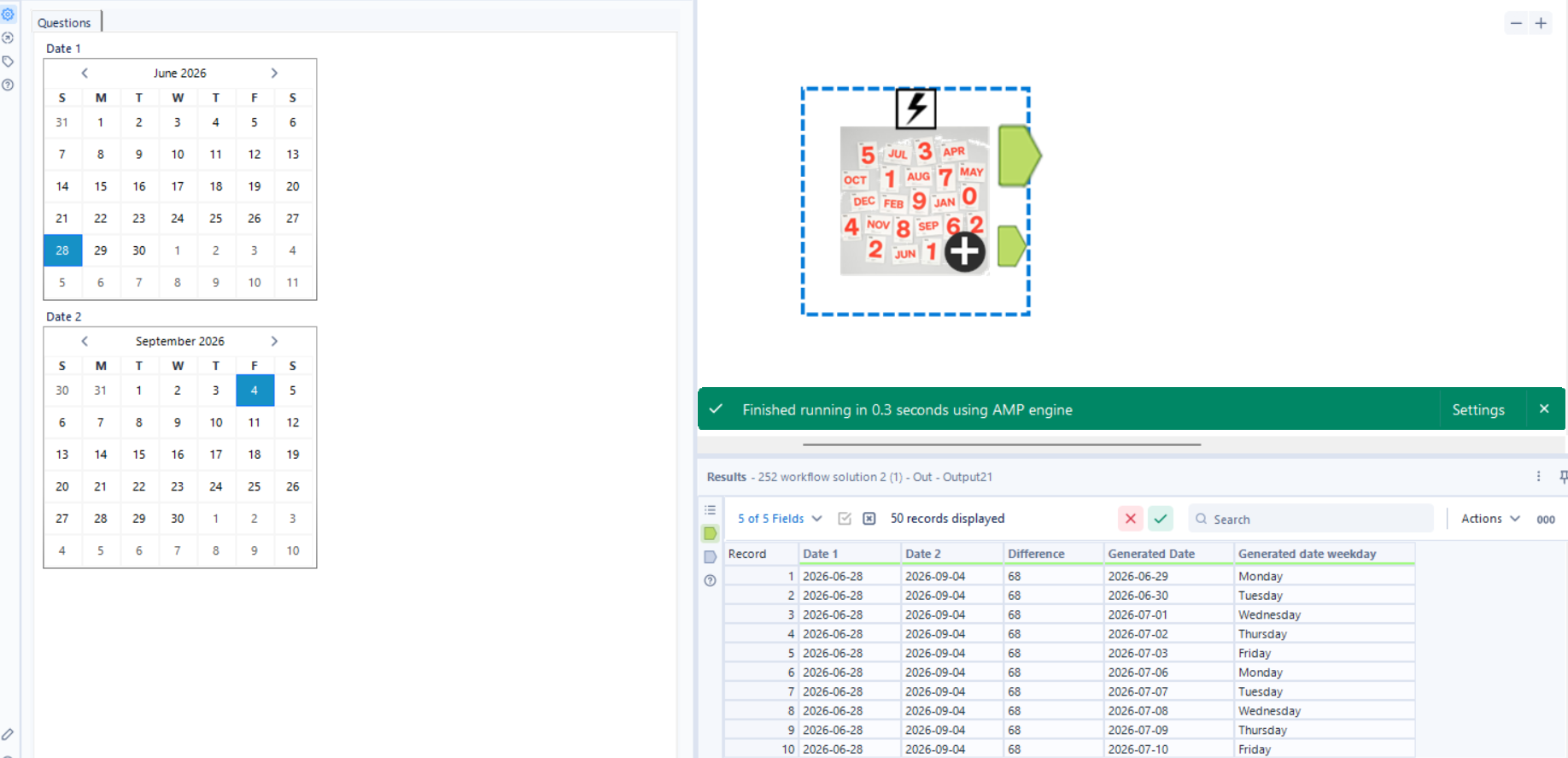
To the person using it, there is no ten-tool workflow. There's one icon on the canvas with two calendars. They pick a start date, pick an end date, and run it. Out comes the list of working days and the count. The complexity hasn't gone anywhere; it's just been sealed inside the box, where it can't be broken by accident and doesn't have to be understood in order to be used.
That shift changes who can answer the working-days question. It's no longer reserved for whoever remembers how to chain a Generate Rows tool into a weekday filter into a holiday join. Anyone who can drop a tool onto a canvas and click two dates can now get a correct, holiday-aware answer in seconds.
Wrapping up
A macro like this one is a small investment that pays off every time someone would otherwise have rebuilt the same chain of tools from memory. The build is the interesting, careful part — generating the date range, stripping weekends, excluding holidays, counting what remains. The use is deliberately boring: pick two dates, get an answer.
That's the trade every good macro makes. It concentrates the hard thinking into one place, once, so that everyone downstream gets to skip it entirely. If you find yourself reconstructing the same multi-step workflow more than a couple of times, that's your signal — it's probably time to wrap it up and hand people the one tool instead of all the steps.
Inside the macro:
Outside the macro (what user sees):