


I’ve had some time to focus on a new tool and decided to learn KNIME to achieve the L1-Basic Certification. For those who don't know, KNIME is a free, open-source data analytics platform. It uses a visual, "no-code," node-based interface that feels very intuitive, especially if you're coming from a background in Alteryx or Tableau Prep.
KNIME offers a completely free, self-paced course to get you certified, which is exactly where I started. While it’s designed as an 8-hour course, I managed to work through it in about 3 hours. Since I’m the type of learner who likes to just open a tool and start tinkering with different functions, I skipped some of the manual tasks and dove straight into working with a dataset I know by heart: my Spotify Extended Streaming History.
Each lesson of the course covers a specific data-prep step, so I followed along by building out my own workflow, which was really helpful. Here is my final workflow:
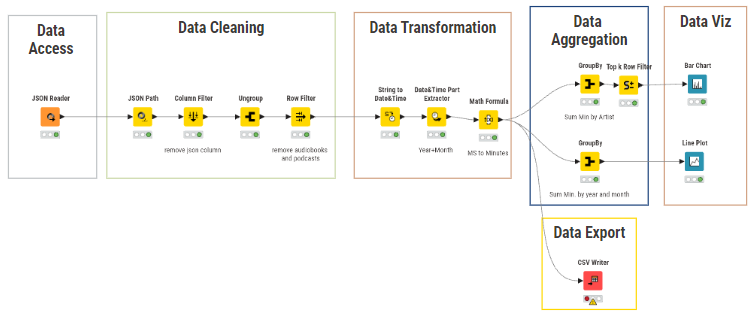
When working with this data in Alteryx, my goal was to create a .hyper output and move straight into Tableau for the visualization. However, one of the biggest surprises for me was the discovery that you can build fully interactive dashboards directly inside the workflow. By wrapping my visualization nodes into Components, I was able to create a "Composite View", as you can see below (still very basic, with no formating and extra text).

To prepare for the exam, I also asked Gemini to generate some mock-up questions so I could practice the theory. Since I am already familiar with Tableau Prep and Alteryx, the challenge wasn't the logic—it was mostly learning the specific KNIME vocabulary. For example, an Alteryx "Tool" is a KNIME "Node," and a "Union" tool is called "Concatenate" in KNIME.
I’ve also noticed something else and decided to add here a screenshot of a similar workflow I've built in Alteryx with the same data:

You can see that it is a lot smaller than the one in KNIME. In Alteryx, a single tool can sometimes handle different changes. In KNIME, the approach is much more modular and specific. What Alteryx does in one tool, KNIME often does in more. For example:
- Alteryx Select Tool = Column Filter + Column Renamer + Column Resorter.
- Alteryx Formula Tool = Math Formula + String Manipulation.
In Summary, I really enjoyed working with KNIME. I’m looking forward to keeping my KNIME Analytics Platform open and, whenever I have some free time, continuing to learn the more advanced analytics and dashboarding features. 😁