


Kestra is an open-source, event-driven orchestration platform that can be used to automate data engineering workflows. It's declarative, language agnostic architecture makes it both versatile and user-friendly, enabling developers to manage pipelines through YAML configurations.
The open source edition of Kestra comes with many useful features, but one particular challenge is the configuration of secret environment variables. This is as simple as a few button clicks for enterprise edition users, and can even be integrated with external secret management services suchs as AWS Secrets Manager or Google Cloud Secret Manager.
Why Use Secrets in Kestra?
Hardcoding API keys, tokens, or database credentials directly into your workflow code is one of the fastest ways to compromise your data infrastructure. One of the first lessons for budding data engineers is setting up .gitignore files to avoid committing these sensitive values to public repositories.
Kestra decouples sensitive credentials from your workflow logic using its built-in secret management engine. Secrets differ from standard environment variables in two fundamental ways:
- Log Masking & UI Redaction: Standard environment variables are treated as plain text and can easily leak in execution logs or UI outputs. Secrets resolved via
{{ secret('NAME') }}are automatically redacted and masked in logs (e.g.,*****) and execution outputs. - Dynamic Resolution & Encryption: Standard environment variables remain exposed on the host machine. Secrets are dynamically injected into tasks at runtime. Furthermore, Kestra allows you to encrypt secrets at rest using AES-GCM or integrate directly with enterprise key vaults like AWS Secrets Manager or HashiCorp Vault (see the Kestra Security Documentation for configuration details).
Note on Open-Source Encoding: In Kestra Open-Source, secret environment variables require Base64 encoding. Keep in mind that Base64 is a formatting scheme—not encryption. It is used to safely pass complex characters into Kestra's runtime without breaking shell syntax; security relies on Kestra's log masking and runtime secret engine.
Configuring Secrets in Kestra:
Follow along the steps below to configure your own secret variable in Kestra Open Source Edition. Important Note any secrets in Kestra must start with SECRET_ and be Base64 encoded to be read by the engine.
Before you start:
Navigate to the directory where your docker-compose yaml file lives, if you have multiple secrets to encode, copy your .env file to this directory also.
Step One: Base64 encode the secrets
Open your terminal (if you're on Windows, you can use WSL or Git Bash for this) and encode your plain-text key:
echo -n "my-super-secret-key-123" | base64
This will output an encoded key, in this case bXktc3VwZXItc2VjcmV0LWtleS0xMjM=.
Step Two: Create a .env_encoded using your encoded secrets
Remember to prefix your secret name with SECRET_ and create a file called .env_encoded using the following bash:
echo "SECRET_OPENAI_API_KEY=$(echo -n 'my-super-secret-key-123' | base64)" >> .env_encoded
If you already have an environment file and multiple keys to encode, you can use this script:
while IFS='=' read -r key value; do
  echo "SECRET_$key=$(echo -n "$value" | base64)"
done < .env > .env_encoded
Regarding pre-existing .env files you may have to remove spaces and quotes
'before encoding your file
Step Three: Configure the Docker .yml
Open your docker-compose.yml from your Kestra directory in your preferred editor such as VSCode. It should look something like this: 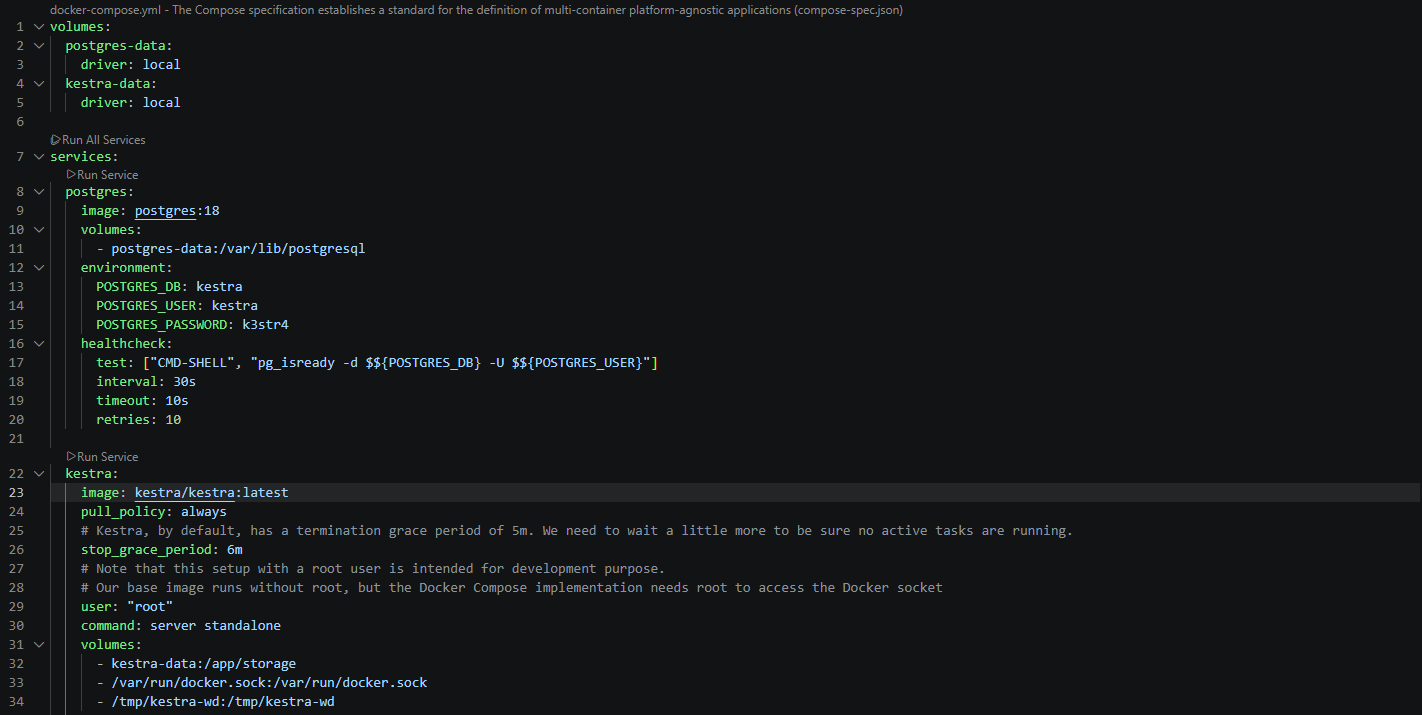
We need to add an env_file argument to the yaml like so, pointed the config towards our encoded secrets.
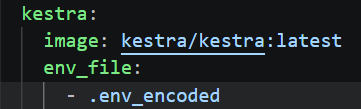
Don't forget to save the file after making the change.
Step Four: Spin up docker container
Reload docker using docker compose up -d from the directory where your docker yml sits.
Step Five: Use the secrets in a flow
Once your Kestra container is running with the new environment variables, Kestra automatically decodes them in memory and masks their values.
The Golden Rule of Kestra Secrets:
When calling a secret in your flow YAML, do not include the SECRET_ prefix. Kestra strips SECRET_ automatically when mapping environment variables to the secret() function.
- Environment Variable Name:
my-super-secret-key-123 - Expression in Kestra Flow:
{{ secret('my-super-secret-key-123') }}
Example Flow: Using an API Key in a Task
Here is an example flow using the my-super-secret-key-123 secret configured in the steps above:
id: openai_secret_demo
namespace: company.team

tasks:
  - id: generate_text
    type: io.kestra.plugin.openai.ChatCompletion
    apiKey: "{{ secret('my-super-secret-key-123') }}"
    model: gpt-4o-mini
    messages:
      - role: user
        content: "Write a 1-sentence motivational quote about automation."
That should have your secrets setup! If you want to check the secrets are being masked properly, execute your flow then go to the execution logs. Any secrets should be redacted using {{ secret(your_secret) }} syntax.