


Snowflake has native features which can enable you to automate your workflow as new data gets uploaded, without using a tool such as dbt (although dbt's features make it far easier to manage, test and document the process). By combining Streams (Change Data Capture), Tasks (Scheduling), and Stored Procedures (Procedural Logic), you can build automated, event-driven pipelines entirely inside Snowflake.
Code snippets will reference the data ingested via my Bikepoint project - see the extraction part of the project here https://github.com/JoeOConnorTIL/Bikepoint-ELT
1. Streams & Temporary Tables- Capturing and Staging Changes
A Stream is a database object that records Data Manipulation Language (DML) changes (inserts, updates, and deletes) made to a table. When you query a stream, it returns the rows that have changed since the stream was last consumed.
Stream Metadata Columns
When you query a stream, Snowflake automatically appends three metadata columns to help you process changes:
METADATA$ACTION: Identifies the DML operation (INSERTorDELETE).METADATA$ISUPDATE: Indicates whether the row was part of anUPDATEstatement (TRUEorFALSE).METADATA$ROW_ID: Unique ID for the row being tracked.
-- Track new or modified records landing in our raw JSON table
CREATE OR REPLACE STREAM raw_bike_data_stream
ON TABLE analytics.raw.bike_point_raw;
The Single-Read Problem & Temporary Tables
Consuming a stream in a DML statement immediately resets its watermark. Because of this, you cannot query the same stream twice in back-to-back statements. If you try running two separate INSERT statements directly from the stream (e.g., updating a Silver fact table and writing an ingestion log), the second statement will return zero rows.
To route data from a single stream into multiple target tables, you can stage the stream data into a temporary table first. This reads the stream once, advances the stream offset, and locks the changed data into session storage so you can query it as many times as needed.
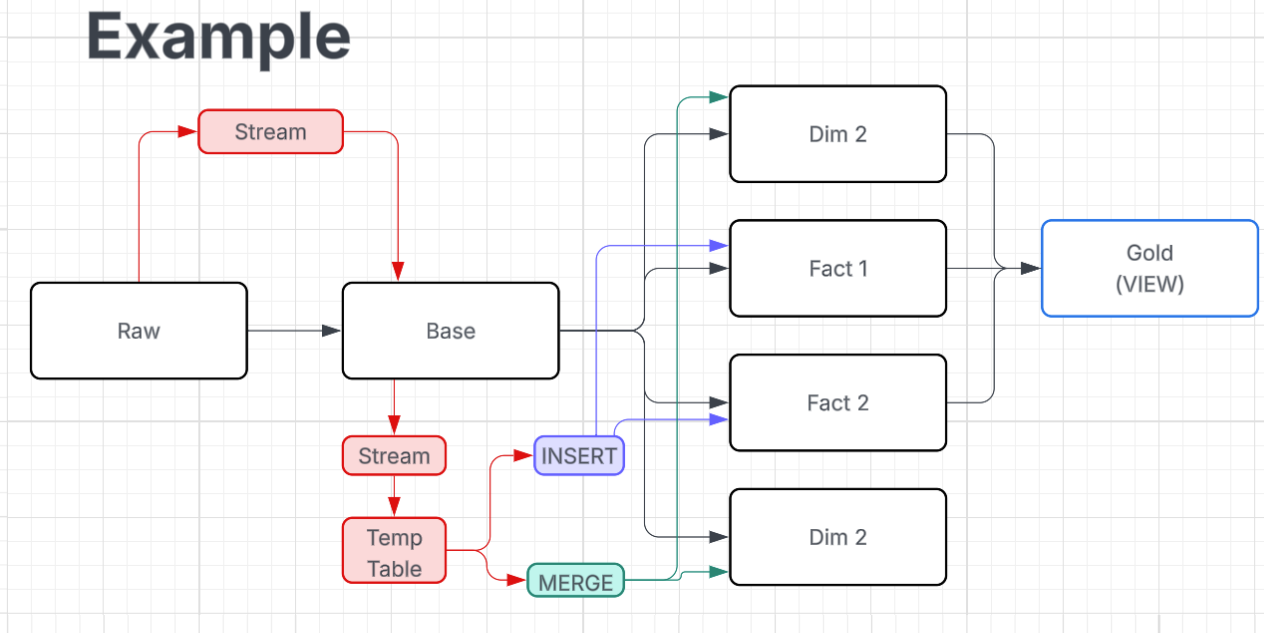
In the example diagram above - a stream can be used to update the base table when new rows are inserted, and once the base table is updated then the stream is cleared, which works as intended for this stage because the stream has updated the raw table's only dependency.
However the captured changes to the base table are then needed to update four separate tables, and therefore a stream on the base table cannot be used alone, as when one of the tables is updated using DML language, that stream will clear before it is able to update the other tables. In this scenario, a temporary table can store the changes captured in the stream and be used to update the four dependent tables without being cleared in the process. Once the session is over, the temporary table will be dropped. If a temporary table is created within a stored procedure, it will exist during the time that the stored procedure is being executed, as that counts as a session.
2. Stored Procedures & Transactions- Atomicity and the DDL Pitfall
While standard SQL is great for declarative transformations, procedural execution (such as staging data, executing multi-table writes, and catching exceptions) requires a Stored Procedure. Stored procedures are essentially repeatable processes which you can call upon - similar to macros in Alteryx/dbt, where writing the whole process out repeatedly would become verbose, you can write the process out once and simply call it, either manually or within a task.
What is a Transaction?
A transaction is essentially an "all-or-nothing" container for database operations. It groups multiple SQL statements together so they execute as a single, indivisible unit of work (ensuring atomicity):
BEGIN TRANSACTION: Opens the container and starts tracking changes.COMMIT: Saves all changes made during the transaction permanently.ROLLBACK: Instantly undoes (reverts) every change made sinceBEGIN, returning the database to its exact starting state as if nothing happened.
Transactions exist to prevent a scenario such as; if a multi-step procedure crashes halfway through, your database is left in a corrupted "half-baked" state, where Table A was updated, but Table B failed. If that procedure was contained within a transaction, all changes would be rolled back to the state when the transaction began.
Transaction with Snowflake Streams
In Snowflake, stream offsets are bound to transaction boundaries. A stream watermark only advances when the DML operation reading from it successfully commits.
Wrapping your procedure inside a transaction ensures that if an unexpected error occurs during processing (e.g. a data type mismatch), the EXCEPTION block triggers a ROLLBACK. This prevents partial writes and guarantees that the stream retains its unconsumed data so the next scheduled task can retry the batch safely.
The DDL Pitfall within Transactions
When combining temporary tables and transactions inside a stored procedure, an issue can present itself: CREATE TABLE (including CREATE OR REPLACE TEMPORARY TABLE) is a DDL statement.
In Snowflake, executing any DDL statement inside an open transaction (after BEGIN TRANSACTION) forces an implicit commit. If you place BEGIN TRANSACTION at the top of your procedure and then run CREATE TEMPORARY TABLE ... AS SELECT ... FROM stream, Snowflake immediately commits the transaction right then and there. This breaks your transaction and stops your rollback safety net.
The Solution: Pre-create Temp Tables before beginning the Transaction
To ensure your transaction works as intended, separate DDL setup from DML transaction logic:
- Outside the transaction: Ensure the temporary table structure exists using
CREATE TEMPORARY TABLEbefore the transaction begins. - Inside the transaction: Open
BEGIN TRANSACTIONand useINSERT INTO temp_table SELECT ... FROM stream. BecauseINSERTis a DML statement, it does not trigger an implicit commit - keeping your transaction open.
The Complete Stored Procedure Pattern
Here is an example of how Streams, Temporary Tables, and Transaction handling come together inside a procedure:
CREATE OR REPLACE PROCEDURE process_raw_bike_data()
RETURNS string
LANGUAGE sql
AS
$$
BEGIN
    -- 1. Ensure temp table structure exists (DDL outside transaction)
    create temporary table if not exists temp_bike_staging (
        station_id varchar,
        bikes_available integer,
        docks_available integer
    );

    -- Clear residual session data from prior runs
    TRUNCATE TABLE temp_bike_staging;

    -- 2. Start explicit transaction block
    BEGIN TRANSACTION;

    -- 3. Stage stream data into temp table (DML — maintains transaction scope)
    INSERT INTO temp_bike_staging
    SELECT
        src_data:id::varchar AS station_id,
        src_data:bikes_available::integer AS bikes_available,
        src_data:docks_available::integer AS docks_available
    FROM analytics.raw.raw_bike_data_stream
    WHERE metadata$action = 'INSERT';

    -- 4. Downstream Write #1: Populate Silver Fact Table
    INSERT INTO analytics.silver.fct_bike_status (
        station_id,
        bikes_available,
        docks_available,
        loaded_at
    )
    SELECT
        station_id,
        bikes_available,
        docks_available,
        current_timestamp()
    FROM temp_bike_staging;

    -- 5. Downstream Write #2: Populate Audit Log
    INSERT INTO analytics.silver.ingestion_audit (
        pipeline_name,
        records_processed,
        status,
        processed_at
    )
    SELECT
        'bike_point_ingestion',
        count(*),
        'SUCCESS',
        current_timestamp()
    FROM temp_bike_staging;

    -- 6. Commit transaction (finalizes writes and advances stream offset)
    COMMIT;

    RETURN 'Successfully processed stream batch across multiple targets.';

EXCEPTION
    WHEN OTHER THEN
        -- Rollback guarantees stream offsets do NOT advance on failure
        ROLLBACK;
        RETURN 'Error processing stream batch: ' || sqlerrm;
END;
$$;
3. Tasks
A Task is Snowflake’s native scheduler. It allows you to run a single SQL statement or call a Stored Procedure either on a recurring interval or using standard cron syntax.
Saving Compute Credits with SYSTEM$STREAM_HAS_DATA
Running a virtual warehouse every minute to check for new data would be expensive. To avoid this, use WHEN system$stream_has_data().
If the stream is empty, Snowflake skips the task execution entirely without turning on the virtual warehouse, saving you credits.
CREATE OR REPLACE TASK run_bike_data_ingestion
    WAREHOUSE = compute_wh
    SCHEDULE = '5 minute'
    WHEN system$stream_has_data('analytics.raw.raw_bike_data_stream')
AS
    CALL process_raw_bike_data();
Chaining Tasks
You can chain tasks together using the AFTER keyword. When the root task finishes, its dependent child tasks trigger automatically.
-- Root Task: Processes raw JSON from the stream into Silver layer
CREATE OR REPLACE TASK task_raw_to_silver
    WAREHOUSE = compute_wh
    SCHEDULE = '15 minute'
    WHEN system$stream_has_data('analytics.raw.raw_bike_data_stream')
AS
    CALL process_raw_bike_data();

-- Child Task: Triggers automatically AFTER the root task succeeds to aggregate Gold metrics
CREATE OR REPLACE TASK task_silver_to_gold
    WAREHOUSE = compute_wh
    AFTER task_raw_to_silver
AS
    INSERT INTO analytics.gold.daily_station_summary
    SELECT
        station_id,
        date(loaded_at) AS log_date,
        avg(bikes_available) AS avg_bikes
    FROM analytics.silver.fct_bike_status
    WHERE loaded_at >= current_date()
    GROUP BY 1, 2;
4. Activate the Workflow
To resume and activate your tasks, you must manually enable them starting from the child tasks up to the root task (since tasks are created in a SUSPENDED state by default):
-- 1. Enable child task first
ALTER TASK task_silver_to_gold resume;

-- 2. Enable root task last
ALTER TASK task_raw_to_silver resume;
Here is how the automated lifecycle runs:
- Data Lands: Snowpipe or an external script drops raw JSON into
bike_point_raw. - Stream Captures:
raw_bike_data_streamautomatically detects the new records. - Task Triggers: Every 15 minutes,
task_raw_to_silverwakes up and evaluatesSYSTEM$STREAM_HAS_DATA(). IfTRUE, it boots upCOMPUTE_WHand calls the procedure. - Procedure Stages & Writes: The procedure opens a transaction, stages stream data into
temp_bike_stagingvia anINSERT(avoiding implicit DDL commits), writes to both the Silver and Audit tables, and commits - safely advancing the stream offset. - DAG Continues:
task_silver_to_goldimmediately runs to update business aggregates in the Gold layer.
Summary
If your data transformation pipeline must stay strictly within Snowflake, combining Streams, Temp Tables, Stored Procedures, and Tasks gives you the power to automate updates internally. And while native Snowflake automation handles warehouse-centric tasks well, incorporating dbt can take your workflow even further, giving you automated data quality testing, visual DAGs to trace downstream dependencies, and the flexibility to orchestrate transformations across modular compute, warehousing, and modeling tools as your stack expands, amongst other features.