


Swapping from data visualization tools to SQL as a tool for analysis can make it confusing to understand how you’re calculating your analyses due to the differences between the order of writing the clauses in your query and the order of their execution. However, once you understand why these differences exist it becomes much easier to translate your calculations between tools.
Writing Order VS Execution Order
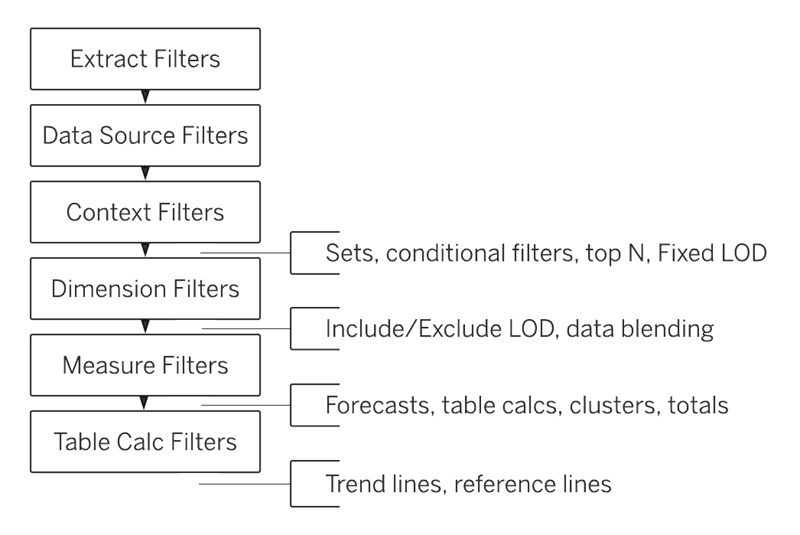
When using many data visualization tools, Tableau being the main example here, just because you apply a filter to a measure on one of your worksheets before you’ve added a filter to your data source doesn’t mean the measure filter is applied to your dataset before your data source filter. The order in which each filter is applied depends on Tableau’s order of operations, where Tableau applies each filter that has been added, regardless of timing, based on their predetermined order.
Differently to Tableau, the order that you place your written queries in SQL does make a difference. This is because SQL code has an expectation on when each clause will appear in a query, and doesn’t know what to return if the order isn’t as it expects, giving a data engineer or analyst much less flexibility.
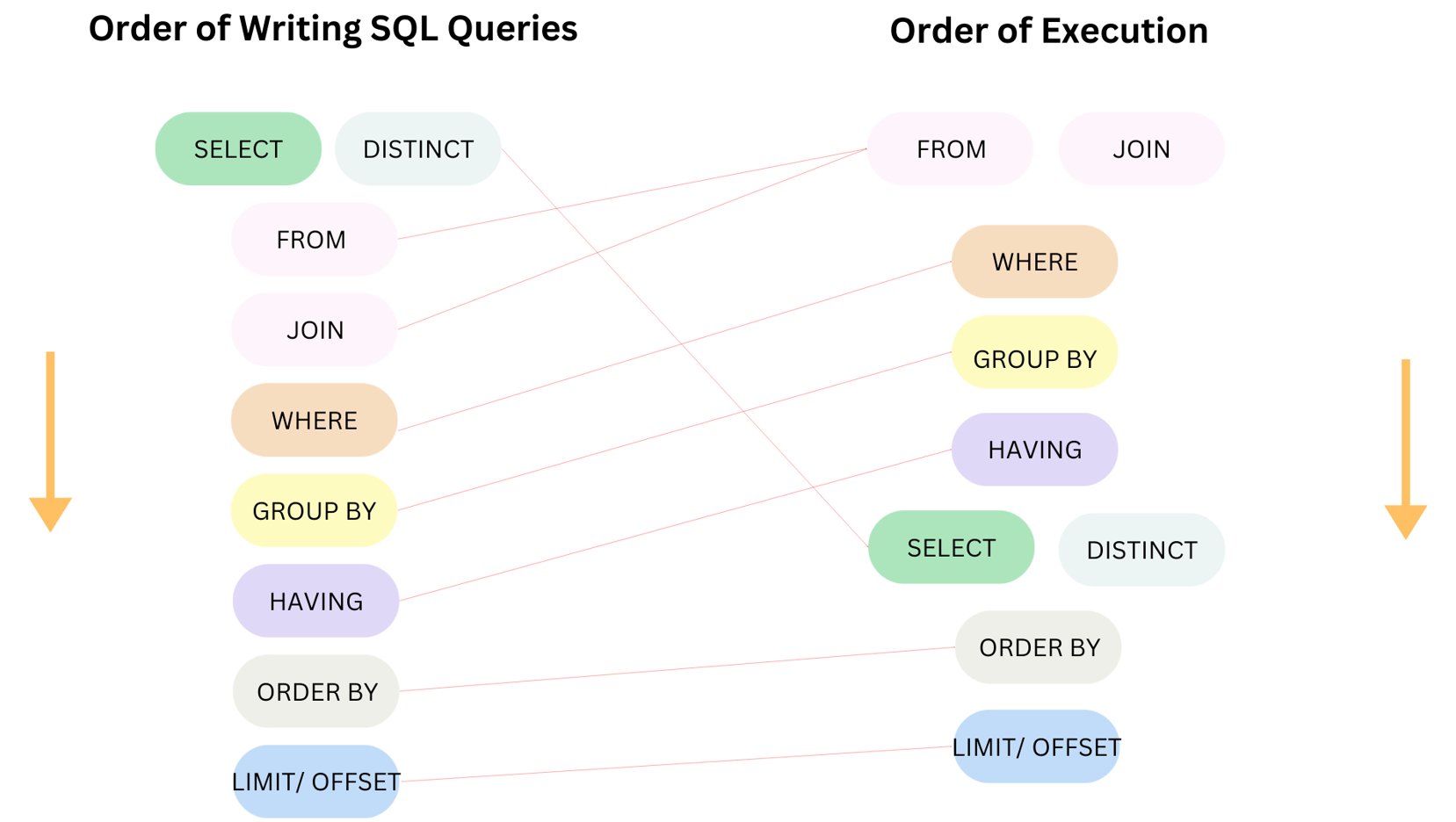
This “writing order” is sometimes conflated with their order of execution, but they are not synonymous. In fact, the writing order of SQL queries often don’t match up with their execution order. This can make things extra confusing as SQL users may try to order their queries based on expected execution.
Why Does the Writing and Execution Order Differ in SQL?
The main differences between writing and execution order in SQL is the placement of SELECT & DISTINCT and FROM & JOIN. The rest of the clauses stay in the same order.
From a human readability standpoint, this placement in the order makes the most sense, as your table and columns are the most general and unaltered state of your data. However, a computer cannot read or execute a query in this order due to how filtering is applied.
Understanding the order of execution can lead to a better understanding of how to format your queries and why SQL functions the way that it does.
Explaining the Order of Execution
FROM and JOIN
First in the order are FROM and JOIN clauses. This is because it states where your data is actually coming from. This clause needs to be executed first so your data can be pulled from wherever it’s being stored. JOIN serves as basically an extension of FROM, because it adds additional data to be pulled from.
WHERE
Next is WHERE. The WHERE clause filters your data like a yes/no boolean, where you state a condition, and WHERE checks whether the condition applies to every row of data.
For example, if you had a table with the column User_ID, you could use WHERE to filter your data to every row that starts with the characters “UO2.”
GROUP BY
GROUP BY aggregates your data. After WHERE has checked whether all the rows in your data apply to your condition, GROUP BY starts manipulating the data. It aggregates data from multiple rows into a single row while unaggregated fields are selected for unique values.
For example, if you had a table with 2 rows, Order_Date and sum(Order_Amount), you could GROUP BY Order_Date to combine multiple rows from the same day. This would leave you with one row per unique day, with the sum(Order_Amount) summing all values from that row’s day into one value.
HAVING
HAVING is used to filter any aggregated data, which is why it has to be executed after GROUP BY. Although it appears similar to WHERE, and can be confusing to differentiate from it, HAVING is filtering multiple rows that have been “combined,” whereas WHERE is filtering single rows as they are. It must also be executed after WHERE because it’s trying to filter data after it’s already been aggregated, while WHERE is pre-aggregation.
SELECT and DISTINCT
Next is SELECT. This one is especially confusing because it’s usually the first thing you write in a query. When I first started using SQL, I assumed that SELECT was the second execution because I thought the order would go from table to column. However, there’s a good reason why this isn’t the case.
In clauses like WHERE and HAVING, you’re filtering your data using certain conditions, but that doesn’t mean that the columns you’re pulling your conditions from will necessarily be in the final view of your data after querying. SELECT has to come later than them because the columns you add to your view using SELECT will not always include the columns you use to filter in earlier clauses.
For example, you could use WHERE to filter a dataset of order information from a grocery store to only show products that were in a “Fruit” category. However, you may not want to include a category column where every row just says “Fruit” in it. SELECT coming after a filter means that you can filter the data using other fields without having to include those fields in your final table view.
DISTINCT checks your view for duplicates. It’s executed later because it checks your final view and ensures that the same data is not being repeated. It can't be executed earlier because duplicates can sometimes arise from manipulating the data, so it must be one of the last steps. It is the final filter.
ORDER BY
ORDER BY moves us away from filtering. Now that all of the rows that will be used in the final view have been determined, ORDER BY determines the way the rows are arranged. It does not manipulate what data is shown like previous clauses, only the order you see them.
LIMIT/OFFSET
While LIMIT/OFFSET appears to be filtering the data, it’s a superficial “filter.” The changes that previous clauses have made to your data will not be affected by limit, only cut off from the view.
For example, if you created a column that showed a rolling calculation of sales, and limited your view to only showing 5 rows, the calculation would stay intact, it would just “hide” the rows you didn’t specify.
OFFSET has to go after LIMIT because LIMIT determines the number of rows, while OFFSET determines where the rows start. This will also not affect your aggregations. If you don’t use OFFSET, your LIMIT will start at your first row by default.
For example, say your 10th row in a table of 100 rows has a rolling_sales value of $4000. If you were to apply a limit of 50 rows, and an offset of 10, your new first row in the table would still have a rolling_sales value of $4000, and would have 50 rows overall.
Hopefully you now have a better understanding of how SQL queries are executed and what each clause means to perform your analyses!