


The Text to Columns tool in Alteryx is essential for separating text (string) fields from one column into multiple. It works in the following way...
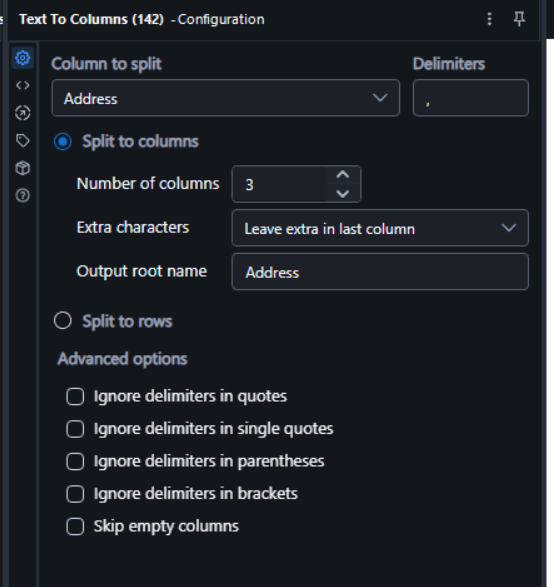
Looking at figure 1 above the user first needs to select the field they wish to be split, in this case its an Address field. Next the user needs to define a delimiter which defines where the text will be split. In this example the delimiter is a comma. Multiple delimiters may be added simultaneously.
The number of columns does exactly what is says on the tin; the Address field will be split into three separate fields with any extra characters going in the last generated column. There are also further options below where the user can define a naming convention to the new columns and ignore certain delimiters based on conditions.
You may also notice the split to rows option. This works in a similar way but splits the string into multiple rows instead. With this option selected it is not required to define how many rows you want.
And that is it really...the tool is pretty analogous to the Tableau Prep split function. Whilst Text to Columns is certainly efficient in simpler situations it will struggle in complex scenarios so be mindful of this, Regex may be more appropriate if you want to extract very specific parts of a complex string (see my previous blog on this).