


My introduction to web scraping in Alteryx
After learning how to download APIs, we moved on to another function in Alteryx that the download tool allows you to do: web scraping. I have web scraped before in R and Python, but this was the simplest way I have learned it yet and I'm excited to try more with it and test the limit of what you can do in Alteryx
The task was to scrape the Books to Scrape website and pull out three fields for each book: title, price, and star rating. Like the API workflow, this was another example of bringing data into Alteryx from somewhere other than a normal CSV or Excel file. The difference this time was that instead of working with JSON, we were working with the HTML behind a webpage.
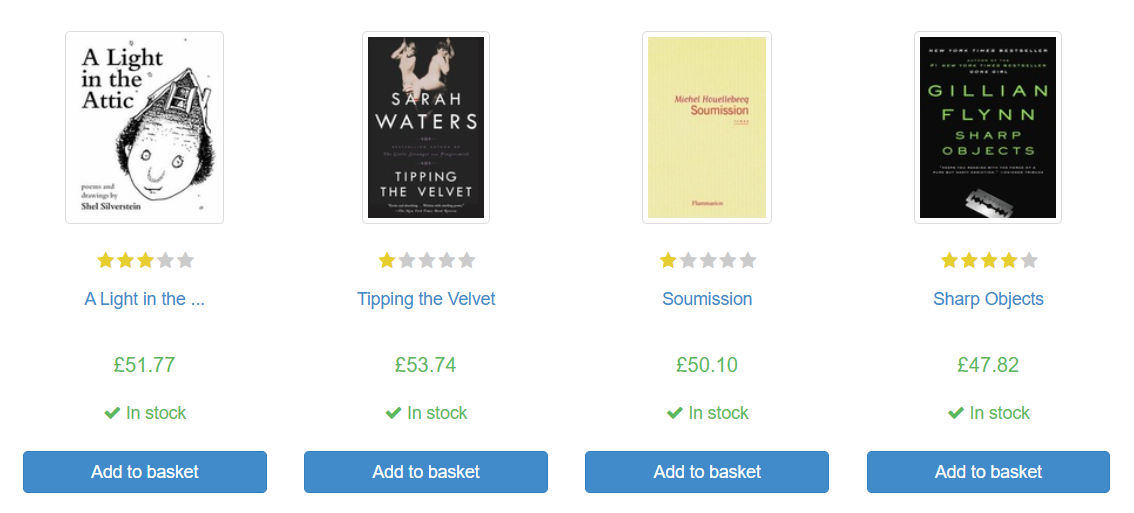
Getting the webpage into Alteryx
The workflow started in a very similar way to the API exercise.
We used a Text Input tool containing the website URL, then passed that into the Download tool to bring the contents of the webpage into Alteryx. Once that data was in the workflow, the interesting part was figuring out how to pull out the bits we actually wanted from all the surrounding HTML.
That was where inspect element became really useful. Looking at the structure of the page made it much easier to spot where the book information was sitting and what patterns repeated for each product.
Using regex to pull out the book details
The first regex expression we used was:
<li class(.*?)</li>
The idea here was to isolate the section of HTML containing each individual book. The (.*?) part means capture everything between <li class and </li>, so this gave us the relevant block for each book listing.
We then tokenised that result, which split the captured sections into separate rows. That effectively gave us one row per book, which made the rest of the workflow much easier.
From there, we used another regex tool to parse out the book URL and title:

<h3><a href="(.*?)" title="(.*?)">.*</a></h3>
This expression captured two things from the HTML. The first set of brackets pulled out the book URL, such as catalogue/a-light-in-the-attic_1000/index.html, while the second pulled out the book title, such as A Light in the Attic.
After that, we used another regex expression to get the price:
<p class="price_color">£(\d+\.?\d+)</p>
This one looks for the price section of the HTML and captures only the numeric part. The (\d+\.?\d+) tells Alteryx to find digits, including a decimal point where needed, rather than bringing through the whole HTML tag.
Finally, we parsed the star rating with:
<p class="star-rating (.*?)">
This followed the same basic logic as the earlier expressions, capturing the part of the HTML that told us whether a book was rated One, Two, Three, Four, or Five stars.
What I learned
What I liked about this exercise was how clearly it showed the logic behind web scraping.
At first, the page source just looks like a wall of code. But once you start spotting repeated patterns and pulling out the bits you need with regex, it becomes much more manageable. Like the API exercise, the hardest part was not getting the data into Alteryx. It was understanding the structure of what came back and working out how to turn it into something usable.
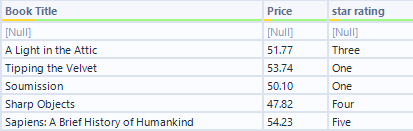
By the end, we had a clean table of book titles, prices, and star ratings ready to work with. It was a good introduction to scraping because the website had a clear and consistent structure, which made it easier to focus on the logic of the regex rather than getting lost in messy HTML.
More than anything, this was a useful reminder that a lot of data work starts before any analysis does. First you need to actually get the data into a shape you can use.