


If you're new to dbt, you may see people using the commands dbt run and dbt build interchangeably, without fully understanding the difference between the two. I had a vague awareness that 'dbt build does other stuff…' but was never entirely sure what that meant, so let's break these down. If you're already familiar with dbt commands, feel free to skip the introduction.
What are dbt commands?
Put simply, this is where you're asking dbt to do something. In dbt, you can create model files to transform your sources, and .yml files for documentation and testing, but at this point, dbt hasn't done anything.
For example, if you create a model file to join two tables together, dbt won't automatically place this in your data warehouse, unless you ask it to do so. With this, you also can't test your sources and models without asking dbt to (again, this isn't automatic). So this is where dbt commands come in.
Where can I input commands in dbt?
In the studio interface, there is a bar at the bottom of the page where you can type in your commands. There are also buttons for the most commonly used commands available in the ribbon above this.
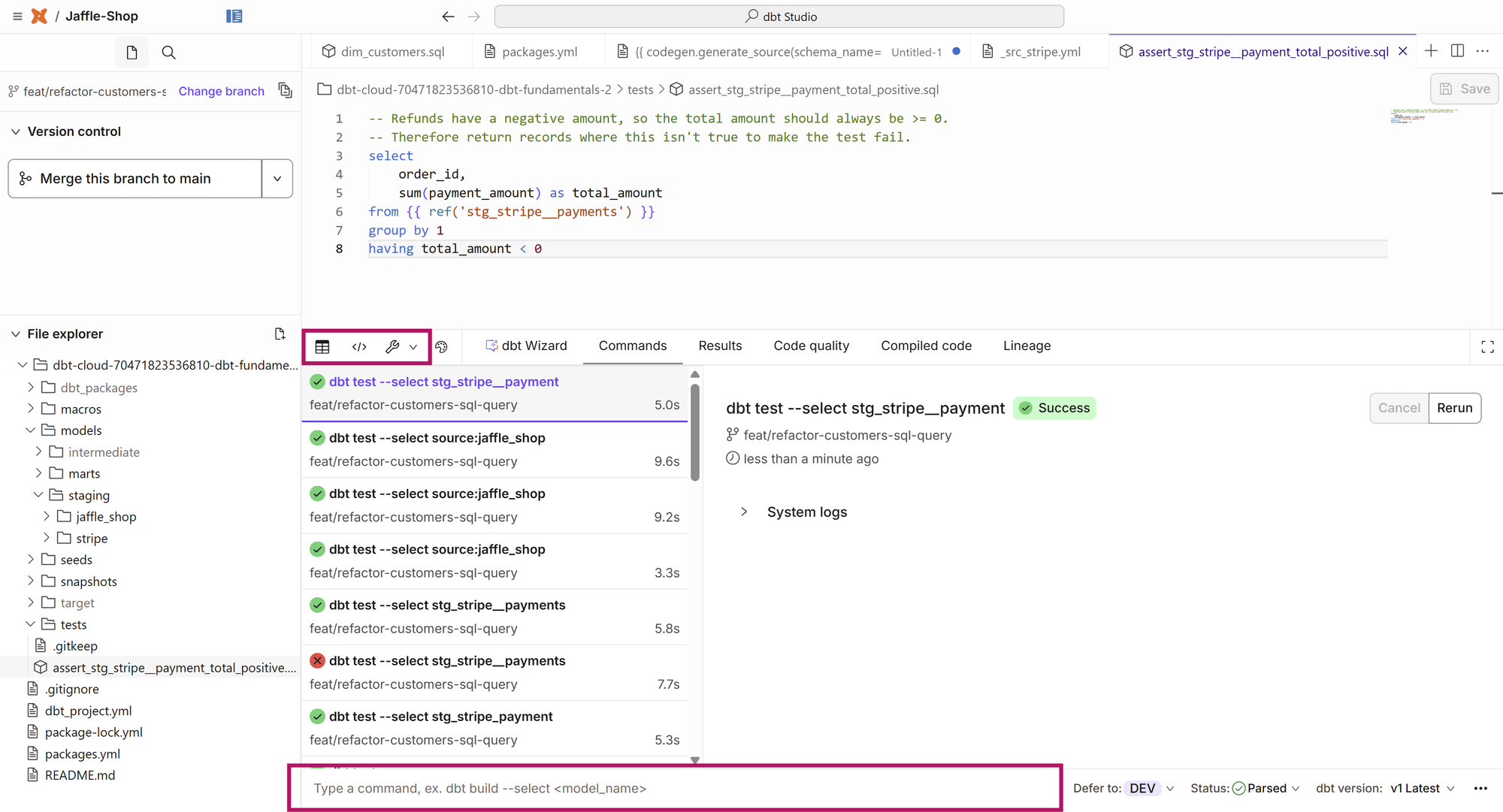
dbt run - What does it do?
dbt run transforms and builds models directly in your warehouse. It does this by:
- Connecting to your data platform (e.g. Snowflake)
- Parsing your dbt project - this essentially means it "reads" and maps out all the files in your project, to identify models, dependencies, configurations, and macros.
- Uses the materialisation configured for each model to determine how it should be created in your warehouse. For example, if you have configured a model to be set as a table, dbt will wrap the SQL script in the model with a
CREATE TABLE AS (). - Then executes this SQL to create your models in your target schema.
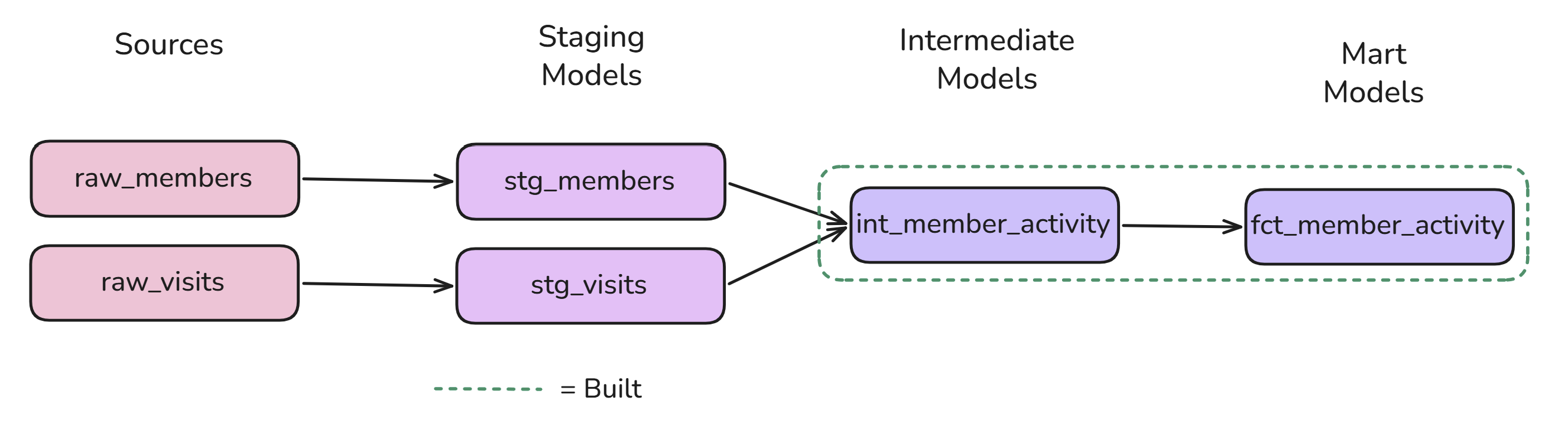
For example, let's say you have data looking at gym members and their visit activity, with a rough DAG below (directed acyclic graph, aka a dependency chart).
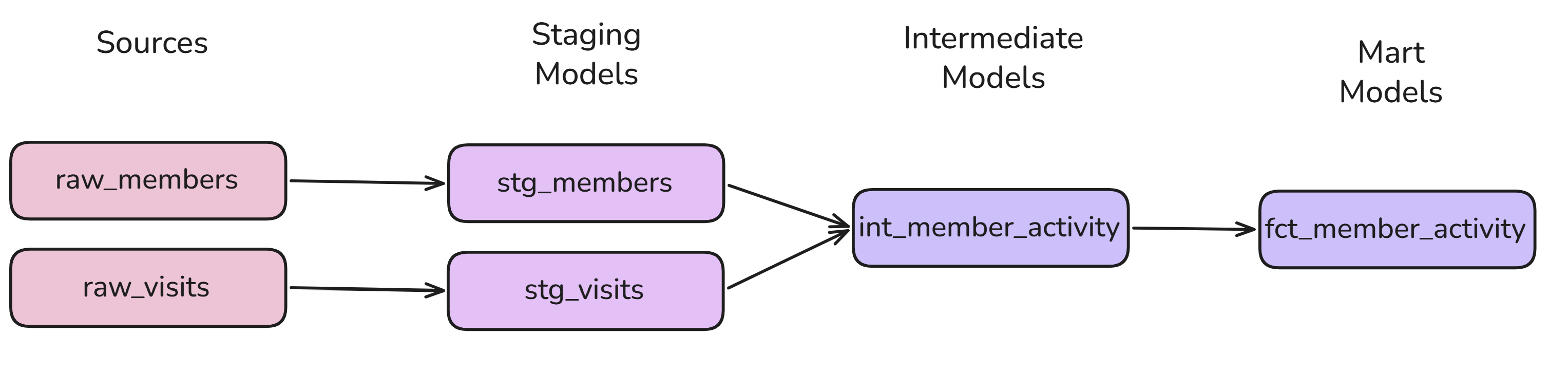
In this project, you have 2 source tables looking at all the individual members and visits to the gym. These are then cleaned in the staging models, and joined at the intermediate model, with the final fact table which looks at all members and their activity appearing at the mart level (for more details on models in dbt, check out this blog).
Understanding the select syntax for dbt run (applies to other commands)
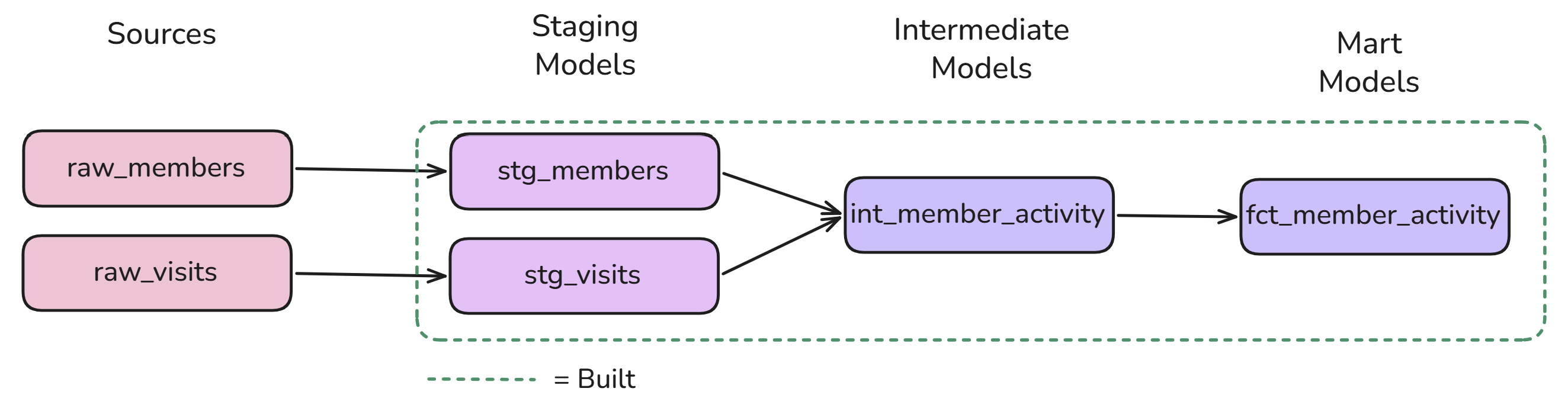
Example 1:
Executing
dbt run --select +fct_member_activity
or
dbt run --select +fct_member_activity+
would build all the models in this flow.
Example 2:
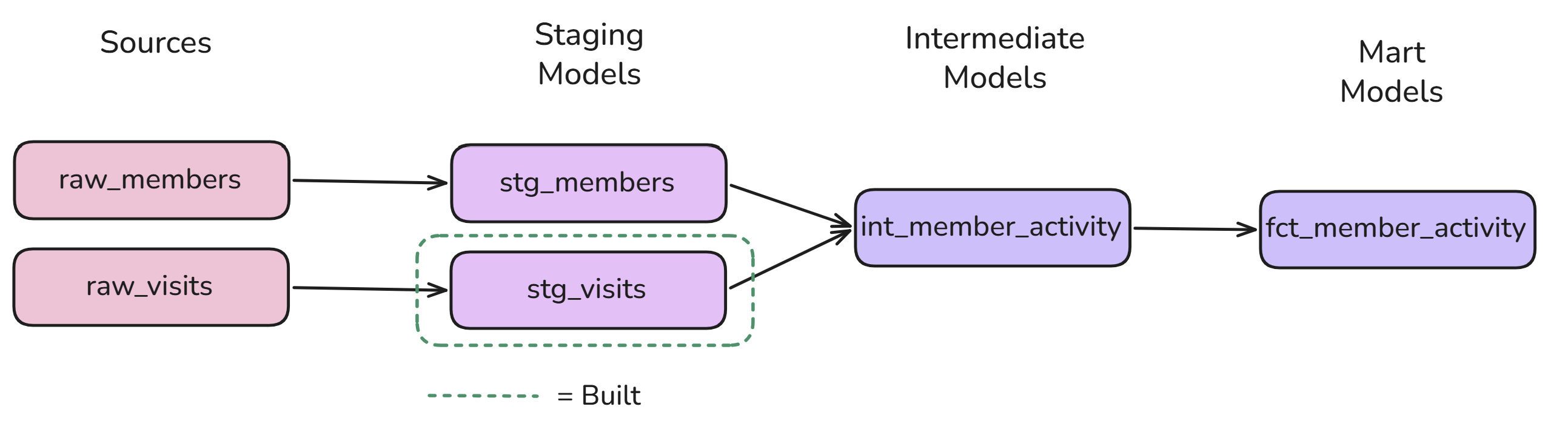
Executing
dbt run --select +stg_visits
or
dbt run --select stg_visits
would only create the model stg_visits in your warehouse (the + placed before the model name indicates anything upstream of the selected model, so because there is no model upstream of this stage, the + is optional in this example).
Example 3:
Executing
dbt run --select int_member_activity+
would only create the models int_member_activity and fct_member activity in your warehouse. Placing the + after the model name in this command essentially executes the selected model plus all subsequent models in that lineage, which is why the final fact model is built too.
In summary, the selector syntax works as follows:
+model_name= the selected model and its upstream dependencies.model_name+= the selected model and its downstream dependencies.+model_name+= the selected model and both upstream and downstream dependencies.
Note: dbt run without a selector will execute all enabled models in your project. When using --select, it will then execute ALL models based on your selection. Now you have your models built, what would happen if you wanted to test the quality of your sources and models in your data warehouse? This is where the command dbt test is useful.
A brief introduction to dbt test
If you'd like to test your sources and models, likewise to dbt run, you can execute the command dbt test with the same selector syntax as explained previously.
Note: whilstdbt runcreates the models in your project, you can usedbt testto test your sources too. This is a really powerful feature!
Whilst this is an incredibly useful command, it's important to know that you have to configure the tests you'd like dbt to execute in your documentation files before executing it. In doing so, dbt needs to know what kind of tests to execute (unique, not null, relationships, accepted values, to name the most common generic ones), what sources or models to execute each test on, and for which specific columns. If you haven't configured any tests in your project, executing this command will not do anything!
So, whilst it's possible to run dbt run followed by dbt test, what can dbt build do for us instead?
dbt build - A layered approach to building and testing your sources and models
dbt build, at first glance, is very similar to dbt run - most of the time it will also create all the relevant models in your warehouse. It also utilises the same selector syntax as dbt run (most commands follow these).
However, under the hood, dbt build brings together 4 different dbt commands:
dbt rundbt testdbt seed= loading csv data into your warehousedbt snapshot= used to track slowly changing dimensions in your data
Whilst you don't necessarily need to have a deep understanding of the latter two commands at a beginner's level, it's useful to know this is what dbt build can do. However, the key part of dbt build is not necessarily the commands it's executing, but HOW it's executing them. If any tests fail, dbt build will stop dependent models from being created. As dbt run doesn't test your data, it doesn't automatically identify errors in models, which is why it creates everything you specify in the warehouse, faulty or not.
Looking back at our gym memberships as an example, dbt build will execute its run and test commands in the following order:
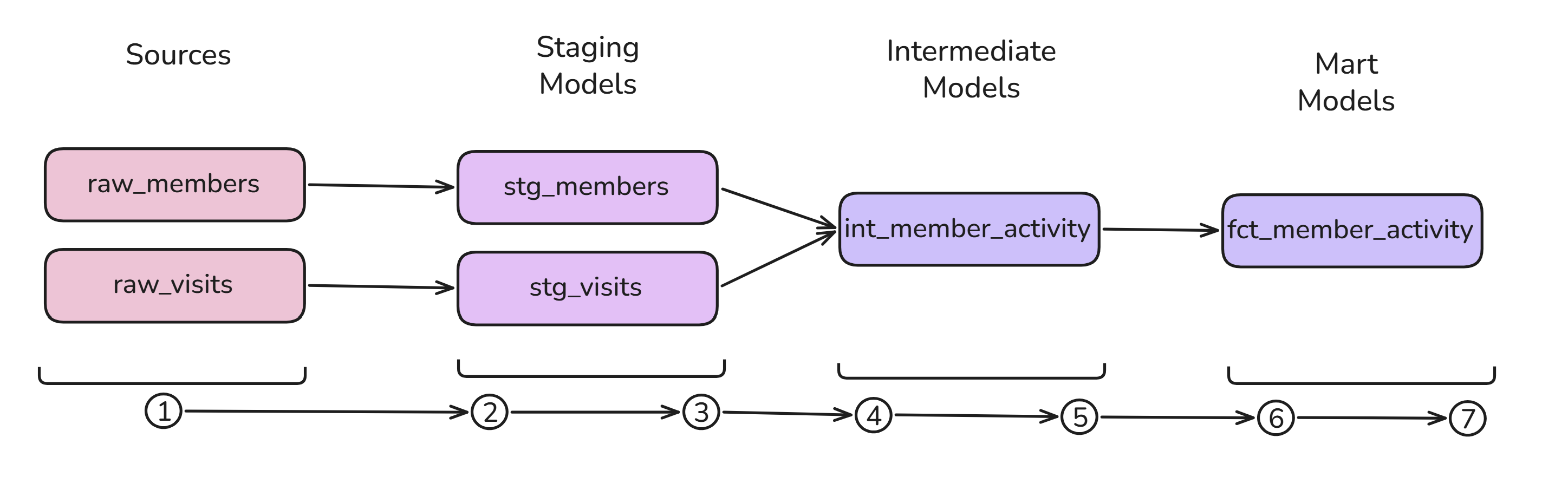
- Tests configured on the source tables are executed.
- If the relevant source tests pass, the dependent staging models can then be built.
- Tests configured on the staging models are executed.
- If these tests pass, the intermediate model can then be built.
- Tests configured on the intermediate model are executed.
- If these tests pass, the final fact model can then be built.
- Tests configured on the fact model are executed.
Essentially, the testing steps are critical to the subsequent dependent layer being created. dbt build ensures that downstream models are not built on faulty data, and provides a layered approach to quality control.
Things to note when deciding to use dbt run vs dbt build
Despite dbt build having lots of additional functionality/quality control implemented, it's not something you'll want to use all the time. Here are some considerations:
dbt buildis slower, and utilises more warehouse compute, thandbt run.dbt buildrequires you to configure your tests to reap the full benefits of it.- Whilst
dbt runexecutes faster, it may create models with faulty data.
Recommendation
If you're in the earlier stages of development and primarily focused on writing and refining your SQL transformations, dbt run is a useful command. It allows you to build your models without having to execute your tests every time. However, once you've configured your tests and want to build your pipeline whilst also checking the quality of your data, dbt build is generally the better choice.
Ultimately, the biggest difference is that dbt run focuses on executing your models, whereas dbt build takes a more holistic approach by building and testing your data pipeline, using the dependencies between resources to manage execution.
Useful resources
For more information, check out dbt's official resources: