


Models in dbt are SQL SELECT statements that provide a modular step of logic between your source and final transformed datasets. (Note: these can also be python statements.)
Models are organised in several layers based on what stage of transformation the data is at, in addition to the types of transformations that are taking place.
For those already familiar with models, here is a brief summary/overview:
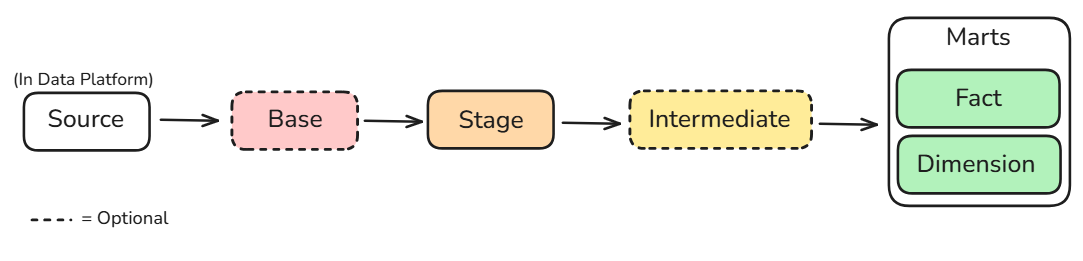
dbt Model Layers
- Source (pre-model)
- These are the raw tables that you wish to work with in dbt, that live in your data platform (e.g. Snowflake).
- You won't see any files for these directly in your dbt project (unless you make one) as this is a raw table with no transformation done to it.
- Staging
- This is the first transformation layer, and is dependent directly on the source table.
- Typically, each source table should have one corresponding staging model, maintaining a 1:1 relationship between the source table and staging model.
- In staging models you can do very superficial transformations, such as:
- Casts
- Conversions
- Row-level calculations
- Renaming columns
- Staging models commonly start with stg_
- Intermediate
- This is an optional layer where more complex transformations take place, including joins and aggregations
- These do not connect directly to the source - your staging models do that
- These typically depend on staging models, although they can also depend on other intermediate models.
- There is no fixed limit to the number of intermediate models you can create. Build them as needed to keep transformations modular and reusable.
- Files start with int_
- Marts
- These are your Gold layer, business-ready models.
- These are generally divided into two types:
- Facts
- These are your fact tables
- These contain real-world events or processes. Each row represents a specific occurrence at a defined level of detail (grain), such as: one row = one order, or one row = one website visit.
- Files often start with fct_
- Dimensions
- These tables are descriptive - they will describe either people, places, or things, within your fact table
- These are kept separately to reduce the storage required in your fact table
- Generally speaking, dimensions can be mutable, meaning they can change over time. How these changes are handled depends on the modelling approach. For example, a Type 1 dimension overwrites the existing value (e.g. changing someone's address), whereas a Type 2 dimension preserves historical changes by creating a new row.
- Files start with dim_
- Facts
Additional modelling layers to be aware of
- Base
- These are an optional layer.
- A use case for this would be: if your data is stored as a JSON and needs restructuring for it to become readable, you would do this in a base model BEFORE your staging model.
- Once again, the base would also connect directly to the source, and your staging model would then connect to the base
- Similarly to staging models, base models typically have a 1:1 relationship with the source (so for each source there is one base model, as opposed to multiple base models for one source).
- Files start with base_
Summary
|
Layer |
Prefix |
Purpose |
|
Base |
base_ |
Restructure complex raw data (e.g. JSON) |
|
Staging |
stg_ |
Clean, rename and standardise source data |
|
Intermediate |
int_ |
Applying complex transformations and combining datasets |
|
Fact |
fct_ |
Shows measurable business events |
|
Dimension |
dim_ |
Describes people, places, and things |
Note: these naming conventions are not "rules" that are enforced, but are widely used conventions that can be used at a business.