


Loading data, put simply, is where you move data from your staging layer into your data warehouse. Having a staging layer for your data is key for ensuring incoming data is consistent and error-free before it reaches your main warehouse - it's essentially a platform for resolving errors whilst protecting your existing stored data.
If you're using Snowflake as your data warehouse, there are two approaches to loading newly extracted data from an external staging environment:
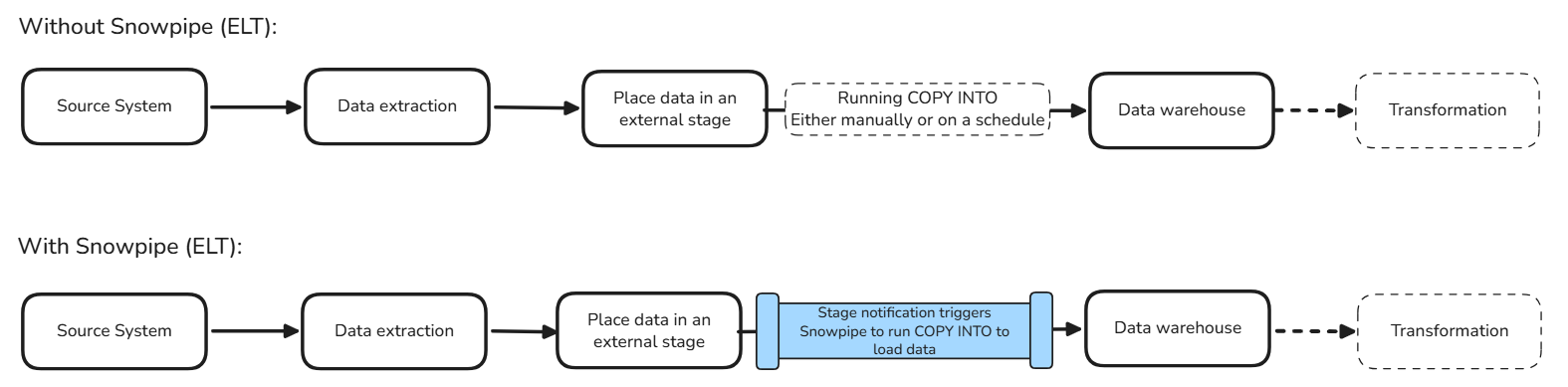
- Using a COPY INTO statement: This runs a SQL statement in Snowflake to load new files from your stage, and is triggered either manually or on a scheduled basis.
- Using Snowpipe: Snowpipe is an automated ingestion feature that also runs a COPY INTO statement to load new files into your warehouse. Contrary to the first method, this can be triggered by when data enters the stage itself, so loading is continuous as opposed to in large batches. It supports loading data from any of the three major cloud storage providers - Amazon S3, Microsoft Azure, and Google Cloud Storage.
In terms of the whole ELT process, this is where these two methods sit:
What are the pros of using Snowpipe?
Automatic Computation
When running a standard COPY INTO statement, you are responsible for setting up a schedule for it and the compute, which means you have to decide how often it should run, and what virtual warehouse to run it on (meaning you also have to consider warehouse size, when it should be running/suspended, etc.).
On the other hand, Snowpipe will automatically manage the compute needed to load your data. This means you don't have to select/manage a warehouse for it, the compute is automatically scaled according to the need for incoming files, and you don't have to decide on a schedule.
Continuous loading
As already mentioned, Snowpipe's most attractive feature is that it can automatically load new files as they arrive in the external stage, without needing a scheduled COPY INTO statement. This works by tracking notifications created by the stage's storage service itself, and using this as a trigger to load new files. If you want your files to arrive near real-time, as opposed to in batches, Snowpipe is the best approach.
Something to note: Snowpipe doesn't have to rely on the stage's automatic event notifications, if you don't want it to. Looking at the syntax, you will find a key line starting with AUTO_INGEST.
CREATE PIPE mydb.myschema.orders_pipe
AUTO_INGEST = TRUE
AS
COPY INTO mydb.myschema.orders
FROM @mydb.myschema.orders_stage
FILE_FORMAT = (TYPE = 'JSON')
MATCH_BY_COLUMN_NAME = CASE_INSENSITIVE;
AUTO_INGEST determines whether Snowpipe uses cloud storage event notifications to trigger loading. So, when set to FALSE, this is not used.
Why would you want Snowpipe without the stage notification as a trigger? Doesn't this eliminate it's main benefit?
As always, it depends on the context. Having AUTO_INGEST = FALSE doesn't necessarily stop ingestion from being continuous/automatic, it simply changes how your pipe is triggered. When set to FALSE, you can use external applications to trigger when Snowpipe runs, using Snowpipe's REST API. This can be a helpful benefit in terms of orchestration, and can give you greater control over when loading is triggered.
When should you not use Snowpipe?
Snowpipe is a useful feature when used effectively. Some situations where Snowpipe isn't best are as follows:
When your data is not at file level
Snowpipe works at the file level, so if you wish to load data on an event, or row-by-row basis, it's better to use Snowpipe Streaming instead.
When you want no lag between extracting data to your stage and loading into your warehouse
Whilst there is only a small delay in loading your data using Snowpipe, there is no guaranteed loading latency for when files are processed. If having a short/instant time-frame for loading is critical, then Snowpipe Streaming would be a stronger alternative.
When you want data to be loaded at a fixed schedule
It's better to schedule a COPY INTO statement instead.
When you are loading data that isn't standard tables or Iceberg tables
Snowpipe supports loading into standard Snowflake tables and Apache Iceberg tables. If you're working with other table types, you'll need to consider alternative ingestion methods.
When you wish to load historical files
Snowpipe is specifically designed to continuously ingest new files. If you're loading historical files into your warehouse for the first time, it's often better to run a COPY INTO statement first, then use Snowpipe to handle any new files arriving afterwards.
Cost Considerations
One important consideration when choosing between the two methods is cost. With a standard COPY INTO statement, you pay for the virtual warehouse used to execute the statement. Whilst this is more setup. you have control over the size of the warehouse and how frequently it runs. With Snowpipe, Snowflake manages the compute for you and charges based on the amount of data loaded.
Neither is necessarily cheaper. If you're loading large batches of data occasionally, a COPY INTO statement may be more cost-effective. If you're loading smaller files throughout the day, Snowpipe may be worth considering for the added automation.