


Welcome to my third and final (at least for now) blog on SQL. This blog will explore CTEs (common table expressions), explaining what they are and when and how to use them, with examples to aid this explanation. If this is your first foray into SQL, I would recommend starting with the basics rather than plunging into the swamp of CTEs (maybe not a swamp, that's probably reserved for sub-queries, but a lake rather than a puddle). I've written a blog on the basics but if you'd rather go elsewhere, there are plenty of other resources online too - my feelings won't be too hurt. I've also explored sub-queries and that might make understanding CTEs a little simpler if you want to read that blog too, but it's not as much of a necessity as having a confident understanding of the underlying principles. Now that we're all in the same place, let's get started.
What is a CTE?
A CTE is a section of code which produces a temporary output that can be used in a main query. It's similar to sub-queries in that you're looking for a value/set of values, that you can't automatically call upon from the dataset in the main query, and therefore you need a secondary query to enable the option.
There are a couple of different types of CTE which primarily boil down to recursive and non-recursive CTEs.
- A standalone (non-recursive) CTE is completely independent and can be run alone to test out the temporary result. It accesses the database directly.
- A nested (non-recursive) CTE is a CTE that is dependent on another CTE and cannot be run alone.
- A recursive CTE self-references to create iterations until the assigned limit is reached. Again, this is a CTE that is dependent on another CTE for running.
CTE general rules
There are several consistencies between CTEs which should be followed, not only as best practice but also just so that your code will run.
- A CTE is written before the main query and fixed at the top of the set of code.
- A CTE requires an alias. You can just name it 'cte' which is what I often name it as but it might make more sense to label it as something more relevant.
- A CTE is started with the words 'With [insert CTE alias] as...'
- CTEs are always encapsulated in brackets like sub-queries.
Examples of CTEs
Now that we have an understanding of the types of CTE and some general rules on their syntax, let's actually write some together.
For reference, I'm writing these CTEs in Snowflake SQL so there might be a few minor differences in syntax if you're using a different flavour of SQL but the basic structure of the CTE will remain the same. I'm using a superstore dataset too.
A standalone CTE
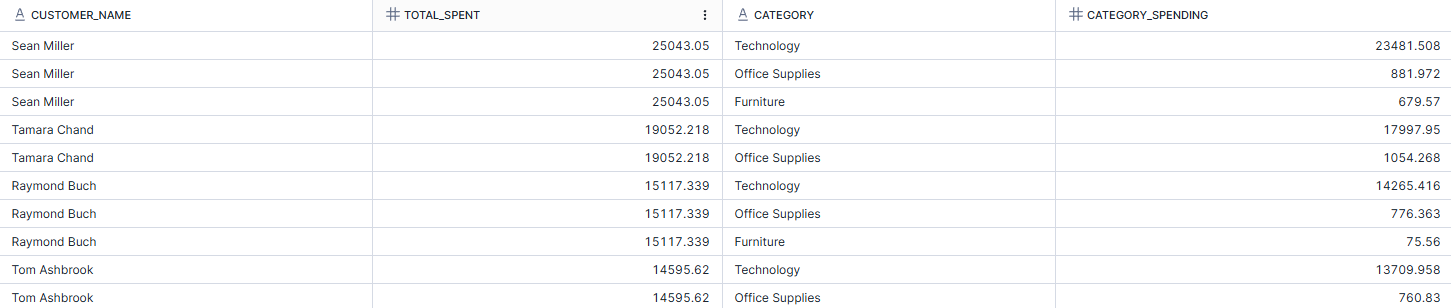
In the example below, I want to look at the big spenders in the superstore dataset. As part of this, I want to look at the total spending by each customer as well as the breakdown across the different categories. As I'm looking at multiple levels of aggregation, I need a CTE. In the CTE which I've named as Customer_Spending, I calculated the total spending of each customer and then filtered the customers for a total spend of more than 5000. To get the category spend, I joined the CTE on the main query and grouped the spending at the category level this time, and called the total spend from the CTE.
WITH Customer_Spending AS (SELECT
customer_id,
customer_name,
SUM(sales) AS total_spent,
FROM orders
GROUP BY 1, 2
HAVING SUM(sales) > 5000
)
SELECT
cs.customer_name,
cs.total_spent,
o.category,
SUM(o.sales) AS category_spending
FROM orders AS o
JOIN Customer_Spending AS cs
ON o.customer_id = cs.customer_id
GROUP BY 1, 2, 3
ORDER BY cs.total_spent DESC, category_spending DESC;
A nested CTE
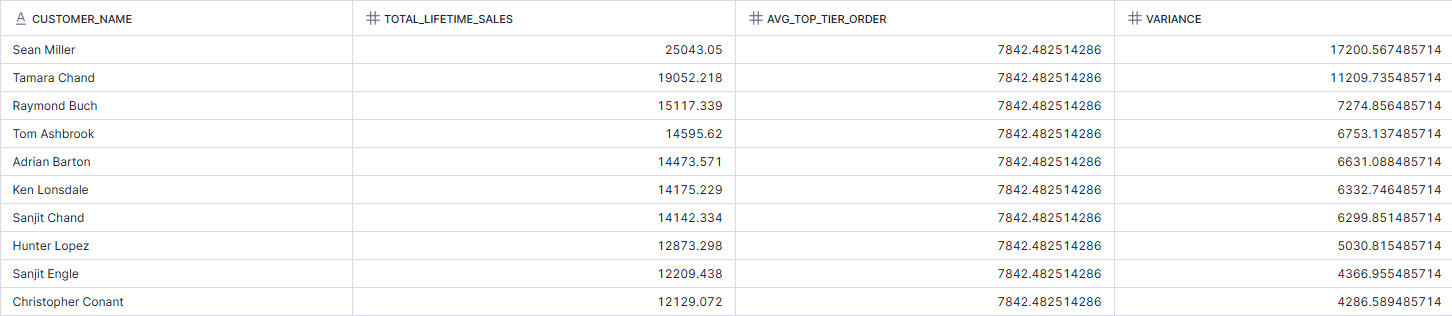
In the example below, I again wanted to look at customer spending within the top tier of spenders which is what the first CTE covers. I also wanted to find the average of the overall spending amongst these customers and therefore utilised the first CTE within my second CTE to make it nested. I then wanted to look at the variance between the average overall spend and the customer spend on a row by row level, joining these together with the customer name to form the final output.
WITH High_Value_Customers AS (
SELECT
customer_id,
SUM(sales) AS total_lifetime_sales
FROM orders
GROUP BY 1
HAVING SUM(sales) > 5000
),
High_Value_Orders AS (
SELECT
AVG(total_lifetime_sales) AS avg_top_tier_order
FROM High_Value_Customers hvc
)
SELECT
o.customer_name,
hvc.total_lifetime_sales,
hvo.avg_top_tier_order,
(hvc.total_lifetime_sales - hvo.avg_top_tier_order) AS variance
FROM orders o
JOIN high_value_customers hvc
ON hvc.customer_id = o.customer_id
CROSS JOIN High_Value_Orders hvo
GROUP BY 1, 2, 3
ORDER BY variance DESC;
A recursive CTE
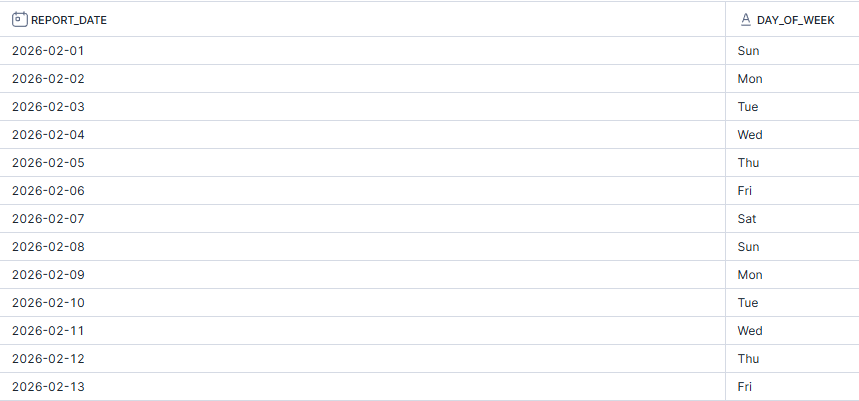
I think the best way to understand a recursive CTE initially is simply by producing a set of dates. This will help introduce the basic concepts before adding hierarchies and other such stuff to the mix.
To start a recursive CTE, certain servers require you to specify that the CTE is recursive in the initial SQL code, like Snowflake which I'm using. Double check the server that you're using to see if it's needed. You then pull what you need from the initial table to create an anchor. This anchor might be another CTE, a table in your database or, as I've done here, a newly created value. Your anchor is then unioned with the recursive member. This recursive member has an iterative condition where it alters the value in the previous row (in this case, adding one day). It also contains a limiting condition using the WHERE clause which specifies how long the CTE should keep recurring for (in this case, until the date is the 28th February 2026). Depending on your server and your dataset, you might want to set a maximum recursion value as well but in Snowflake, that isn't an issue with such a small output.
WITH RECURSIVE February_Dates AS (
SELECT DATE('2026-02-01') AS report_date
UNION ALL
SELECT DATEADD(day, 1, report_date)
FROM February_Dates
WHERE report_date < DATE('2026-02-28')
)
SELECT
report_date,
DAYNAME(report_date) AS day_of_week
FROM February_Dates;
Another recursive CTE (with superstore this time)
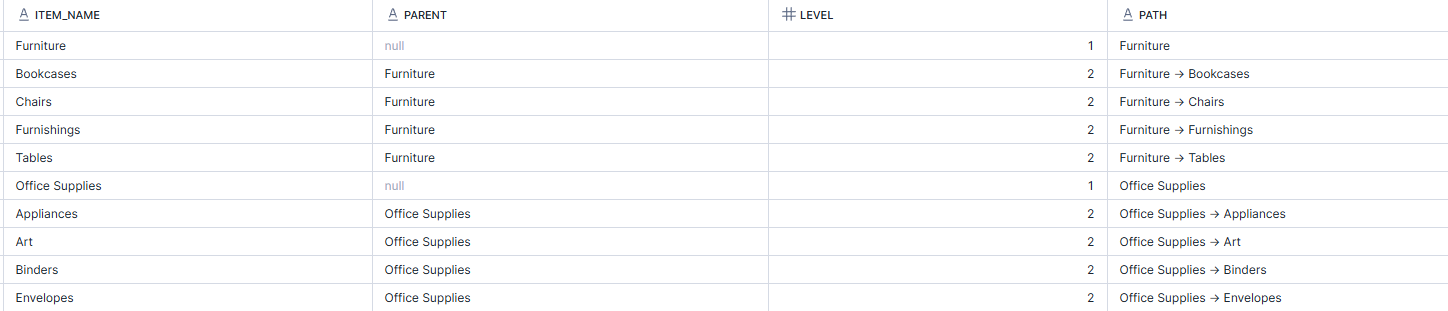
In the example below, I wanted to demonstrate the category hierarchy within the superstore dataset. As they both exist within a single row of the dataset, the recursive CTE doesn't hold as much purpose but this is to demonstrate how it might be used in an actual dataset. Employee hierarchies are where this is more commonly used, looking at line managers for the different employees and their levels.
In this instance, the first CTE is actually a standard CTE. It starts by creating a temporary results table by saying if the category is in the child column, it has no parent (i.e. it's the top of the hierarchy) and unioning this with the sub-category as child having category as the parent. The second CTE is the recursive CTE which uses the initial CTE. It starts by creating the anchor, the top-level of the hierarchy, and then unions this with the second level of the hierarchy, adding 1 to the level number. All of this can then be output in a single table.
WITH RECURSIVE Hierarchy_Bridge AS (
SELECT DISTINCT
category AS child,
NULL AS parent
FROM orders
UNION
SELECT DISTINCT
sub_category AS child,
category AS parent
FROM orders
),
Category_Tree AS (
SELECT
child AS item_name,
parent,
1 AS level,
CAST(child AS STRING) AS path
FROM Hierarchy_Bridge
WHERE parent IS NULL
UNION ALL
SELECT
hb.child,
hb.parent,
ct.level + 1,
ct.path || ' -> ' || hb.child
FROM Hierarchy_Bridge hb
INNER JOIN Category_Tree ct ON hb.parent = ct.item_name
)
SELECT * FROM Category_Tree
ORDER BY path;
Why are CTEs often preferred to sub-queries?
- Readability. CTEs can make a complex query far more readable by setting it out separately to the main query, making it clear what is happening.
- Reusability. CTEs prevent the need to repeat chunks of code within a main query, which again makes things more readable, but also reduces the chance of human error.
- Recursion. CTEs are necessary to perform the recursive steps we made above which is essential for creating hierarchies.
And there you have it - a rundown of CTEs and their types in SQL. I hope you feel like you've learnt something and are now more confident tackling trickier problems, or at least know where to start when solving them. If you've read all three of my SQL beginner blogs, you should have a solid foundation to build upon and go beyond the realms of beginnerdom into intermediacy or further. That's the end of my SQL deep dive for now so until next time, happy coding!