


Since the turn of the new year, I've been helping a client onboard dbt and migrate 200+ models into dbt from Snowflake.
As the number of models grew, I needed a way to QC the models and dbt workflow. There were a couple of things I was looking for:
-
Check for test coverage. Every intermediate and marts model should have roughly the same tests applied.
-
Check for models without downstream. Staging and intermediate models should have downstream. If they don't, either they can be dropped or are awaiting further transformations to move it along to the next layer.
-
Check for "ghost" models in Snowflake. If a model exists in Snowflake but is not tied to an active model in dbt, the model is most likely obsolete and can be dropped.
dbt's Discovery API was the perfect solution to build in checks against all cases above. By triaging metadata pulled from the API and incorporating the API into my workflow, I was able to catch mistakes early and build an additional layer of redudancy to help manage hundreds of models.
Introduction to dbt's Discovery API
The discovery API is a GraphQL-based API in dbt Cloud that exposes detailed metadata about dbt projects, including models, sources, tests, and lineage, generated after every run.
Coming from the world of Tableau, the API felt very similiar to Tableau's medata API. And just as Tableau offers a sandbox for testing and developing GraphQL queries against server/cloud, dbt offers a similar development environment: https://metadata.cloud.getdbt.com/graphql.
The sandbox allows you to easily traverse nodes and add new arguments without the need to type and remember syntax.
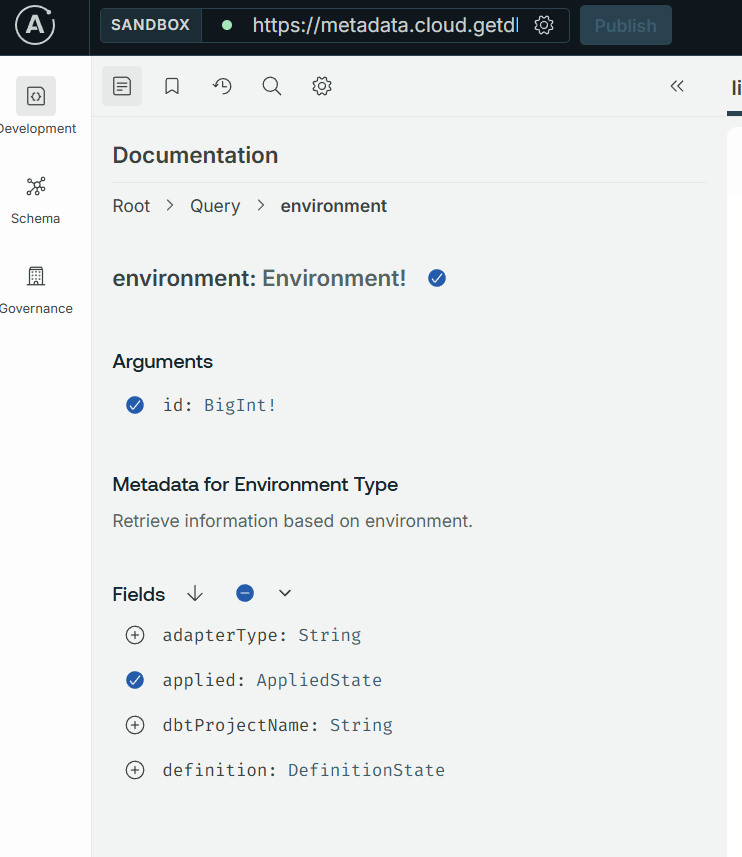
The API can surface all kinds of valuable metadata that's collected after each project run. In this blog, I'll focus on how I used the API to return information about tests and model dependencies.
Retrieving All Nodes and Finding Models Without Downstream Dependencies
The first step was to retrieve all models and their dependencies in dbt. This information is also used to validate test coverage and compare against models in Snowflake.
This is the graphql query I used to fetch this information:
    lineage_query = """
      query ($environmentId: BigInt!) {
        environment(id: $environmentId) {
          applied {
            lineage(filter: { types: [Model] }) {
              name
              uniqueId
              parentIds
              schema
            }
          }
        }
      }
    """
The query targets a selected environment ID (usually the production environment) and fetches various information about the model, including name, uniqueID, and the schema it belongs to. parentIds is particularly important, because this is the information that I will use to check for downstream dependencies in the code below:
    ids_with_downstream = set()

    for node in nodes:
        if not isinstance(node, dict):
            continue
        for pid in node.get("parentIds") or []:
            ids_with_downstream.add(pid)

    models_without_downstream = [
        n["name"] for n in nodes
        if isinstance(n, dict) and n.get("uniqueId") and n["uniqueId"] not in ids_with_downstream
    ]
In this code, I first create a unique list (set) of parentIds, which gives me all the models that have downstream dependencies. Next, I compare this list against my full list of models to identify models without downstream. Just the other day, this process helped me identify a child-less intermediate view that should have been unioned with other models in a marts table.
Checking for Test Coverage
Next is the metadata query to return my test coverage. Not every model will have the exact same tests applied to it. As a rule of thumb, however, most intermediate and marts models should have the same number of tests.
The query I used to retrieve this information is below:
        metadata_query = """
            query ($environmentId: BigInt!, $first: Int!, $after: String) {
              environment(id: $environmentId) {
                applied {
                  tests(first: $first, after: $after) {
                    pageInfo {
                      startCursor
                      endCursor
                      hasNextPage
                    }
                    totalCount
                    edges {
                      node {
                        name
                        columnName
                        parents {
                          name
                          resourceType
                        }
                        executionInfo {
                          lastRunStatus
                          lastRunError
                          executeCompletedAt
                          executionTime
                        }
                      }
                    }
                  }
                }
              }
            }
        """
This paginated query returns the names of tests attached to each model, along with other information. With some wrangling and joining to my full list of models, I can return the count of tests and concatenated list of test names for each model. The final dataframe helps me easily identify where I missed a test in my model .yml files.
        df_testCount = df_merged.groupby(['model']).agg(
            test_count = ('test_count', 'sum'),
            test_concat = ('macro', ', '.join)
        ).reset_index()
Finding Obsolete Models
The final use case for the API was to identify ghost models in Snowflake without a corresponding definition in dbt. This discrepancy can happen for a variety of reasons, including renames or import of superfluous models. Whatever the reason, I wanted to periodically check for such models to help maintain clean development and production schemas in Snowflake.
For this step, I had to step outside of dbt for a bit and work on some Snowflake queries. Relying on existing methods built by my client to programmatically query Snowflake, I pulled all views, tables, and dynamic tables from the targeted schema (dev or prod).
        tables_in_schema = execute_snowflake_query(
            query=f"""
                select table_name as name, 'TABLE' as object_type
                from {sf_db}.information_schema.tables
                where upper(table_schema) = upper('{sf_schema}')
                  and table_type = 'BASE TABLE'
            """,
            connector=sf_conn
        )

        views_in_schema = execute_snowflake_query(
            query=f"""
                select table_name as name, 'VIEW' as object_type
                from {sf_db}.information_schema.views
                where upper(table_schema) = upper('{sf_schema}')
            """,
            connector=sf_conn
        )

        dynamic_tables_in_schema = execute_snowflake_query(
            query=f"""
                select table_name as name, 'DYNAMIC TABLE' as object_type
                from {sf_db}.information_schema.dynamic_tables
                where upper(table_schema) = upper('{sf_schema}')
            """,
            connector=sf_conn
        )
Again, I wrangle the result and compare against my full list of dbt models. And just like that, I now have a list of Snowflake views, tables, and dynamic tables that are probably obsolete and can be dropped, or at least warrant further investigation.
If I determine they can be dropped, I execute a drop statement for each obsolete model.
        dropped = []
        for _, row in obsolete_relations.iterrows():
            relation_name = row['name']
            object_type = row['object_type']

            if object_type == 'VIEW':
                drop_stmt = f"DROP VIEW IF EXISTS {sf_db}.{sf_schema}.{relation_name}"

            elif object_type == 'DYNAMIC TABLE':
                drop_stmt = f"DROP DYNAMIC TABLE IF EXISTS {sf_db}.{sf_schema}.{relation_name}"

            else:
                drop_stmt = f"DROP TABLE IF EXISTS {sf_db}.{sf_schema}.{relation_name}"
This process can be scheduled using an orchestrator like Prefect to surface obsolete models and periodically drop them to maintain clean development and production schemas.
Conclusion
dbt's Discovery API is a powerful tool that we can leverage to build in redundancies, automate maintenance, and ultimately give us some peace of mind as we manage a large number of dbt models and workflows.
I'll continue to explore the API and think of new ways to incorporate it. Hope this blog gave you some ideas on how it can enrich your dbt work!