


If you've been using Tableau for a while, you likely have the Tableau Order of Operations basically memorized. When transitioning to Snowflake SQL, however, data filtering can feel slightly unnatural at first. You might wonder, for example, why you can't put SUM(sales) > 1000 in a WHERE clause.
The goal of this blog is to demystify the fundamentals of filtering in SQL. Along the way, you'll find example code in Snowflake SQL using Superstore fields, aimed at helping you think through it with familiar data.
Snowflake provides three distinct filtering clauses: WHERE, HAVING, and QUALIFY. Understanding how they map directly to Tableau’s filter hierarchy makes writing clean, efficient Snowflake queries much easier.
Before we dive into each one, here's a tidy table detailing the differences:
Snowflake SQL vs. Tableau
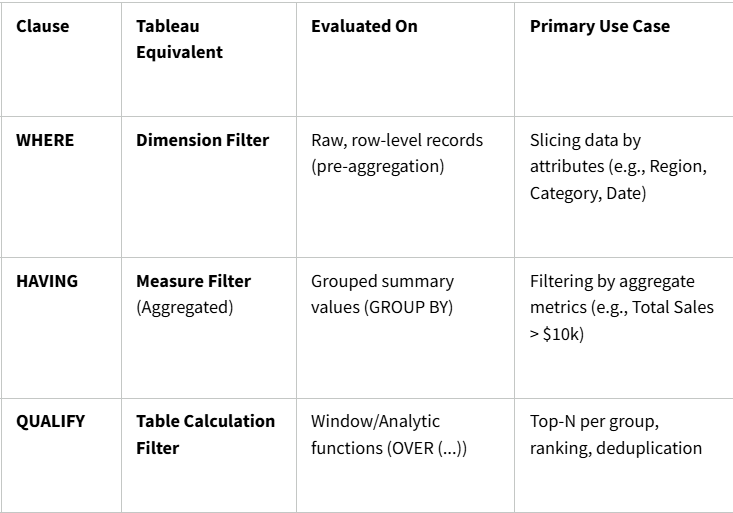
1. WHERE: The Dimension Filter
The WHERE clause operates at the row level, before any grouping or mathematical aggregation occurs. It evaluates records individually and discards rows that fail the condition before passing the remaining data downstream.
In Tableau terms, this is identical to dragging a dimension like [Region] or [Ship Mode] onto the Filters shelf.
WHERE Snowflake SQL Example
SELECT
    region,
    product_category,
    sales
FROM superstore_orders
WHERE region = 'West' AND order_date >= '2024-01-01';
This query retrieves the region, product category, and sales for all orders in the West region placed on or after January 1, 2024.
Key Takeaways for WHERE
- Evaluated first in the filtering lifecycle
- Cannot contain aggregations (for example,
WHERE SUM(sales) > 500will throw a syntax error) - Use wherever possible: filtering early reduces compute costs and memory usage
2. HAVING: The Measure/Aggregate Filter
Once data passes the WHERE filter, Snowflake bundles the rows into groups using GROUP BY. The HAVING clause comes after and evaluates these aggregated buckets.
In Tableau, this mirrors dragging an aggregated measure like SUM([Sales]) or AVG([Discount]) onto the Filters shelf and specifying a threshold (such as "At least 50,000").
HAVING Snowflake SQL Example
SELECT
    sub_category,
    SUM(sales) AS total_sales,
    AVG(profit) AS avg_profit
FROM superstore_orders
WHERE order_date >= '2024-01-01'                    -- this is a row-level filter
GROUP BY sub_category
HAVING SUM(sales) > 50000 AND AVG(profit) > 0;      -- this is an aggregate filter
This query calculates the total sales and average profit for each sub-category for orders placed on or after January 1, 2024, returning only sub-categories with over 50,000 in total sales and a positive average profit.
Key Takeaways for HAVING
- Evaluated after
GROUP BY(andWHERE) - Only filters groups, not individual rows
- Must evaluate columns present in the
GROUP BYor aggregate expressions
3. QUALIFY: The Table Calculation Filter
A mini SQL history lesson helps understand the need for QUALIFY. In standard SQL (PostgreSQL, standard MySQL), filtering on the result of an analytic or window function like ROW_NUMBER() OVER (...) or RANK() OVER (...) is notoriously tedious. You must wrap the query in a Common Table Expression (CTE) or derived subquery. Luckily, Snowflake solves this with QUALIFY.
QUALIFY works with window functions exactly how HAVING works with aggregates. In Tableau, this directly mirrors using a Table Calculation Filter (such as RANK_UNIQUE(SUM([Sales])) <= 3 computed along Customer).
Tableau applies Table Calculation filters last—preserving the underlying partition context while filtering the display. QUALIFY behaves the exact same way in Snowflake, bypassing the need for CTEs or subqueries.
QUALIFY Snowflake SQL Example
SELECT
    customer_id,
    order_id,
    order_date,
    sales
FROM superstore_orders
WHERE region = 'West'
QUALIFY ROW_NUMBER() OVER (PARTITION BY customer_id ORDER BY sales DESC) = 1;
This query retrieves the single highest-value order for each customer in the West region.
Common Use Cases for QUALIFY
- Deduplication: Grabbing the latest updated record per ID (
ROW_NUMBER() OVER (PARTITION BY id ORDER BY updated_at DESC) = 1) - Top-N per Category: Getting the top 3 best-selling products per region (
DENSE_RANK() OVER (PARTITION BY region ORDER BY sales DESC) <= 3).
Wrapping Up
We've seen that WHERE mimics dimension filters, HAVING is equivalent to measure/aggregate filters, and QUALIFY works like table calculation filters.
Next time you find yourself deciding which filter clause to use in your Snowflake queries, ask yourself where the filter would live if you built it in Tableau:
- For fields that live directly in the data source, use
WHERE - For aggregations (wrapped in
SUM(),AVG(), orCOUNT()), useHAVING - For calculations with
RANKor an anOVER (...)clause, useQUALIFY
Happy querying!