


As I continue learning Power BI and working more with DAX, one concept that has become increasingly important is the use of variables. At first, variables can feel optional, especially when a measure already works without them. Over time, I have realised that their real value is not in adding new functionality, but in making calculations clearer, more structured, and easier to build on.
What are variables in DAX?
Variables in DAX allow you to store the result of a calculation and give it a name, which can then be reused later in the same measure. They are created using the ‘VAR’ keyword and are evaluated before the final result of the measure is returned. Variables do not return values on their own. They exist purely to support the final expression, which is defined using the ‘RETURN’ keyword. Only the result after ‘RETURN’ is displayed in the report.
Why are variables useful?
Without variables, DAX measures can quickly become long and repetitive, which makes them harder to read and maintain. Variables allow you to calculate a value once and reuse it elsewhere in the measure, reducing duplication and making the logic easier to follow. By breaking calculations into named steps, variables also make measures easier to debug and extend as requirements change.
Understanding the structure
Measures that use variables follow a clear structure:
- VAR statements are used to define intermediate values
- A single RETURN statement defines the final output of the measure.
- Everything above RETURN prepares the logic, while the expression after RETURN is what appears in the report.
- Once a variable is evaluated, its value remains fixed for the rest of the measure, which helps make calculations more predictable.
A simple example
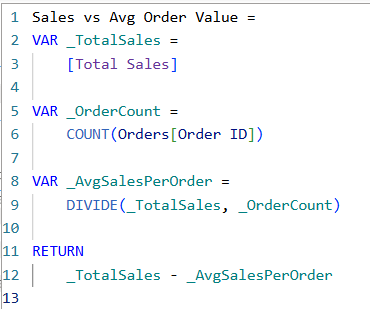
- A measure is created to compare total sales to the average sales per order.
- Total sales is calculated once and stored in a variable.
- The number of orders is stored in a second variable.
- These two values are then used to calculate the average sales per order in a third variable.
- All variables are finally referenced in the RETURN statement to produce the final result.
Structuring the measure this way makes each step of the logic explicit and avoids recalculating the same values multiple times.
Final thoughts
Variables are not about making DAX more powerful, but about making measures easier to understand, maintain, and extend. As calculations become more layered, having clearly defined steps becomes increasingly important. Through learning Power BI, I am finding that variables appear frequently in real-world measures, particularly when calculations rely on multiple intermediate results. Becoming comfortable with them early has made it much easier to follow complex logic and write measures that are clearer and more intentional.